New in Halo · Asset Discovery

Halo Discovery.
Find every device. Keep the CMDB current.

Halo now has its own discovery, built into the platform. It finds the devices and software on your network and keeps the CMDB up to date, with no second console, no extra server and no connector to maintain.

Book a demo
Agent and agentless
20,000 endpoints fair use
EU or US data region
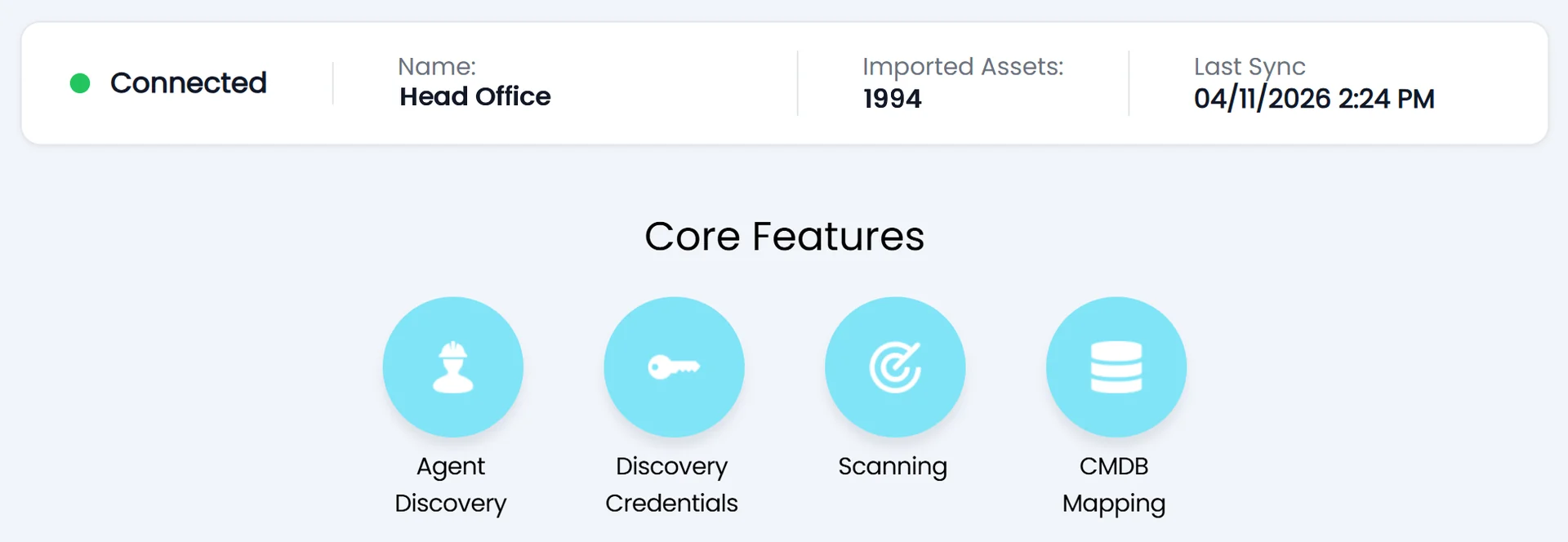
Halo Discovery site overview showing a connected Head Office site, 1994 imported assets, last sync time and four core features: Agent Discovery, Discovery Credentials, Scanning and CMDB Mapping

How it works

Discovery, without another tool to run.

Discovery is configured and run inside Halo. What it finds goes straight into the Halo CMDB.

No separate console

Halo provisions the connection to the discovery service for you. There is no extra server to host, no connector to maintain and no second product for your team to learn.

Agent based and agentless

Install the agent on Windows, macOS and Linux so laptops are covered wherever they are. Link credentials to an agent and it scans the servers, switches and printers nearby that cannot run one.

Find the devices nobody recorded

Turn on network visibility and agents record every device they see by MAC and IP address. Each one is flagged as unknown until a scan fills in the detail, so gaps are visible, not hidden.

Mapped straight into the CMDB

Mapping uses the same configuration as Halo’s other CMDB integrations: user matching, site and asset type mappings, field mappings, and status rules for new, deleted and rediscovered assets.

Kept current without the chase

Changes reach Halo through webhooks as they are found. Duplicate records from more than one source are merged before they arrive, and cleanup rules retire assets not seen for a set period.

Scanning on your terms

Target IP ranges, Active Directory domains or OUs, with exclusions. Run scans every few hours or at set times, and use maintenance windows so scans only run when it suits the business.

What it brings back

Complete asset records,
filled in for you.

Each asset record is populated and ready to use from the first scan. No spreadsheets, no manual entry.

  • Device identity and hardware. Hostname, domain, IP and MAC address, make, model, serial number, processor, memory, storage and OS version, plus last seen date, uptime and antivirus
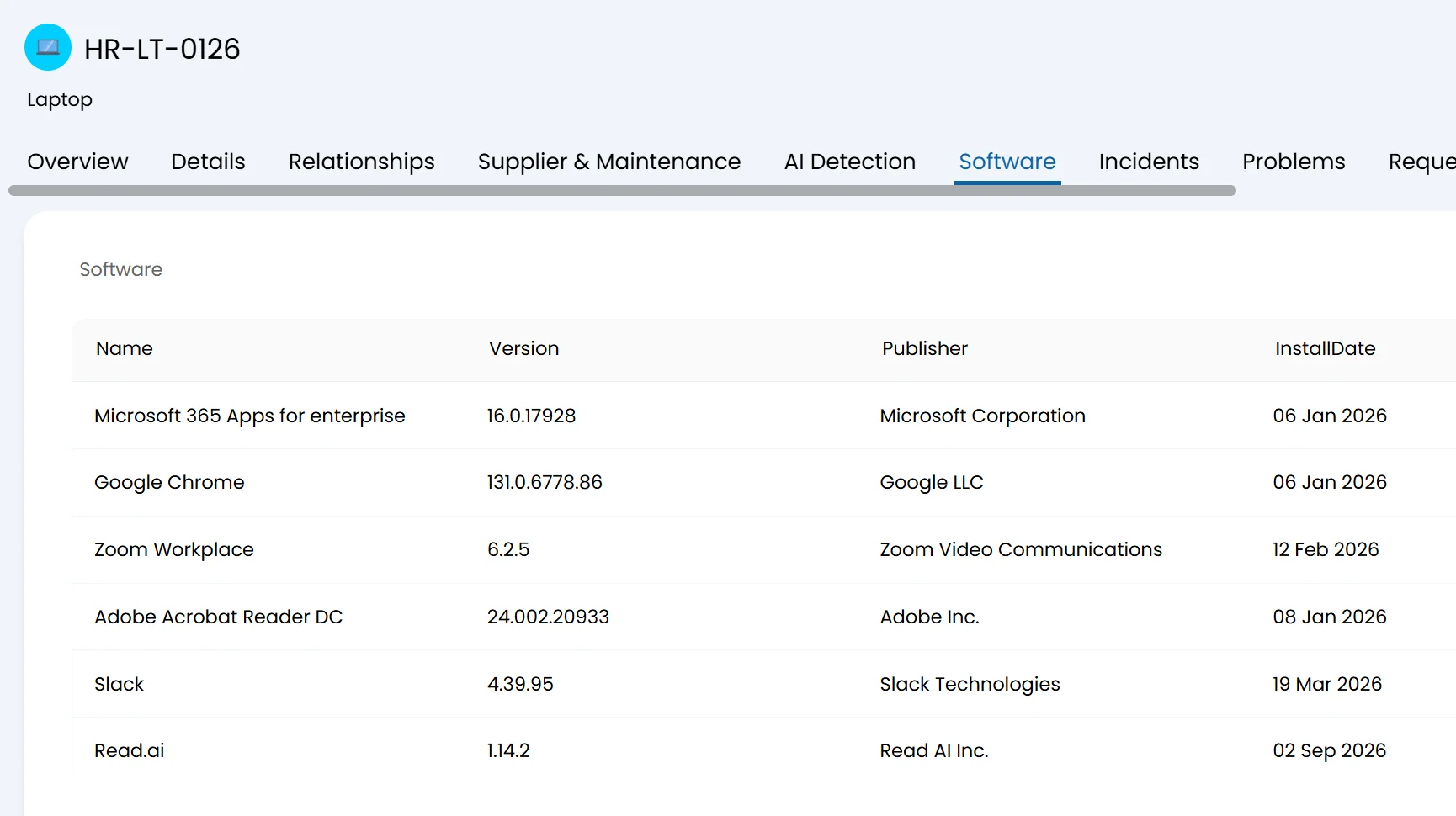
  • Installed software and licences. Applications with version and install date, normalised into Halo Software Licences. Publisher names are tidied so one vendor counts once
  • Six detail tabs on every asset. Antivirus, network adapters, AI detections, mapped drives, hard disks and certificates. Read only, so the data stays true to what was found
  • Servers and network equipment. Switches, routers, firewalls and printers. Credentialed scans capture hardware, OS, software, services and network configuration with no agent installed
Halo asset record for laptop HR-LT-0126 on the Software tab, listing installed applications with name, version, publisher and install date
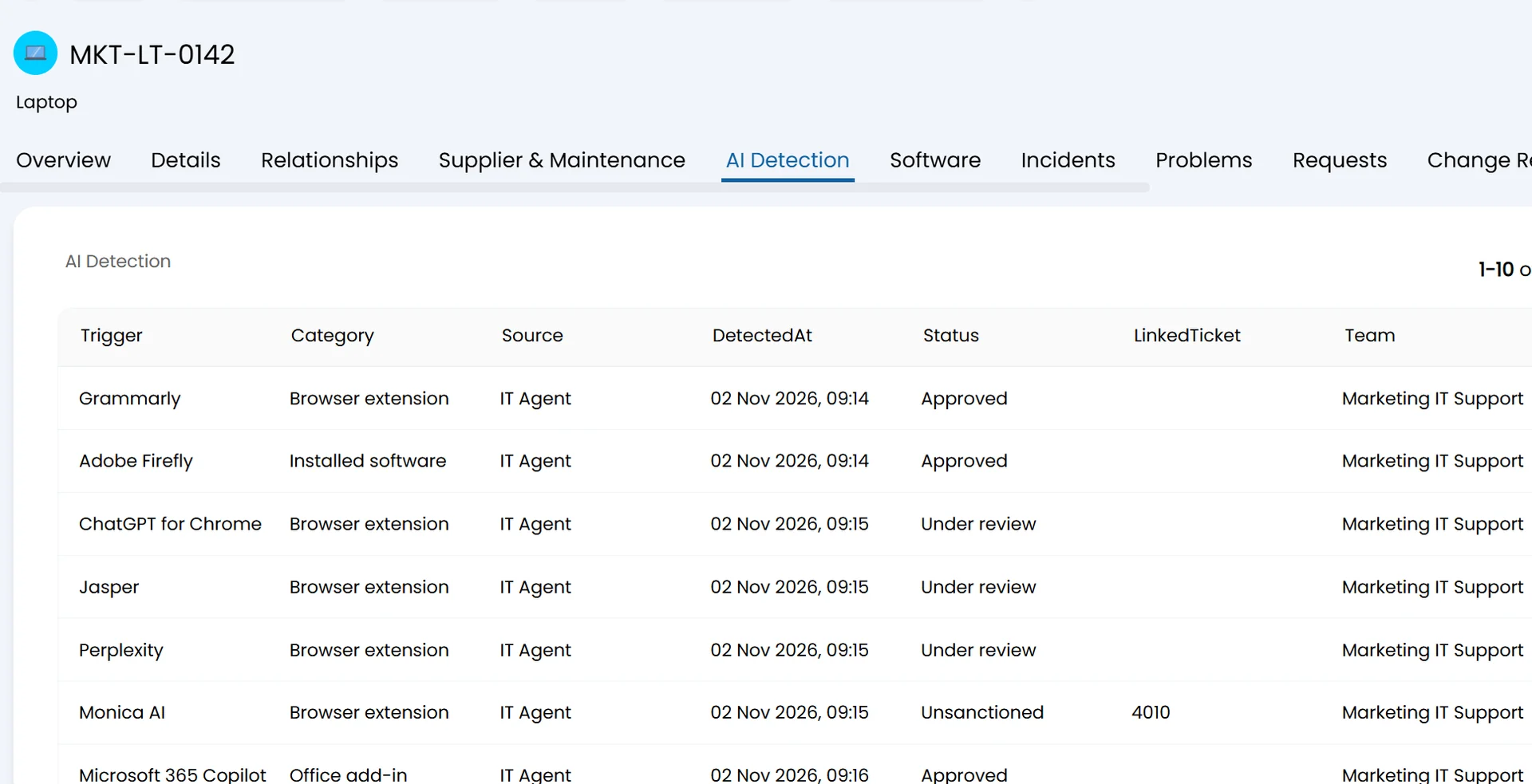
Halo asset record for laptop MKT-LT-0142 on the AI Detection tab, listing detected AI tools by trigger, category, source, detection time and status such as Approved, Under review and Unsanctioned
AI detection

See where AI is in use
across your estate.

Every asset carries an AI detections table. IT and security teams get a factual view of AI usage that they can act on through the usual service and change processes.

  • What it finds. Installed AI applications, browser extensions and IDE plugins, connections to AI services, locally running models and AI API keys held in configuration
  • What it never collects. Conversation content is never collected
  • Better data behind Halo AI. A complete, current asset layer gives Halo AI an accurate picture of the estate for routing, impact analysis and suggestions

Security and deployment

Built to pass your security review.

The questions your security team will ask, answered up front.

Credentials stay on your network

A credential is encrypted with the agent’s public key before it is sent, then held in an encrypted vault on the agent, not in the cloud. Saved passwords are never shown in plain text.

Outbound only

Agents need outbound access on TCP 443 and nothing inbound. Halo provides the service hostnames for your region so they can be added to firewall and proxy allowlists.

Your choice of data region

Choose EU or US hosting when a site is created. Data is stored and processed in that region, encrypted in transit and at rest. Asset records live in your Halo instance.

Least privilege by design

Windows scanning uses a non administrative account, SSH uses read only commands without root, and SNMP needs only a read only community string or a v3 user.

Runs alongside what you have

Existing asset and CMDB integrations keep working. Where sources overlap, Halo’s Reconciliation Engine lets you set which source wins for each field.

Simple to deploy at scale

Install agents one by one or roll them out centrally with Group Policy or Intune. Schedule agent updates by device group and set a minimum version.

Licensing and readiness

What it costs, and what you need first.

Licensing

Customers on standard pricingIncluded in your Halo licence
Fair useUp to 20,000 endpoints
More than one Halo instanceOne licence, shared between instances
Above fair use, or not on standard pricingExtra endpoints in bands of 100
How to switch it onActivated by your Halo contact or CSM

Before you switch it on

Halo versionv2.258 or later
Data regionEU or US. Cannot be moved later
NetworkOutbound TCP 443 for agents
Agentless scanningService accounts for WMI, SSH or SNMP
ScopeAn agreed scan scope

Source: Halo, usehalo.com/platform/asset-discovery. Checked 16 November 2026.

ALLIED ESM

Want Discovery set up properly the first time?

Allied ESM can scope and deliver your Discovery rollout: scan scope, agent placement, CMDB mappings and reconciliation rules against your existing sources. Scoped and quoted as part of your project.

Talk to us

FAQ

Common questions

Do I need a separate discovery tool or server?
No. Discovery is configured and run inside Halo, and Halo sets up the connection to the discovery service for you. The only thing you install is the agent, on your devices and on at least one machine in each network segment you want to scan.
What is the difference between agent and agentless discovery?
An agent scans the device it is installed on. It suits laptops and desktops, including those often off the corporate network. Agentless scanning uses credentials linked to a nearby agent to scan servers, switches, printers and other devices that cannot run an agent. Most organisations use both.
Which operating systems does the agent support?
Windows 10 and 11, Windows Server 2012 to 2025, current and previous macOS releases on Intel and Apple Silicon, and the major Linux distributions including Ubuntu, Debian, RHEL and SLES.
How many scanning agents do I need?
At least one in each network segment or site you want covered. Under 5,000 assets, one scanning agent covers a weekly scan and two cover a daily scan. From 5,000 assets, use two for weekly and four for daily scanning.
Is Halo Discovery included in my Halo licence?
Yes, for customers on standard pricing, with fair use of up to 20,000 endpoints shared between your Halo instances. Customers not on standard pricing, or above the fair use limit for their band, can buy extra endpoints in bands of 100. Your Halo contact or CSM activates it.
Will it replace our existing asset integrations?
No. Existing asset and CMDB integrations are unaffected and can run alongside Discovery. The Reconciliation Engine sets which source takes precedence for each field.
Can Allied ESM set Discovery up for us?
Yes. Allied ESM can scope and deliver the rollout, from readiness checks through to CMDB mappings. It is scoped and quoted as part of your project. Contact us to discuss what is involved.

See Discovery map your estate into the Halo CMDB.

Book a demo, or talk to us about getting your instance ready for Discovery.