Halo
Microsoft Teams

Halo + Microsoft Teams Integration

Your team lives in Teams.
Now your service desk does too.

Halo's native Microsoft Teams integration means your agents handle tickets, your end users raise requests, and your channels stay in sync — all without leaving Teams. Five layers of integration, one platform, no extra cost.

✓ Teams bot for agents & end users ✓ Self-service portal in Teams ✓ Channel notifications ✓ Click-to-call via Teams ✓ Entra ID / Azure AD SSO ✓ Native — included in every licence
What you get

Five layers of Teams integration.

Most ITSM platforms have a basic Teams notification. Halo has five distinct integration layers — each one designed to keep agents and end users working where they already are.

Channel Notifications

Ticket updates delivered to Teams channels

Any event in Halo — new ticket, status change, priority escalation, SLA breach — can push a rich message card to any Teams channel. Your team stays informed in real time, in the place they're already watching.

Configurable per trigger — send on any Halo event
Route to any channel or Teams group chat
Rich message cards with ticket ID, status, and assignee
Teams Bot

Raise and manage tickets from any Teams chat

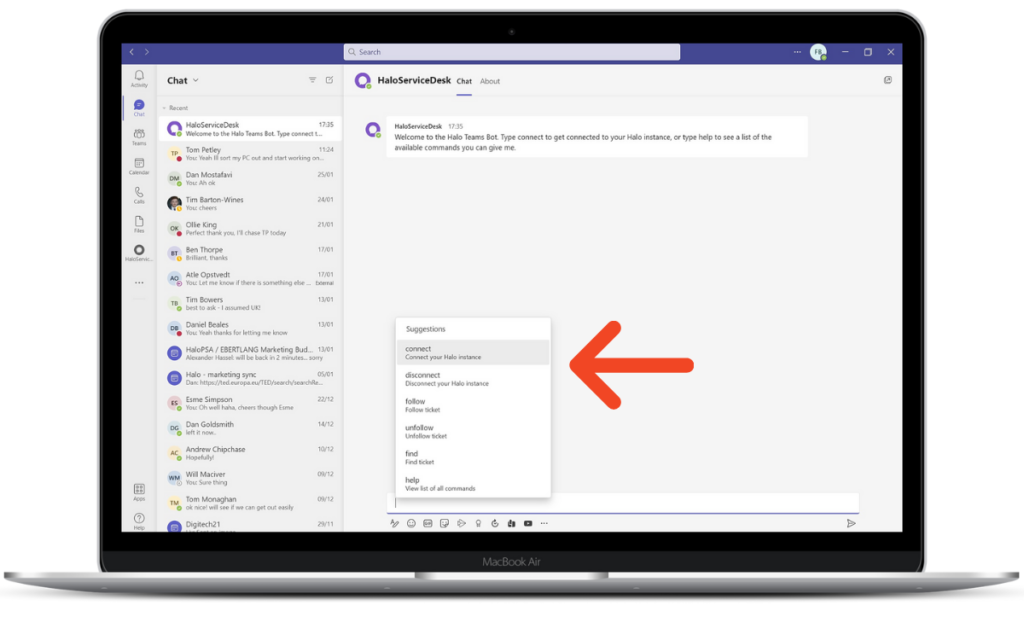
The Halo bot is available from the Teams app store. Agents and end users can raise a ticket from a message, search by ticket number, follow updates, and share ticket details with colleagues — all from inside Teams, in both private and group chats.

Raise a ticket directly from any Teams message
Search, follow, and share tickets in private and team chats
Connect your Halo account once — then use bot commands anywhere
Self-Service Portal

The full Halo portal, embedded as a Teams tab

Embed the Halo self-service portal as a tab inside your Teams environment. End users raise requests, check ticket status, and browse the knowledge base — all without opening a browser. Works with Entra ID / Azure AD SSO for seamless, frictionless access.

Full SSP accessible as a native Teams tab
Entra ID / Azure AD SSO — no separate login required
Can be pushed to customer tenants for MSP deployments
Call Management

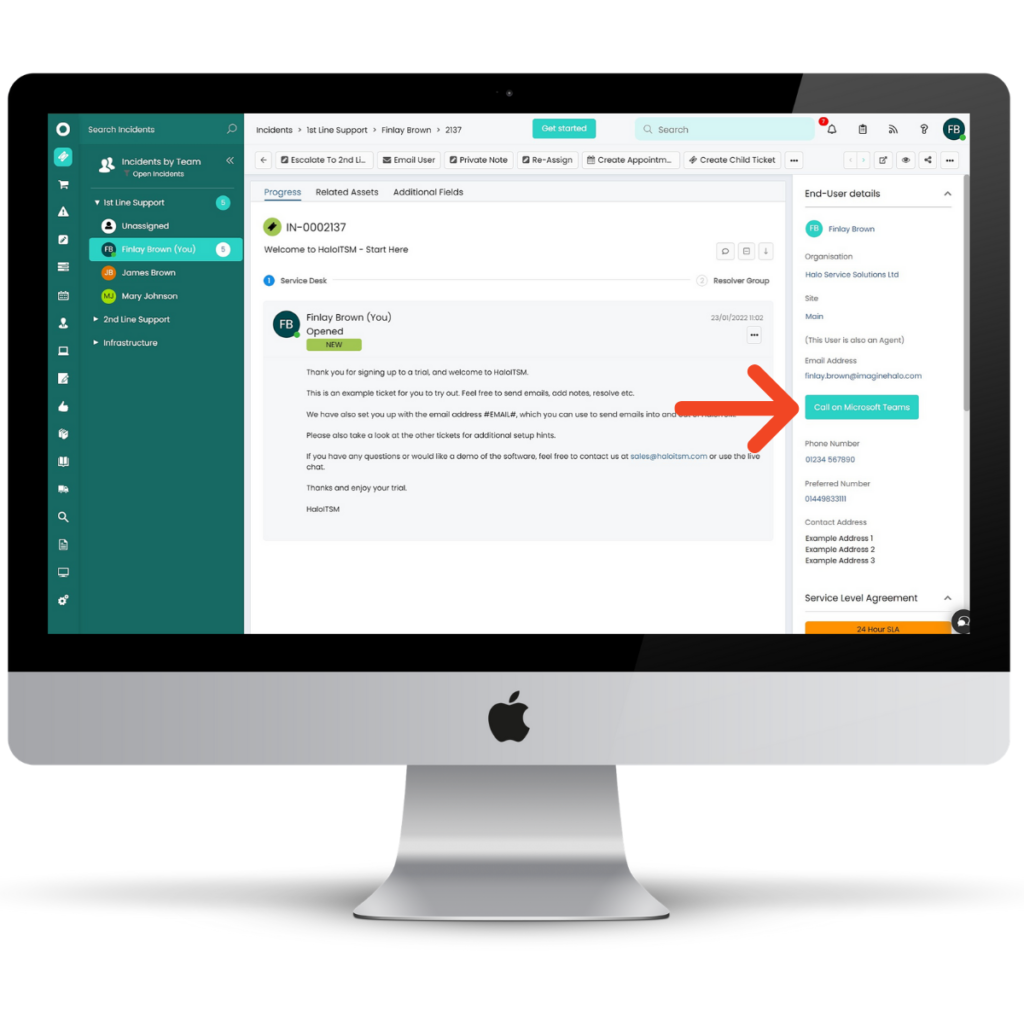
Click-to-call via Teams from inside a ticket

Agents can initiate a Microsoft Teams call directly from any Halo ticket — one click, no context switching. When a Teams call arrives, a pop-up surfaces the relevant ticket and caller details automatically.

Call any user via Teams from within a Halo ticket
Incoming call pop-up links to the relevant Halo ticket
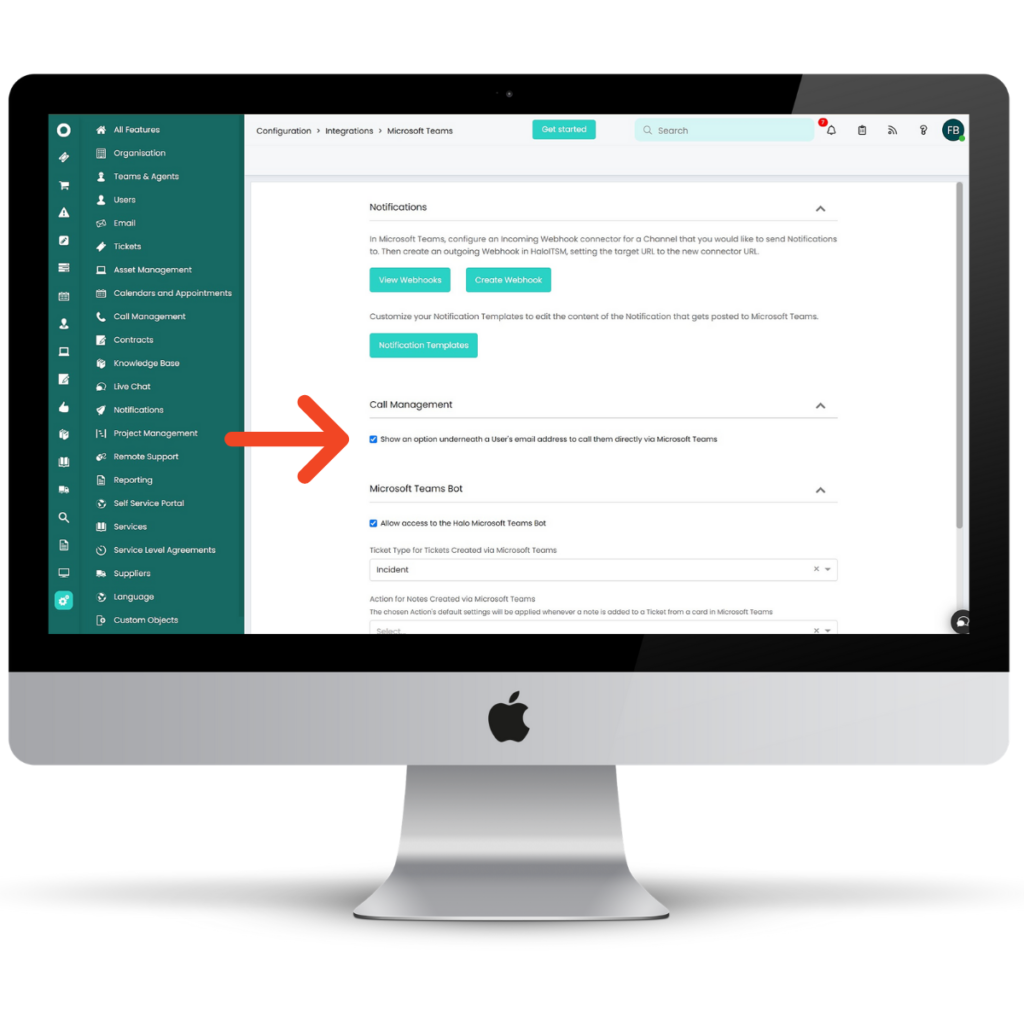
Enabled via Configuration → Integrations → Microsoft Teams
Virtual Agent

AI-powered virtual agent, running inside Teams

Deploy Halo's virtual agent directly within Microsoft Teams. End users describe their issue in plain language — the agent suggests relevant knowledge base articles, raises a ticket automatically if needed, or escalates to a live agent through a live chat session. No browser. No portal. Just Teams.

Natural language ticket creation — no forms to fill
AI-generated knowledge base suggestions before a ticket is raised
Escalate to live agent chat without leaving Teams
Deflects repeat requests — reduces ticket volume over time
Powered by Halo AI — included in every licence at no extra cost

The detail

Everything the integration delivers.

The full feature set — active from day one, included in your Halo licence, no middleware, no extra subscriptions.

Ticket notifications to channels
Push any Halo event — new ticket, update, SLA breach, priority change — as a rich message to a nominated Teams channel.
Configurable notification triggers
Choose exactly which events fire a Teams notification — by ticket type, team, priority, or SLA threshold. Full control, no noise.
Bot — raise ticket from a message
In any Teams chat or channel, highlight a message and use the Halo bot to raise a ticket from it immediately — no copy-paste, no browser.
Bot — ticket search & lookup
Find any Halo ticket by ID or search phrase from within a Teams chat. Share the ticket card with anyone in the conversation instantly.
Bot — follow & unfollow tickets
Subscribe to any ticket and receive Teams notifications whenever it updates — without logging into Halo. Unfollow with a single command.
Bot — works in private & group chats
All bot commands work in 1-2-1 chats with the Halo bot, in group chats, and in team channel conversations — no restrictions.
SSP embedded as a Teams tab
The full Halo self-service portal runs inside a Teams tab. End users access it without switching context — raise requests, check status, browse KB articles.
Entra ID / Azure AD SSO
The embedded SSP authenticates via Microsoft Entra ID. Users log in automatically using their Microsoft 365 identity — no second password, no friction.
Push SSP to customer tenants
MSPs can push the Halo self-service portal into their customers' Microsoft Teams tenants — giving each client their own branded support tab.
Click-to-call from Halo tickets
Agents call users via Teams directly from inside a Halo ticket. The call is placed using the user's Microsoft 365 identity — one click, no dialling.
Teams call pop-up
When a Teams call comes in, a pop-up surfaces the related Halo ticket and caller record. Agents have full context before they answer.
Virtual agent in Teams
Halo's AI virtual agent runs as a bot in Teams — handling common requests, surfacing KB articles, raising tickets, and escalating to live chat.
Add notes from Teams
Agents can add notes to open Halo tickets directly from Teams chats using the bot — no context switching while a conversation is in progress.
Works across HaloITSM & HaloPSA
Every Teams integration feature is available whether you run HaloITSM for an internal IT function or HaloPSA as a managed service platform.
No extra cost — ever
Every Teams integration feature — bot, SSP, notifications, call management, virtual agent — is included in the standard Halo licence. No add-ons, no connectors to buy.

Getting connected

How the integration is configured

Setup is handled from within Halo and your Microsoft 365 admin centre. No middleware, no third-party connectors, no software to install. Allied ESM can scope and configure this as part of your project.

1

Enable the Teams integration in Halo

In Halo, go to Configuration → Integrations → Microsoft Teams and enable the integration. The module ships with every Halo licence — nothing to download or install.

2

Register the Halo app in your Microsoft 365 tenant

Create an Azure App Registration in your Microsoft admin centre and grant the appropriate permissions. Halo uses this to authenticate and post messages to your Teams environment securely.

3

Add the Halo bot from the Teams app store

Install the Halo bot into your Teams environment from the Microsoft Teams App Store. Users can then connect their Halo account to the bot with a single command in a private chat.

4

Configure notification channels and triggers

In Halo, define which events should fire Teams notifications and which channels they route to. You can configure multiple rules — for example, P1 incidents to a war room channel, SLA breaches to a manager channel.

5

Embed the self-service portal (optional)

Add the Halo self-service portal as a Teams tab for your end users. Configure Entra ID SSO so users log in automatically using their Microsoft 365 identity. For MSPs, the portal can also be pushed to customer tenants.

6

Go live — Teams and Halo are fully in sync

From this point, your teams receive ticket updates in their channels, end users raise requests from Teams tabs, agents handle tickets from chats, and calls route through the Teams integration automatically.

Allied ESM configures this for you

Allied ESM can scope and configure the full Halo + Microsoft Teams integration — app registration, bot setup, notification rules, and portal embedding. Whether you're doing a new implementation or adding Teams to an existing Halo environment, we'll handle it properly.

Real-world uses

Three ways this changes the day-to-day.

These are the most common ways organisations put the Halo + Teams integration to work from day one.

01

The end user never needs to leave Teams

A new starter needs to request a laptop. They open the IT tab in Teams, fill in the service catalogue request, and submit — still in Teams. They get a notification in the same tab when it's approved. They never opened a browser or sent an email.

Teams tab Request raised Notified in Teams
02

A P1 incident lands in the right channel instantly

A major incident is raised in Halo at 11pm. Before any agent logs in, a rich notification card lands in the Major Incidents Teams channel with ticket ID, priority, and description. The on-call engineer responds in Halo. Every update posts to the same channel automatically.

P1 raised in Halo Channel alerted Updates follow
03

An agent turns a chat into a ticket in seconds

A colleague messages an IT agent in Teams: "my laptop won't connect to the VPN." The agent uses the Halo bot to raise a ticket directly from that message — category, user, and description pre-filled. The ticket is live before the conversation ends. No portal. No email.

Teams message Bot raises ticket In Halo instantly

Common questions

Frequently asked questions

Is the Microsoft Teams integration included in every Halo licence?
Yes. Every layer of the Teams integration — notifications, bot, self-service portal embedding, click-to-call, and virtual agent — is a native, first-party Halo feature included in the standard monthly licence. There is no middleware, no third-party connector, and no add-on subscription required.
Does it work with both HaloITSM and HaloPSA?
Yes. The Microsoft Teams integration is available across both HaloITSM and HaloPSA. The full feature set — notifications, bot, embedded SSP, call management, and virtual agent — is identical regardless of which Halo product you run.
Can the self-service portal be embedded for end users inside Teams?
Yes. The full Halo self-service portal can be added as a tab within Microsoft Teams. With Entra ID / Azure AD SSO configured, end users access the portal automatically using their Microsoft 365 identity — no separate login. For MSPs, the portal tab can also be pushed to individual customer tenants so each client has their own branded support experience within their own Teams environment.
Does the Teams bot work in private chats and in team channels?
Yes. The Halo bot works in both 1-2-1 chats and in group chats and team channel conversations. In private chats, users can connect their account, follow and unfollow tickets, and search by ticket number. In group and team chats, any message can be turned into a ticket, and ticket details can be shared directly into the conversation.
What is needed on the Microsoft side to set up the integration?
The integration requires a Microsoft 365 tenant with Teams and an Azure App Registration with the appropriate permissions granted. Allied ESM handles this as part of the implementation. For SSO on the embedded self-service portal, Entra ID (formerly Azure Active Directory) is used — standard in any Microsoft 365 environment. No additional Microsoft licences are required beyond your existing M365 subscription.
We're already live on Halo — can we add Teams without starting over?
Yes. The Teams integration can be added to an existing live Halo environment. Allied ESM can scope and deliver the setup — app registration, bot installation, notification configuration, and portal embedding — without disrupting your current workflows. Contact us to discuss what's involved for your specific setup.

Ready to bring Halo into Teams?

Allied ESM can scope and configure the full Halo + Microsoft Teams integration — whether you're starting fresh or adding it to an existing environment. Talk to us to find out what's involved.