CRM

Halo CRM Campaigns & Sequences.

Build a one-off Blast to a segment, or a multi-step sequence that branches, delays and A/B splits its way through a journey — on a visual, drag-and-drop canvas with no HTML and nothing for IT to deploy. Campaigns and Sequences are part of the same Halo licence as the pipeline the lead came from, with no separate marketing platform to buy and no cap on sends, contacts, or sequences. Every open, click and unsubscribe lands on the same customer record as the deal and the support ticket — not in a tool you have to export from.

Campaigns / Blast, Nurture & automated journeys Sequences / Visual flowchart builder Included / No send caps, no contact tiers
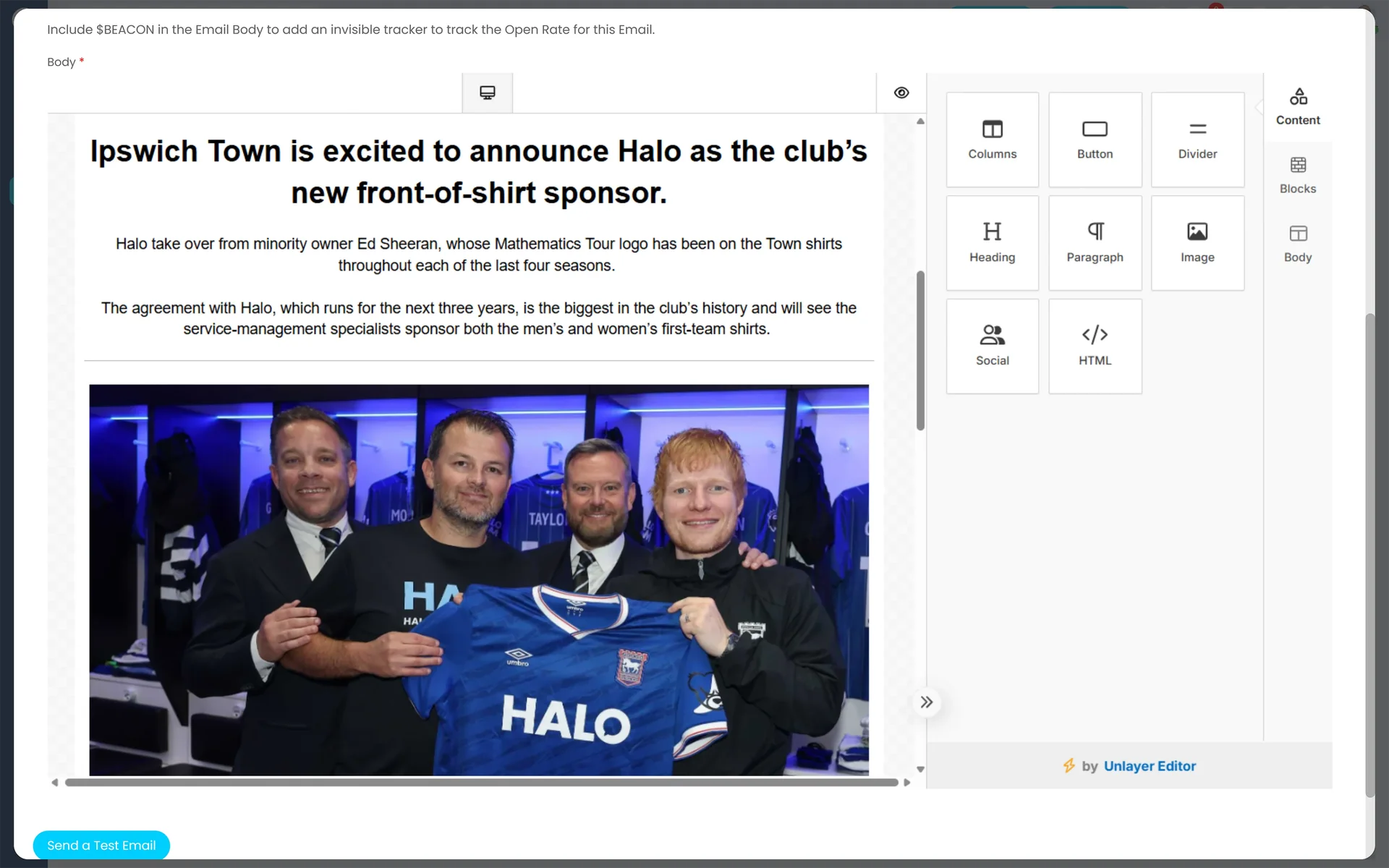
Halo CRM campaign email builder — drag-and-drop content blocks for headings, paragraphs, images, buttons and HTML alongside a live preview of the email being built

The channel that works best is the one you get charged more for

Email still outperforms — most marketing platforms just price it against you

Marketing tools built on a separate platform from the CRM tend to bill by contact count. The channel doing the heaviest lifting is usually the one with a meter on it.

22%

The share of marketers naming email one of their top ROI-driving channels — the joint fifth highest of any channel measured.

Source: HubSpot, State of Marketing, 2026

2.8%

Email marketing's average conversion rate for B2C brands — 2.4% for B2B — among the strongest of any digital channel.

Source: FirstPageSage 2025, via HubSpot Marketing Statistics

Halo's answer is structural: campaigns and sequences are included in the same licence as the rest of the CRM, with no cap on sends, contacts or the number of sequences you run — so the channel that performs best doesn't get more expensive the better it works.

The visual journey builder

Every step, branch and delay on one drag-and-drop canvas

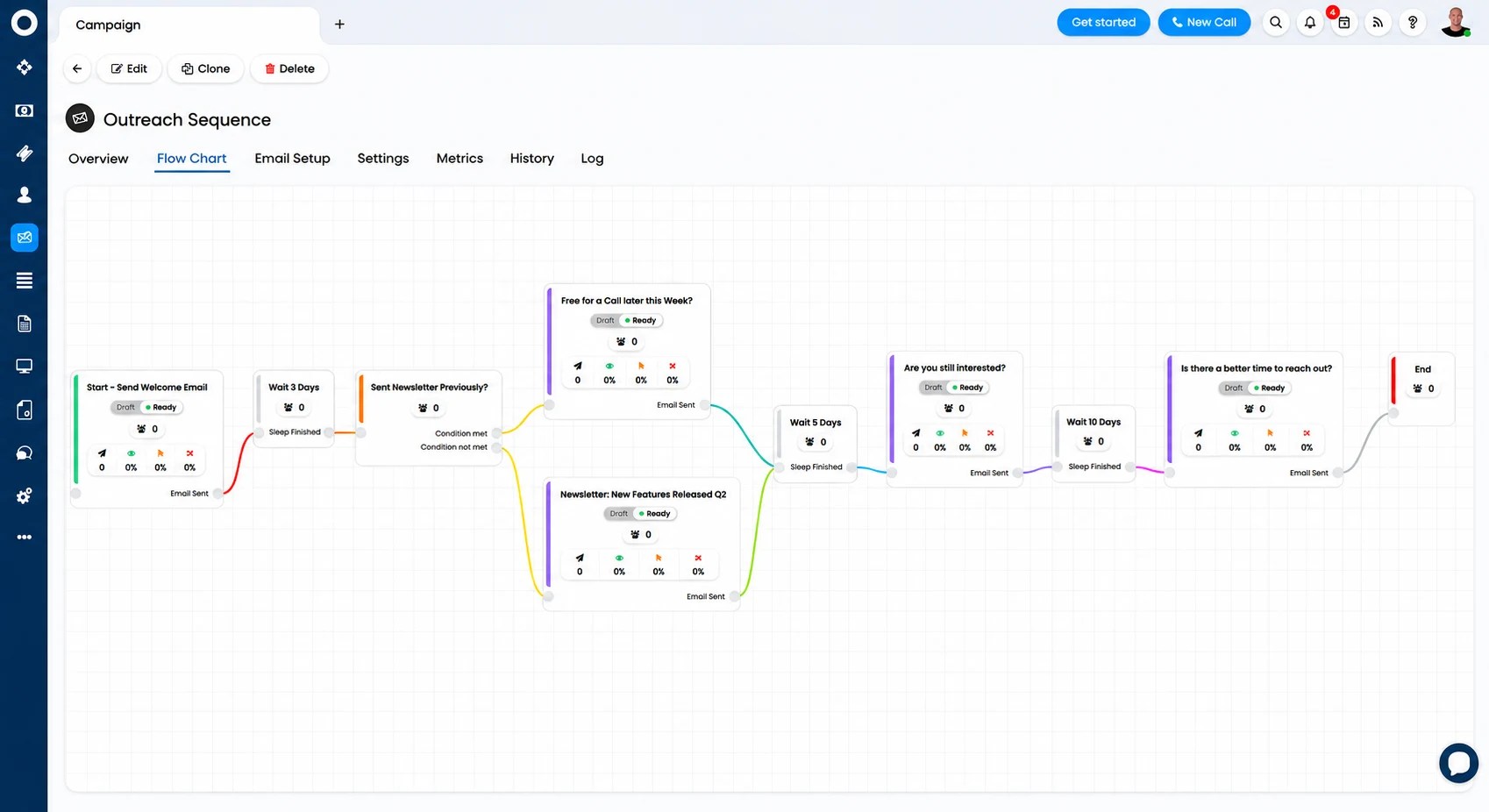
Map every step and decision point on a visual flowchart: add email steps, delays and conditions in any order, and A/B split paths exactly where you need to test messaging or timing. Any step can be edited in place, so a change doesn't mean rebuilding the whole journey — and the same builder runs sales cadences, marketing nurtures and service follow-ups, triggered from a contact, a lead, an opportunity, or a closed ticket.

  • Drag-and-drop email builder — build branded emails with no HTML, personalise with merge fields for names, companies and deal values, and save any email as a reusable template across other sequences
  • Conditions & branching — branch by contact behaviour, tags or custom fields, A/B split subject lines, content or timing, and Halo routes each contact down the best-performing path automatically
  • Triggered from any CRM event — start a journey from a new contact, a lead, an opportunity reaching a stage, or a ticket closing, so sales, marketing and service all run on the same automation engine
Halo CRM campaign flow chart — an outreach sequence mapped as welcome email, wait steps, a condition branch into two email paths, and an end step

Blast, Nurture-Triggered, Nurture-Scheduled

Blast sends a one-off communication to a fixed list. Nurture-Triggered drip-sends from the moment a contact qualifies, with each new contact starting the sequence from step one. Nurture-Scheduled evaluates list membership on a set schedule instead, protecting continuity once a run is already underway.

Workflow-style flows

Set a campaign's configuration style to Workflow and build it on a flow chart of Split, Action (Delay), Communication and End steps — branching the audience by criteria at each point in the journey, not just running a straight-line drip.

Triggered from opportunities

Add opportunity contacts to a distribution list automatically as leads are logged, and set the status an opportunity moves to once its nurture campaign finishes — so outreach and the deal record stay in sync without an agent updating either by hand. See Pipeline & Opportunity Management →

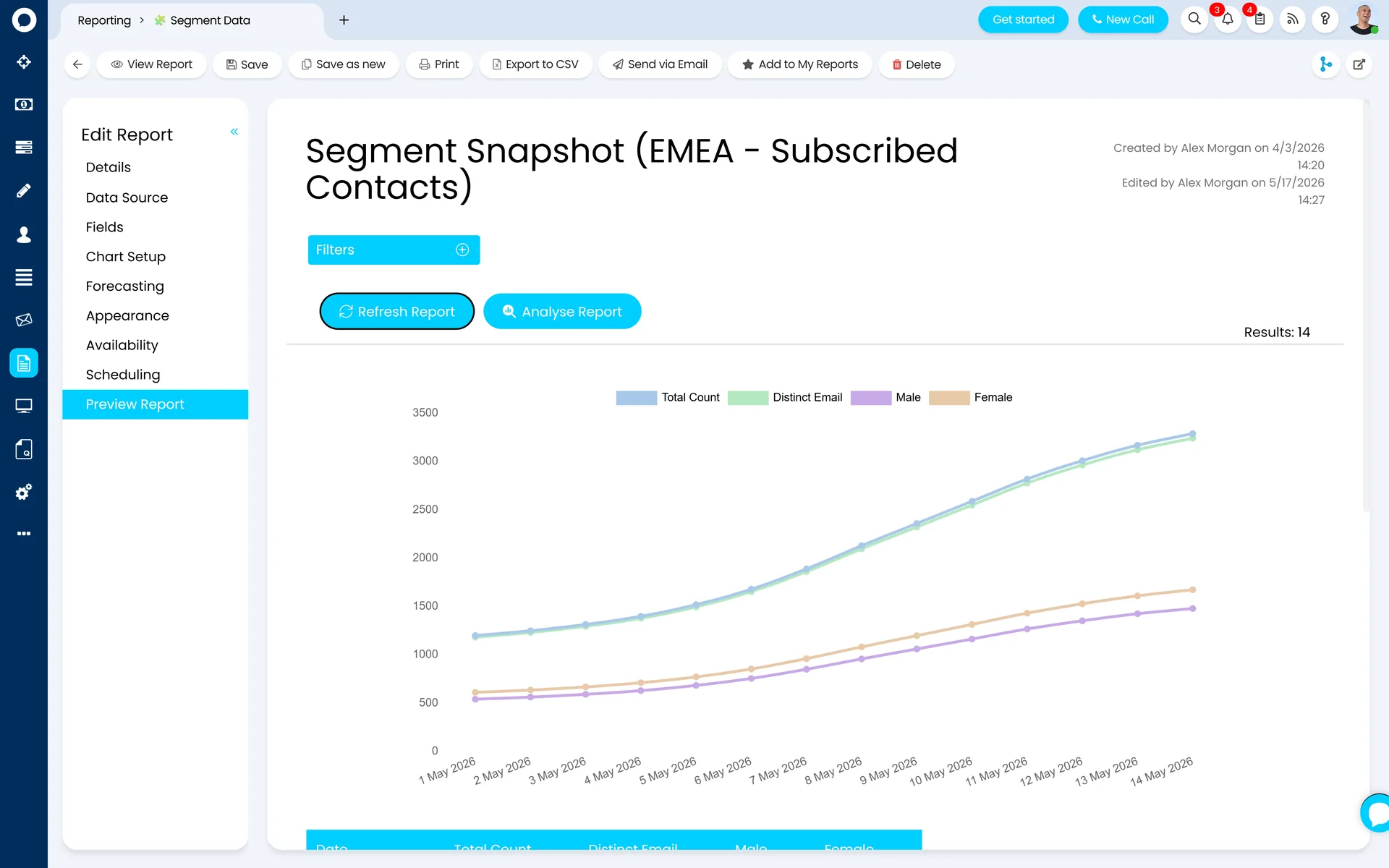
Halo CRM Segment Data report — a saved Segment Snapshot report for EMEA subscribed contacts, charting total and distinct contact counts in the segment over time

Segments & audiences

One audience list, built from real CRM data — not an export

Segments — also called Distribution Lists — group contacts by any combination of criteria. Dynamic segments re-evaluate membership automatically as records change; static segments hold a fixed group for a one-off send. Members can be pulled straight from ticket and opportunity lists, so a segment of "open leads in a region" is built from live pipeline data, not a spreadsheet someone exported last month.

  • Dynamic & static segments — dynamic lists filter on ticket, user and campaign-activity fields (opened, not opened, sent, not sent) and stay current automatically; static lists hold a fixed group for a one-off send
  • Bulk sending, built in — send individually or as a single BCC, with a personalised unsubscribe link on every send that removes the contact and stops them being re-added by a dynamic list
  • Lead capture forms — embed opportunity forms directly into your website so submissions log straight into the pipeline as new contacts, ready to enter a segment and a journey automatically

Already invested in Mailchimp?

Halo's native Mailchimp integration imports Audiences as Distribution Lists, Segments and their members, and Mail Campaigns complete with open rate, click rate and unsubscribe statistics — so existing audience work doesn't get rebuilt from scratch. You can also start a Mailchimp campaign from inside Halo and finish it there.

Measurement & attribution

Know which step worked, which one didn't, and what it did for the pipeline

Every campaign and sequence tracks engagement in real time, broken down per step — not just as one blended number for the whole send.

1

Per-step engagement — opens, clicks and unsubscribes tracked at every individual step of a sequence, not just the send as a whole, so you can see exactly which email in a five-step journey is losing people.

2

A/B comparison & drop-off analysis — compare split results side by side to see which subject line, content or timing wins, and spot the exact step where contacts stop engaging.

3

Pipeline & revenue attribution — because campaigns and sequences sit on the same database as the CRM, engagement records against the contact and the opportunity it influenced, right next to the deal — no export, no separate attribution tool.

AI Performance Analysis

AI surfaces what's working across your campaigns and sequences and highlights where to optimise, so the insight comes to you rather than you having to dig through reports for it.

Audience Recommendations

AI analyses engagement patterns and suggests the right segments to target next, so every send reaches the audience most likely to respond rather than the whole list by default.

A marketing dashboard that shows the full picture

Opens, clicks and conversions broken down per campaign, reportable on pipeline influence because the data already sits on the CRM. Dashboards mix chart, counter and data widgets on the home screen of every marketing lead who needs them, no SQL required.

Configured by Allied ESM

Campaigns are configuration too — and segments are where it usually goes wrong

A campaign is only as good as the list behind it and the journey it sits in. Getting segments, triggers and attribution right on day one is the difference between marketing that reports on pipeline and marketing that reports on itself.

Campaign templates & branding

Email templates and the HTML designer set up in your branding, with canned messages and merge-field variables ready to drop into every campaign and every sequence step.

Segments & data hygiene

Distribution lists and dynamic segment criteria built around how you actually sell and market, with the "never send marketing emails" flag and unsubscribe handling configured correctly from day one.

Journey design & triggers

Flowchart-style sequences mapped to your real customer journey, with delays, conditions and A/B splits placed where they matter — and triggers wired to contacts, leads, opportunities and tickets so a journey starts itself.

Measurement & attribution setup

Metrics, tracking beacons and campaign-to-opportunity attribution configured so results are visible on the record from day one, with AI Performance Analysis and Audience Recommendations switched on and tuned to your data.

Allied ESM designs and configures all of this as part of a fixed-price Halo CRM implementation — so you know the full cost before work begins. Where you need integrations or custom automation on top, Allied ESM can scope and deliver that as part of your project.

Frequently asked questions

Campaigns & sequences in Halo — answered directly.

Is there a limit on how many campaigns, sequences or contacts we can run?
No. There's no cap on sends, contacts, sequences or automations in your Halo licence. Halo connects to your existing mailbox — Microsoft 365 or Google Workspace — or a bulk sending platform such as SendGrid or Postmark, so your sending limits are set by your chosen provider, not by your Halo licence.
Do we still need Mailchimp or HubSpot Marketing Hub?
No — campaigns, sequences, segmentation and AI-powered insights are all included in the same Halo licence as your CRM, with no separate marketing platform to buy, integrate or maintain. If you already run Mailchimp, Halo's native integration imports Audiences, Segments and campaign statistics rather than forcing a rebuild from scratch.
How do sequences differ from campaigns?
A campaign is a scheduled send — a one-off Blast to a fixed list, or a Nurture that drip-sends to anyone who qualifies. A sequence is built the same way, in workflow style: a visual flowchart you can branch, delay and A/B split at any point, triggered from a contact, lead, opportunity or ticket rather than a fixed start date. Both run through the same builder, the same segments and the same tracking.
How does Halo handle GDPR and unsubscribes?
Every campaign and sequence supports a personalised unsubscribe link that removes the contact and stops them being automatically re-added by a dynamic segment. Any user flagged "Never send Marketing Emails" is excluded from every send regardless of segment membership.
Can a campaign or sequence trigger from a deal or a support ticket?
Yes. Sequences can be triggered from contacts, leads, opportunities or tickets, and opportunity contacts can be added to a distribution list automatically as a lead is logged — with the opportunity itself updated once its campaign finishes, so outreach and the deal record stay in sync.
Does campaign engagement show up on the customer record?
Yes. Because campaigns and sequences sit on the same database as the CRM, opens, clicks and campaign history appear directly on the contact's record and activity feed — next to the opportunity, the quote and the support tickets, not in a separate marketing tool.
How much does Halo CRM cost?
Halo is priced on one all-inclusive monthly licence — pipeline, quoting, campaigns, AI, reporting and 250+ native integrations are all included, with named and concurrent licence options. See Halo's all-inclusive UK pricing →

Keep going: the rest of the Halo CRM story

Marketing That Reports On Pipeline, Not Just Itself

From segments and templates through journey design and attribution, Allied ESM delivers Halo CRM campaigns and sequences on fixed-price engagements — so you know the full cost before work begins.

Book a Consultation

Official Halo Partner

Allied ESM is a pure play Halo partner — licensing, implementation, consulting & managed services.