CRM

Halo CRM Quoting & Sales Orders.

Build the quote from your product catalogue, route it through internal approval, get it signed by the right person, and watch Halo turn the accepted quote into a sales order automatically. Quoting isn't a separate product bolted onto your CRM — it's built into the same Halo licence as the pipeline the deal came from, with no CPQ tool to license, learn, or keep in sync.

Quoting / Catalogue, bundles & ad-hoc lines Approvals / Internal chain + secure signing Included / No CPQ licence, no add-ons
Halo CRM — building and sending a quotation

The cost of a separate quoting tool

Quoting shouldn't be tool #11

Sales teams already run more tools than they need to close a deal — and a separate quoting or CPQ product is usually one of them.

10

The average number of separate tools a sales team uses just to close one deal.

Source: Salesforce, State of Sales, 2022

66%

The share of sales reps who say they're overwhelmed by the number of tools they're expected to use.

Source: Salesforce, State of Sales, 2022

Halo's answer is structural, not another integration: quoting, approvals, signing and sales orders live inside the same licence as the pipeline the deal came from. There's no separate CPQ product to buy, learn, or keep synced with the CRM — the quote is just part of the opportunity.

Building the quote

From product catalogue to ad-hoc line, without leaving the deal

Raise a quote stand-alone or, best practice, directly from an opportunity so it stays tied to the deal for tracking and approvals — the quote ID follows the opportunity ID, with revisions appended as letters. Product search works across ID, name, group, internal reference, supplier and SKU, so reps find the right line fast, and negative quantities are supported for corrections and trade-ins.

  • Product Bundles — pre-configured groups of items added to a quote in one go; editable bundle quantities recalculate the products inside automatically
  • Ad-hoc lines — free-text "generic product" items for anything outside the catalogue, usable on quotes, sales orders and purchase orders alike
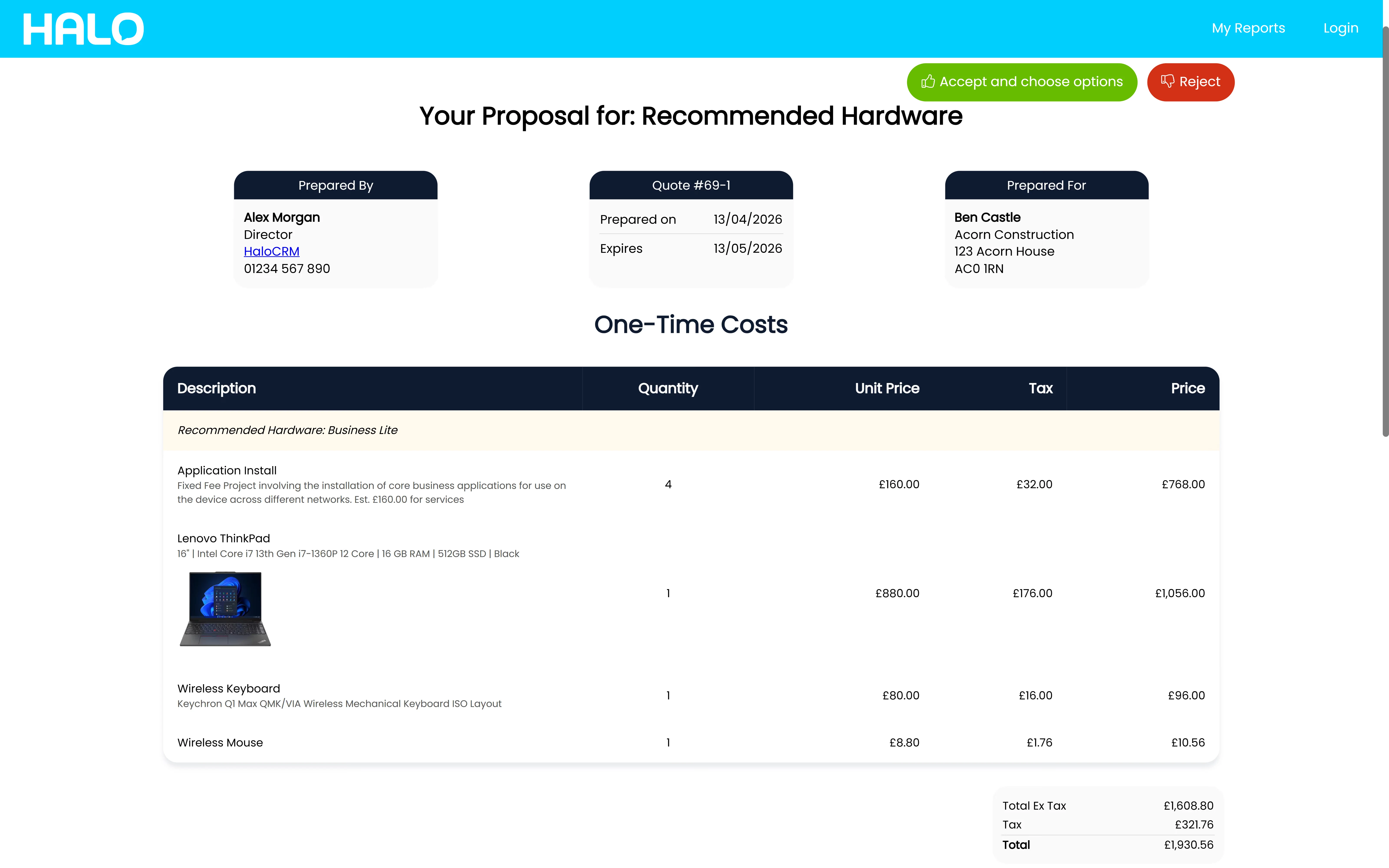
  • Optional items — mark a line optional so the customer decides whether to buy it; the portal shows "Accept and choose options" so add-ons like peripherals are the buyer's call, not a guess
Halo CRM — the sales workspace where quotes are built

Product images & branded PDFs

A primary product image appears on the quote automatically, and PDF templates are edited with your own HTML, variables, margins, footers and a details table you control column by column — down to custom columns of your own.

XLS line import

Large quotes can be built from a spreadsheet: map columns to quote fields in an XLS profile, import the lines straight onto the quote, and re-import against a line ID to update existing lines later.

Comparative quoting

Comparative Quoting adds Current Price and Current Quantity columns to the quote PDF, so a renewal or upgrade shows the customer exactly what's changing, line by line.

Approvals & signing

Two approval gates, one signature you can trust

A discounted quote gets checked internally before it ever reaches the customer — then the customer's own approval is locked to the right person, not just the right inbox.

1

Internal approval first — route quotes for review by margin, using a per-agent margin threshold or Approval Process Rules, or send to a named approver flagged on their agent profile. Nothing goes out under-margin by accident.

2

Customer approval, locked to the right person — enable secure quote signing and the approval email goes to one named contact only. They must use the link in that email to log in and accept, with a signature captured and, once signed, their IP address recorded on the PDF for audit.

3

Or route it through Adobe — the native Adobe Acrobat Sign integration sends the quote out for an Adobe-hosted e-signature instead. The signed agreement returns to Halo by webhook and the quote status updates to Accepted automatically.

Quote Statuses control the process

Every status can disable editing, hide the quote from the end-user, block Accept/Reject, or exclude it from the expiry scan — and each carries a System Use (Accepted, Closed, or none) that determines which area of the Quotes and Orders module the quote sits in.

Visible in the customer portal

Quotes appear in a "My Quotations" tab on the Self-Service Portal, so the customer can review, accept or reject without an email thread — and the opportunity workflow itself can progress automatically the moment a quote is sent, accepted or rejected.

Quote to order to cash

Approval creates the sales order — the sales order creates everything downstream

Turn on "Automatically create Sales Order when Quotation is approved" and an accepted quote becomes a sales order without an agent touching it — copying the lines and the end-user across, and closing the quote behind it. Sales Order Statuses then drive the process from there: a status can flag an order as ready for invoicing, and Halo tracks which orders still need consigning, ordering, or invoicing in dedicated views.

  • Projects from order lines — a sales order line using a product linked to a project template raises the delivery project itself, as a child of the original opportunity
  • Contracts from order lines — mark a product as a contract on its Details tab and a "Create Agreement" action appears on that line, so a managed-service deal produces its own agreement
  • Recurring items handled the same way — licences and managed-service lines can be set to recur, generating a recurring invoice from the sales order rather than a one-off bill
Halo CRM sales reporting — order and invoicing status across the pipeline

Invoicing that lands in your accounting system, not a spreadsheet

Once a sales order is marked ready for invoicing, Halo's first-party accounting integrations — including Xero, QuickBooks, Sage, and Microsoft Dynamics Business Central — post the invoice straight through, with no middleware to build or maintain.

Configured by Allied ESM

Quoting is configuration too — and it's just as easy to get wrong

A quote is the first thing a customer sees with your name and your pricing on it. Getting the templates, the approval rules, and the catalogue right on day one is the difference between a quoting process your sales team trusts and one they route around.

Quote templates & branding

PDF templates built in your branding, with the details table, variables and terms you need — plus the Formal Proposal template configured for bigger, multi-page deals.

Approval rules & statuses

Margin-based internal approval routing, a quote status model that controls editing and visibility, and secure signing locked to the right named contact every time.

Product catalogue & pricing

Products, bundles, optional items and ad-hoc defaults set up correctly from day one — plus XLS import profiles ready for the day a quote runs to hundreds of lines.

Order-to-delivery automation

Sales order statuses, project templates linked to the right products, contract-creation rules, and the accounting integration that takes the invoice from there.

Allied ESM designs and configures all of this as part of a fixed-price Halo CRM implementation — so you know the full cost before work begins. Where you need integrations or custom automation on top, Allied ESM can scope and deliver that as part of your project.
Frequently asked questions

Quoting & sales orders in Halo — answered directly.

Does Halo replace our separate quoting tool?
Yes. Quoting, internal and customer approvals, signing and sales orders are all part of Halo's CRM module — included in the same licence as your pipeline, with no separate CPQ product to buy, license per user, or keep synchronised with the CRM.
Is e-signature included, or do we need Adobe?
Halo includes native secure quote signing at no extra cost — the approval email is locked to a single named contact, who signs on the portal, with a signature and, once signed, their IP address recorded on the PDF for audit purposes. If you already run Adobe Acrobat Sign, Halo has a native integration that routes the quote through Adobe instead and syncs the signed agreement back automatically via webhook.
How does the quote approval workflow work?
There are two gates. Internally, quotes can be routed for approval by margin — a per-agent threshold or Approval Process Rules — before they're ever sent. Externally, the customer approves or rejects on the portal (or via Adobe Acrobat Sign), and Quote Statuses control what's editable and visible at every stage. The linked opportunity's workflow can progress automatically when the quote is sent, approved or rejected.
What happens between a quote being accepted and an invoice going out?
An accepted quote can automatically create a sales order. From there, Sales Order Statuses track what's still outstanding — ordering, consigning, invoicing — and order lines can raise a delivery project or create a contract depending on how the product is configured. Once an order is marked ready for invoicing, Halo's accounting integrations (Xero, QuickBooks, Sage, Business Central) take it from there.
Can we build quotes from a product catalogue, or is everything ad-hoc?
Both, on the same quote. Search the product catalogue by ID, name, group, reference or SKU, add pre-configured bundles in one go, or add free-text ad-hoc lines for anything outside the catalogue. For big quotes, lines can be imported and updated directly from an XLS spreadsheet rather than built one by one.
Can Allied ESM migrate our existing quote templates and branding?
Yes. Allied ESM can scope and rebuild your existing quote templates, branding, approval rules and product catalogue in Halo as part of a fixed-price implementation — including migrating from a standalone CPQ tool where one is currently in use.
How much does Halo CRM cost?
Halo is priced on one all-inclusive monthly licence — pipeline, quoting, sales orders, campaigns, AI, reporting and 250+ native integrations are all included, with named and concurrent licence options. See Halo's all-inclusive UK pricing →

Keep going: the rest of the Halo CRM story

Quotes Your Sales Team Won't Fight

From templates and approval rules through to sales order automation and accounting integration, Allied ESM delivers Halo CRM quoting on fixed-price engagements — so you know the full cost before work begins.

Book a Consultation

Official Halo Partner

Allied ESM is a pure play Halo partner — licensing, implementation, consulting & managed services.