CRM

Halo CRM Pipeline & Opportunity Management.

Every deal on one board, every stage tied to a real sales process, and a forecast weighted by where each deal actually sits — not by rep optimism. Halo CRM gives sales leaders Kanban pipeline views, workflow-driven stages, AI lead scoring, and weighted forecasting, all included in one all-inclusive monthly licence with no per-module fees and no AI add-ons.

Pipeline / Kanban + weighted forecast AI / Scoring, next best action, outreach Included / No add-ons, no tiers
Halo CRM — the sales workspace on one platform

The problem with most pipelines

Subjective stages, guessed probabilities, a forecast nobody trusts

Most CRMs let every rep decide what "Negotiation" means and what 60% feels like. The result shows up in the research.

45%

The share of sales leaders and sellers with high confidence in their organisation's forecasting accuracy — fewer than half.

Source: Gartner, State of Sales Operations Survey, 2020

40%

How much of the week the average seller actually spends selling, according to Salesforce's own research — the rest goes on admin, data entry, and deal management.

Source: Salesforce, State of Sales, 2026

Halo's answer is structural: tie the pipeline to the sales process itself, let AI carry the admin, and weight the forecast by process position — not gut feel.

Pipeline fundamentals

Stages that drive the process — both ways

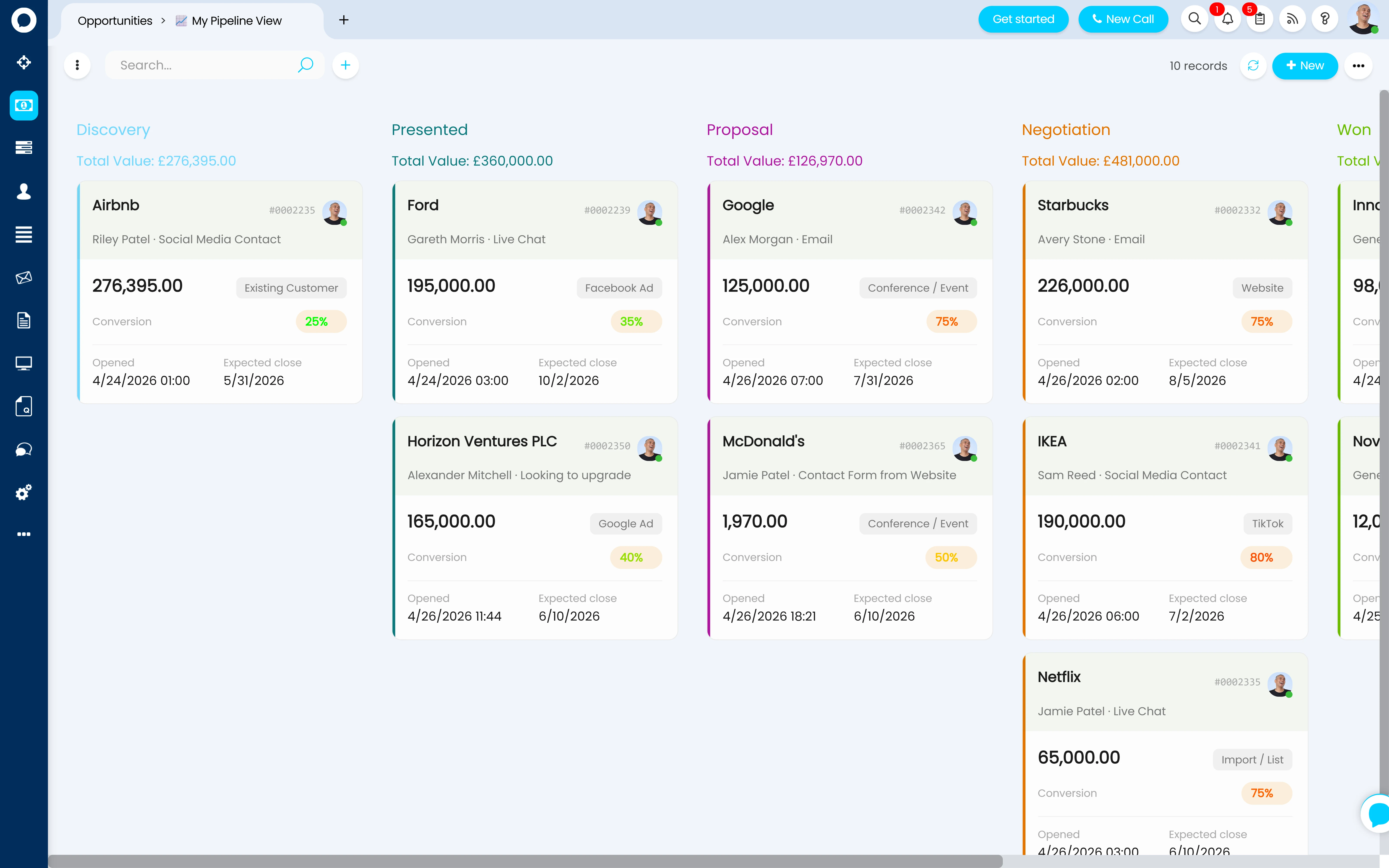
In Halo, an opportunity is a ticket with its Use set to Opportunities — which means the full weight of Halo's workflow engine sits behind your pipeline. Pipeline stages aren't decorative labels: each stage is attached to a step in your sales workflow, and the sync is two-way. Progress the workflow and the stage updates; move the stage and the opportunity moves to the matching workflow step. The board and the process can never drift apart.

  • Kanban pipeline views — deals grouped by stage, with card layouts you control: company, contact, value, and conversion probability on every card
  • Two-way stage ↔ workflow sync — setting a stage automatically applies its workflow step, so "Negotiation" means the same thing on every deal
  • Automatic progression — the workflow advances itself when a quote is sent, accepted, or rejected, or a sales order is raised — progression tied to completed process, not manual updates
Halo CRM pipeline stages — Kanban board view of opportunities by stage

Multiple pipelines, by opportunity type

Opportunity types are fully configurable — and each type can start its own workflow with its own stages, statuses, default team, agent, and SLA. New business, renewals, and project sales each run their own pipeline, and project sales can carry opportunity templates that apply the statement of work and sales task list automatically.

Sales views built per team

Lists, filter profiles, and column profiles define exactly what each team sees — a Pipeline View grouping open deals by stage, a renewals list filtered to one team, a manager view sorted by value. Kanban, table, or tile display can be enforced per list, and every agent can have their own default view.

Quote raised from the deal

Raise a quote directly from the opportunity — the opportunity's workflow displays on the quotation, and the deal's value and profit inherit from the linked quote. When the quote is approved, Halo can create the sales order automatically and move the deal on. See Quoting & Sales Orders →

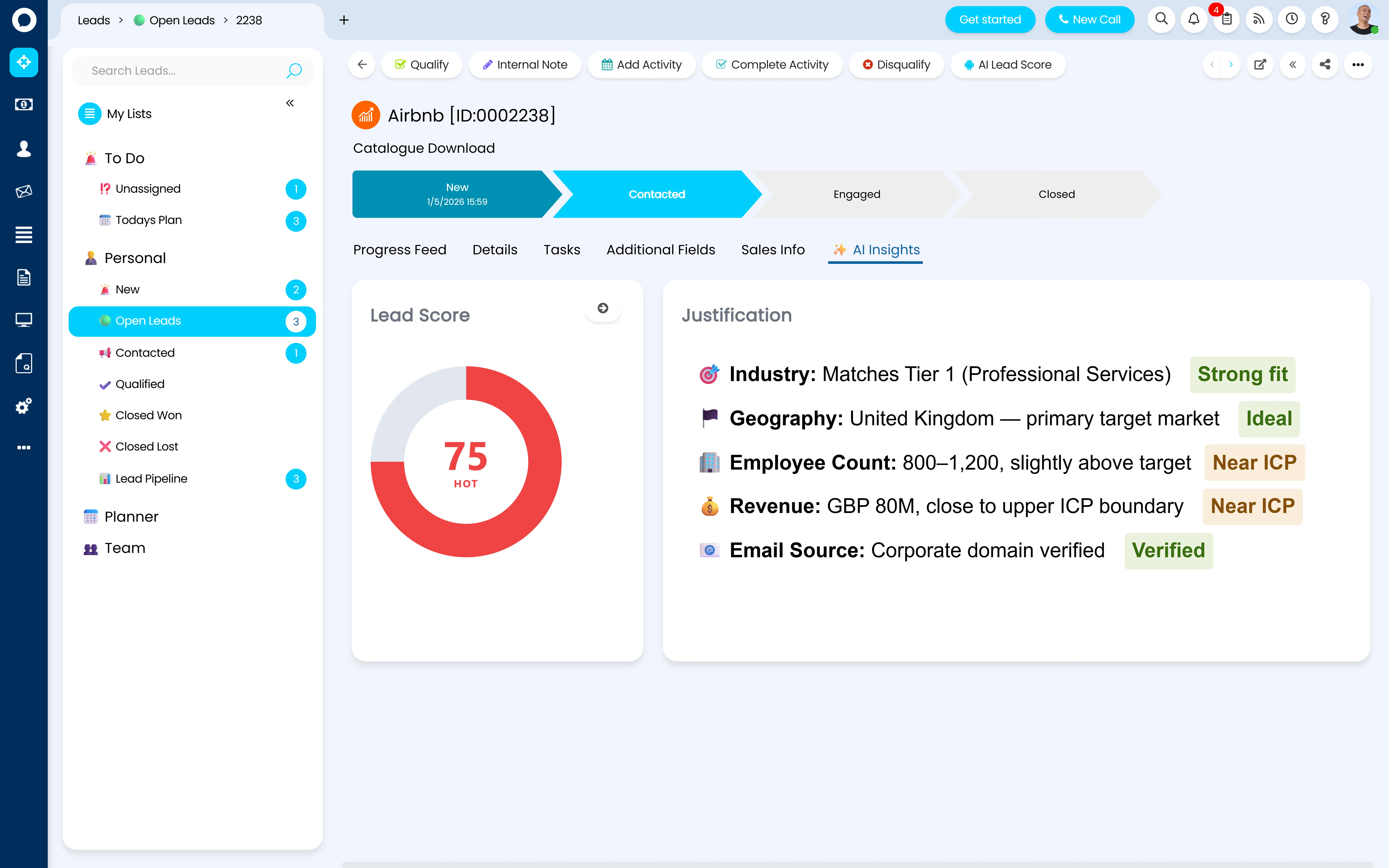
Halo CRM AI lead scoring — leads scored against the ideal customer profile

AI on the pipeline

Scoring, next best action, and outreach — included, not an add-on

Halo's AI is included in every licence, and on the pipeline it does the work that eats a rep's week: qualifying, prioritising, and drafting.

  • AI Lead Scoring — every lead scored against your ideal customer profile, so reps qualify from the top instead of working the list in order
  • Next Best Action — at-risk deals flagged before they stall, with a drafted follow-up ready to review and send
  • Outreach Assistant — AI-drafted emails in the seller's own writing style, not a template voice — for any deal, at any stage

The platform AI story — virtual agents, triage, summarisation, and the intelligence layer behind all of this — lives on Halo AI →

Weighted forecasting

Probability set by process, not optimism

Every step in a Halo sales workflow can carry its own conversion probability, from 0 to 100%. When a deal arrives at a step, its probability updates automatically — so the weighted pipeline is calculated from where each deal actually sits in the process. Two reps at "Proposal Sent" carry the same probability, because the process sets it, not the rep.

1

Set probability per workflow step — configured once, applied to every deal that reaches the step. Discovery might carry 10%, Proposal Sent 40%, Verbal Commit 90%.

2

Choose which deals count — forecasting is enabled per opportunity type, so speculative and unqualified work stays out of the number.

3

Build value from quoted figures — opportunity value and profit inherit from the linked quotation, so the forecast is built on what was actually quoted, not what was hoped.

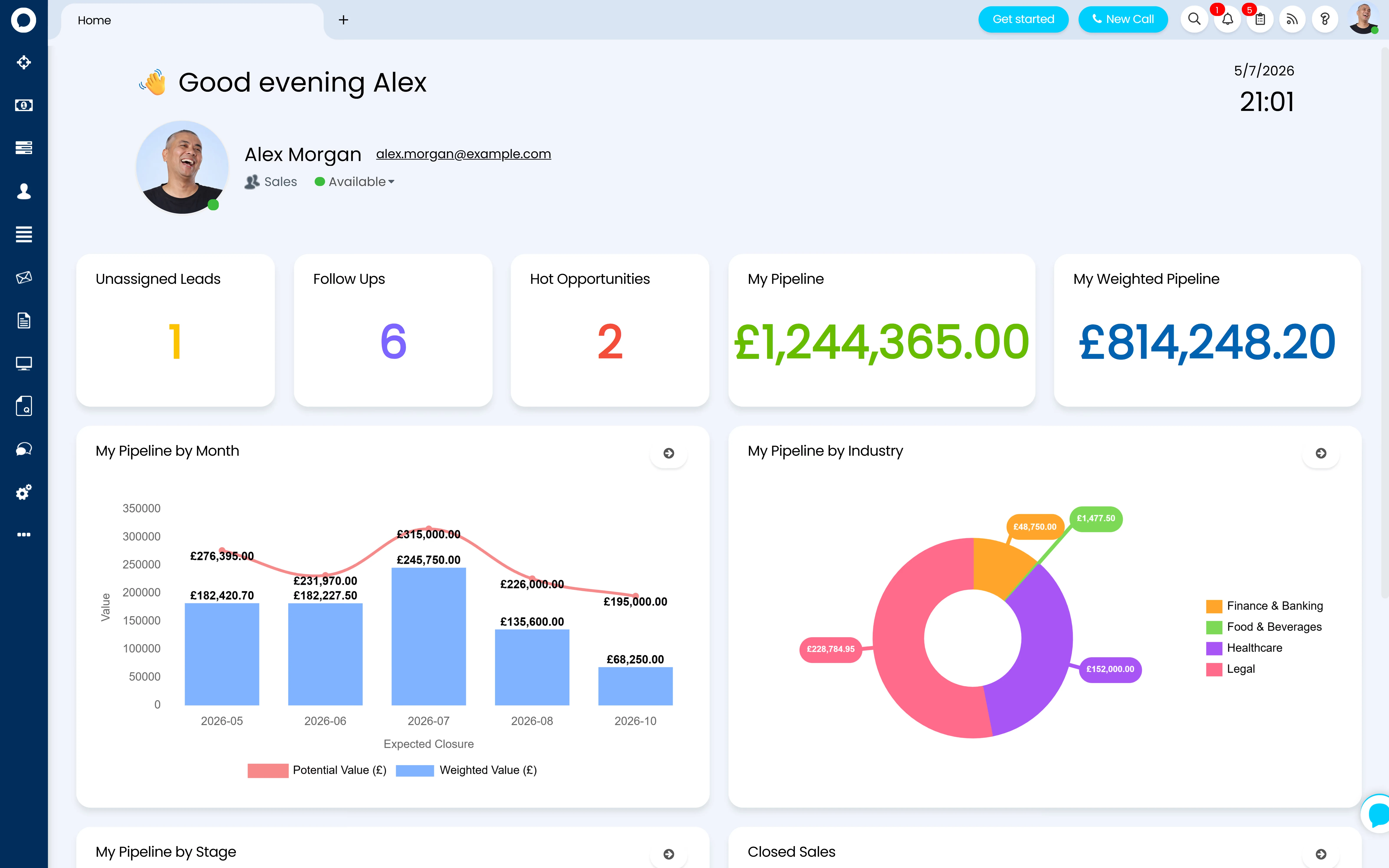
Halo CRM sales reporting and analytics — pipeline and forecast dashboards

Sales dashboards and metrics, in real time

The pre-built Sales Dashboard covers the core metrics out of the box, and the Quote Master Report gives you a cloneable base to filter into any sales metric you track. Dashboards mix chart, counter, and data widgets with live Kanban and ticket lists — on the home screen of every sales manager who needs them, no SQL required.

Agentic AI

Ask the pipeline to build itself

Halo has a native MCP (Model Context Protocol) integration — connect Copilot, OpenAI, or Claude, choose exactly which tools the AI agent can use and which reports' data it can see, and give your sales managers an AI terminal inside Halo itself.

One prompt, from Halo's own walkthrough

"Generate me a report of potential upselling opportunities among my customers — and generate an opportunity ticket for each one."

Upsell report generated · opportunities created in the pipeline

The AI analyses your customer data, produces the upsell report, and creates the opportunity tickets — deals your team would otherwise have found manually, or not at all. Because Halo is one platform with one database, the AI is working from the full customer record: tickets, contracts, invoices, and deals in one place.

Managers get the same power conversationally — ask how the team is performing this week and get the answer, with charts, rendered straight back into the chat.

The plumbing — tools, data scoping, and setup — lives on Halo MCP →

Configured by Allied ESM

Pipeline design is configuration — and configuration is our job

Everything on this page is configuration, not code. But it's configuration with hundreds of decisions behind it — and the difference between a pipeline your team trusts and one they work around is getting those decisions right on day one.

Opportunity types & statuses

Which pipelines you need, what each type defaults to — team, agent, SLA, workflow — and a status model that shows deal health at a glance in every list.

Workflows & conversion probabilities

Sales workflows mapped to how you actually sell, stages linked to steps, automatic progression on quote and order events, and conversion probabilities set per step so the weighted forecast means something.

Views, boards & dashboards

Kanban card layouts, team lists, filter and column profiles, and the sales dashboards your managers open every morning — built around the metrics you already run the business on.

Lead capture & onboarding flow

Sales mailboxes that match inbound email to the right deal automatically, website forms that log opportunities straight into the pipeline, and the prospect-to-customer flow — so a won deal converts to a customer record with nothing re-keyed.

Allied ESM designs and configures all of this as part of a fixed-price Halo CRM implementation — so you know the full cost before work begins. Where you need integrations or custom automation on top, Allied ESM can scope and deliver that as part of your project.

Frequently asked questions

Pipeline & opportunity management in Halo — answered directly.

What is an opportunity in Halo?
An opportunity is a Halo ticket with its Use set to Opportunities — a deal record that carries the contact, company, value, pipeline stage, and linked quotes, backed by the full Halo workflow engine. Opportunities live in their own sales area with their own views, lists, and Kanban boards, and can be created manually, from inbound email, or from a form on your website.
Can we customise the pipeline stages?
Yes — completely. You define the stages, set the default stage for new deals and the closure stage for lost ones, and attach each stage to a step in your sales workflow so the two stay in sync automatically. Because each opportunity type can run its own workflow, you can run different pipelines with different stages for new business, renewals, and project sales.
How does forecasting work in Halo CRM?
Each step in your sales workflow carries a conversion probability from 0 to 100%. As deals move through the process their probability updates automatically, and the weighted forecast is calculated from deal value — inherited from the linked quotation — multiplied by that probability. Forecasting is enabled per opportunity type, so you control exactly which deals count towards the number.
Can Halo capture leads from our website and mailboxes?
Yes. Halo's opportunity forms can be embedded directly in your website, logging submissions straight into the pipeline as new deals. Sales mailboxes connect to Microsoft 365 or Google, matching inbound email to existing opportunities automatically — and emails from unknown senders can log new opportunities, so no enquiry sits unowned in a shared inbox.
Can we migrate our pipeline from Salesforce or HubSpot?
Yes. Halo has data import tools for accounts, contacts, opportunities, and historic records, and Allied ESM can scope and deliver a migration from Salesforce, HubSpot, or another CRM as a fixed-price engagement — including mapping your existing stages and open deals into your new Halo pipelines. See Salesforce to Halo →
Is the AI included, or is it an add-on?
Included. Lead scoring, next best action, the outreach assistant, AI report analysis, and the MCP integration are all part of every Halo licence. There is no separate AI tier, no per-user AI add-on, and no usage-based AI billing.
How much does Halo CRM cost?
Halo is priced on one all-inclusive monthly licence — pipeline, quoting, campaigns, AI, reporting, and 250+ native integrations are all included, with named and concurrent licence options. See Halo's all-inclusive UK pricing →

Keep going: the rest of the Halo CRM story

A Pipeline Your Whole Business Can Trust

From pipeline and workflow design through forecasting, dashboards, and migration from your current CRM, Allied ESM delivers Halo CRM implementations on fixed-price engagements — so you know the full cost before work begins.

Book a Consultation

Official Halo Partner

Allied ESM is a pure play Halo partner — licensing, implementation, consulting & managed services.