Gartner Magic Quadrant: AI Applications in ITSM, Sept 2025
Halo AI — Designed to Work for You.
AI that adapts to your workflow, automating tasks and surfacing insights so your team can focus on what matters. Built in, not bolted on. Included as standard.
Your intelligent ally for faster, smarter service.
Ask Halo AI anything...
AI Triage
Priority 2 assigned
✓ Complete
Similar Cases
3 matches found
Found
Knowledge Base
Article generated
Generated
Sentiment Analysis
Customer sentiment
Satisfied (8/10)
AI Summary
Halo AI has analysed the request, found relevant solutions, and generated a recommended response.
The Direction of Travel
Service AI is no longer optional. Doing it well is the hard part.
80%
of common customer service issues will be resolved autonomously by agentic AI by 2029 — cutting operational costs by 30%.
Source: Gartner, 2025
64%
of customers would prefer companies didn't use AI for customer service — and 53% would consider switching to a competitor over badly-done AI.
Source: Gartner, 2024
The gap between those two numbers is execution. AI that is native to your platform, tuned to your data, and governed by your rules earns trust. AI bolted on as an afterthought loses it. That's the difference this page is about.
Native to Your Platform, Not an Add-On
Halo has long been committed to providing a unified platform that simplifies IT service management across the entire organisation. With the introduction of AI, we're extending that commitment by offering advanced, built-in intelligence without additional licensing or modular fees. By making AI a standard part of the platform, Halo ensures that every customer, regardless of size or scale, can benefit from smarter workflows, faster resolutions, and more consistent service delivery.
AI is reshaping how service management works — and unlike most SaaS platforms that place it behind a paywall, Halo is completely committed to all-inclusive pricing. AI will always be included as part of the standard Halo licence, even as Halo continues to innovate and set the standard for intelligent service management.
Recognised in the September 2025 Gartner® Magic Quadrant™ for AI Applications in IT Service Management
What Halo AI Can Do
From smarter ticket routing to an AI-powered virtual agent, Halo AI covers every stage of the service lifecycle. Automatically, and included as standard.
Smarter Ticket Routing
Halo AI evaluates urgency, impact, sentiment, and request context to assist with categorisation and team routing, reducing response delays and manual sorting.
Instant AI Summaries & Insights
Halo AI transforms long ticket threads into clear summaries with key facts, actions taken, and next steps. Suggested priority, type, tonality, and satisfaction score are surfaced instantly.
Virtual Agent for Self-Service
The Halo Virtual Agent answers FAQs, guides users, and only escalates when necessary. Available via web chat, Microsoft Teams, or Slack. 24/7 help, zero wait time.
Similar Case Suggestions
Halo AI recommends related tickets and their known solutions, helping agents resolve faster and more efficiently. Apply past fixes to current problems.
One-Click Article Creation
After issue resolution, Halo AI drafts knowledge articles using RAG, complete with structure, steps, and tags. Turn every fix into a reusable learning asset, automatically.
Sentiment & Emotion Detection
Halo AI scores tone and emotion, surfacing frustration, anger, or urgency so agents can respond with empathy and speed. Understand the human side of every ticket.
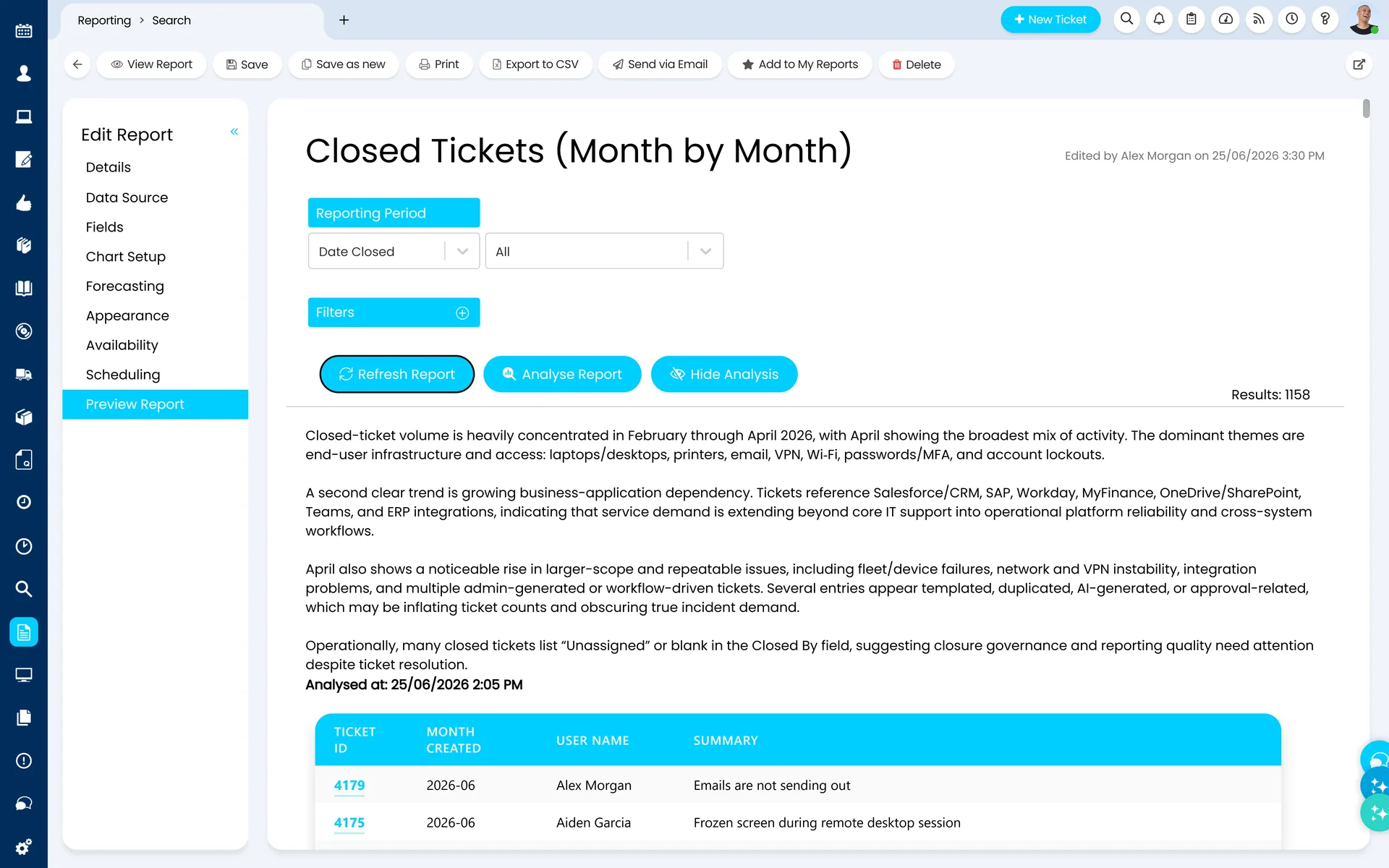
AI Reporting & Analytics
Actionable insights powered by AI to improve decision-making and service performance. Let AI turn your operational data into clear direction for continuous improvement.
Halo AI isn't a single feature — it's a layer that runs across the whole platform, from IT service management to customer service and CRM. Two kinds of AI agent work behind Halo: the ones your people talk to, and the ones that act on their own. Both are included in every Halo licence.
Conversational Agents
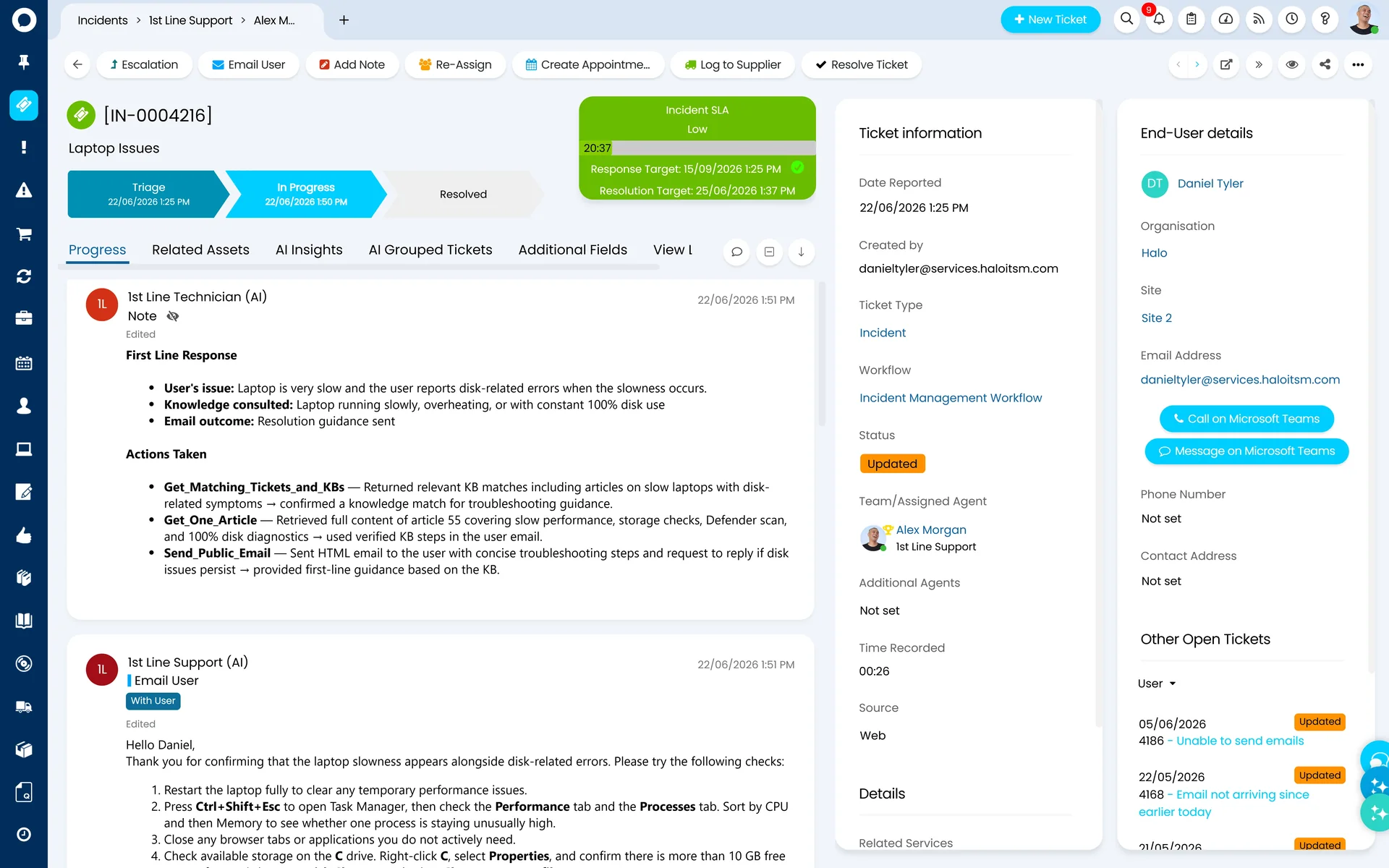
The agents your people talk to. For end users, an agent works across web chat, Microsoft Teams, Slack, and your self-service portal — triaging and logging requests, guiding users through self-service, and escalating to the right person with full context. Pointed at your fulfillers, the same agent sits inside the ticket and works alongside your team.
End-User Virtual AgentFulfiller Operations Agent
Shaped by Chat Profiles
Each agent is defined by its Chat Profile: persona, knowledge scope, tone, escalation logic, and channel. Tailor an agent to a team, a department, or a type of user — and deploy one agent or many.
Process Agents
The agents that act on their own. Process Agents work beyond the chat interface entirely — rather than waiting to be asked, they respond to what's happening across your platform and run on your schedule. Auto-resolve known issues, flag service degradation before it spreads, or coordinate a multi-step change from request to release.
Dispatch Agent1st Line Support AgentMajor Incident AgentKnowledge AgentChange Management Agent
Governed by your access controls
Each Process Agent operates within your existing role-based access controls, which define its identity and permissions — so you stay in control of what it can see and do.
Beneath the agents sits Platform Intelligence — the foundation that learns from your data so every interaction gets smarter — plus a ready-made Ability Library and Open Agent Connectivity for the AI tools you already use. All covered below.
Under the Hood
AI Ticket Triage: How It Actually Works
Halo automates triage two ways. One delivers results from day one; the other becomes the gold standard as your ticket history grows. Best practice is to run both.
Method 1 — The Gold Standard
Historical Ticket Matching
Halo converts your historical ticket data into vector scores, then matches each new ticket against the most similar resolved tickets — and builds its suggestions from that evidence. Because it learns from how your desk actually resolves work, accuracy compounds over time. Expect 6–12 months of good ticket history before it reaches full strength.
Tunable match threshold — set the minimum vector score per suggestion type; 0.8–0.9 gives the best suggestions in practice
Configurable suggestion types — priority, category, assigned agent, estimated resolution time, and automatic problem creation
You control the training data — choose whether embeddings use ticket details or an AI-generated summary, and index only tickets that meet your rules (a technical resolution, specific teams or categories). Clean data in, trustworthy suggestions out.
Method 2 — Results on Day One
Prompt-Based Triage
No ticket history? No problem. The second method sends the new ticket's content to AI along with your category list and descriptions, priority levels, impacts, and urgencies — and asks it to classify the ticket directly. It doesn't just suggest values; it updates the ticket, so routing rules and team assignment fire automatically.
Works from your first ticket — ideal for new Halo customers, or anyone migrating who has sensibly left old ticket data behind
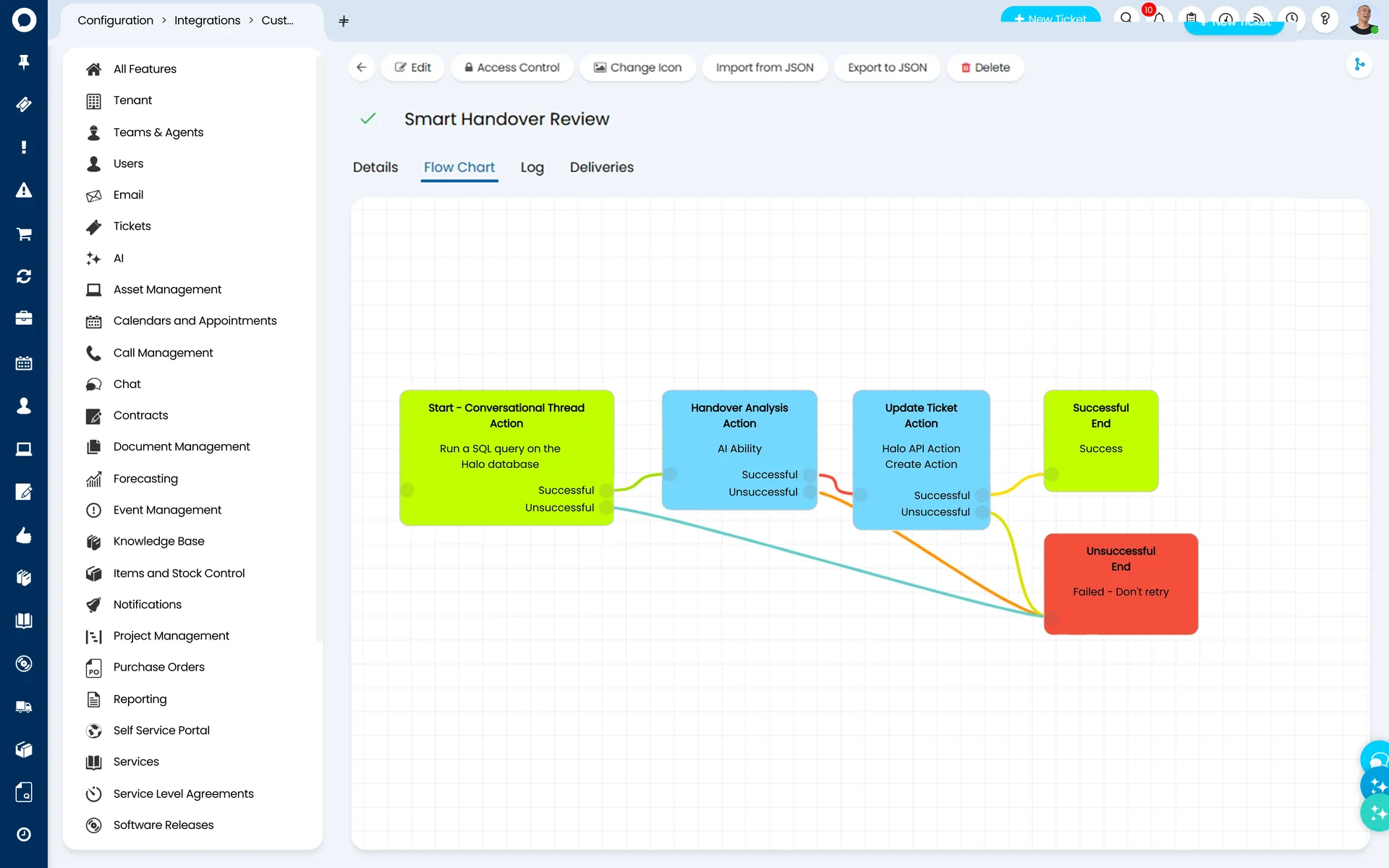
Delivered as a Halo Runbook — imported from the online runbook repository, with an editable prompt: extend it to detect language or the skills a ticket requires
Keep humans in the loop — best practice is to let AI set category, priority, and assignee, then validate during resolution rather than trusting automation blind
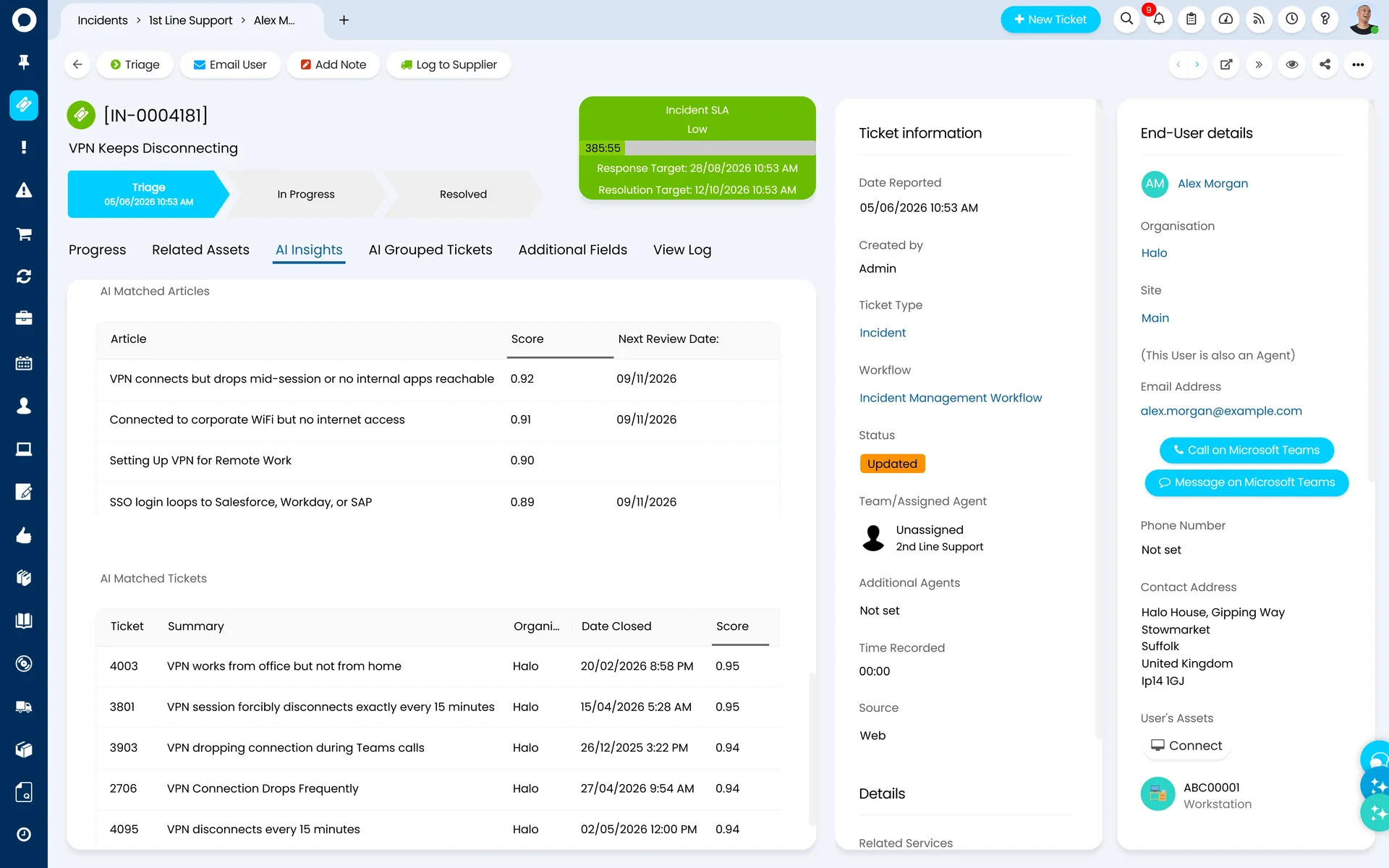
Matched tickets and knowledge, surfaced the moment a ticket arrives.
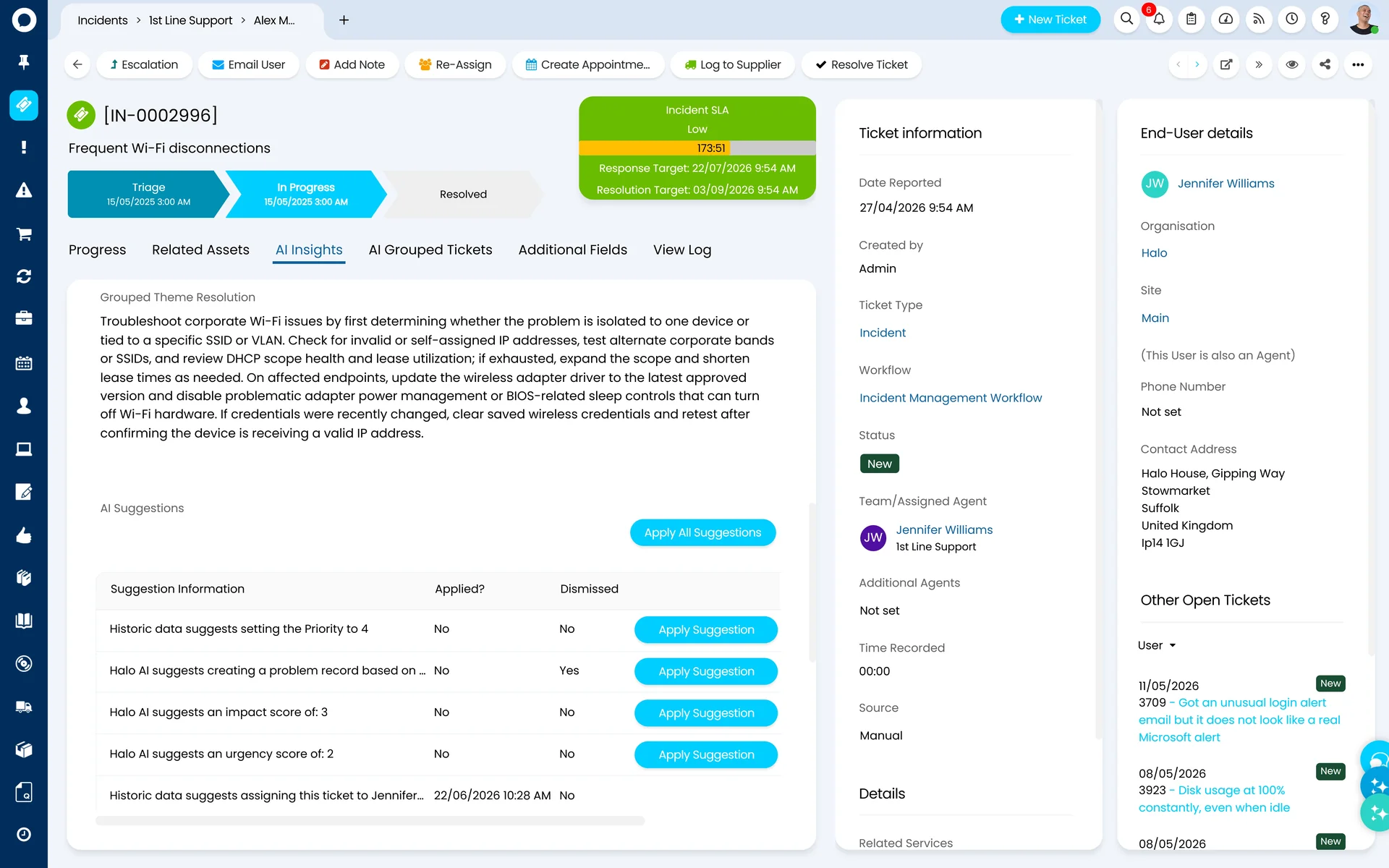
Configurable AI suggestions inside the ticket view.
Automatic Problem Creation
When several similar incidents arrive within a defined window — say Azure goes down and the reports flood in — Halo AI clusters them and automatically raises a problem ticket in line with ITIL practice. Your team works one problem instead of fifty incidents, and affected users see the known issue on the self-service portal instead of raising duplicates.
Skills-Based, Availability-Aware Assignment
Triage doesn't stop at classification. Build a skills matrix of who is qualified for what — languages included — and connect your team's calendars, and Halo can route each ticket to someone who is both qualified and actually available, straight into the right queue. Configuration, not custom development.
Triage tuning is where the value is won or lost.
Embedding rules, match thresholds, suggestion types, and assignment logic all need setting up around how your desk actually works. Allied ESM can scope and configure AI triage as part of your project — contact us to discuss what's involved.
User cannot update Microsoft Teams due to a permission error on the M365 tenant.
AI Suggested Priority
Priority 2
AI Suggested Type
Incident
AI Tonality
Frustrated
AI Satisfaction
8 / 10
AI Suggested Resolution
Review M365 admin permissions for the affected user and re-assign the Teams licence.
Instant AI Summaries & Insights
Halo AI condenses long ticket threads into clear summaries with key facts, actions taken, and next steps, delivered in seconds. The moment a ticket arrives, agents and automations have full context from the start.
AI Generated Summary: instant, concise ticket context for every agent
Suggested Priority & Type: automatically classify incident vs request, and set urgency
Tonality & Sentiment: understand how users are feeling so teams can respond with empathy
AI Satisfaction Score: continuous feedback loop without manual surveys
Virtual Agent for Self-Service
The Halo AI Chatbot is an LLM-powered virtual agent that answers questions from your knowledge base, raises tickets, triggers workflows, and escalates to live agents — all from a single conversation. Available on your self-service portal, Microsoft Teams, Slack, and any web page, included in every Halo licence.
Halo AI Translations automatically translates tickets, replies, and knowledge articles in real time using Azure Cognitive Services. Agents work in their own language; customers receive responses in theirs — with no manual steps and no bilingual headcount required.
Halo AI helps your team convert resolved issues into draft knowledge articles (structured, tagged, and ready for review). It also surfaces the right knowledge at the right moment for both agents and end users, making knowledge-sharing easier and more consistent.
Public Knowledge Discovery
AI analyses the content of incoming tickets and surfaces relevant articles or solutions from the public-facing knowledge base, reducing agent intervention and improving self-service rates.
Internal Knowledge Discovery
Within your organisation, AI recommends relevant internal documentation and past resolutions to support agents, accelerating problem resolution and ensuring consistent responses.
One-Click Article Creation
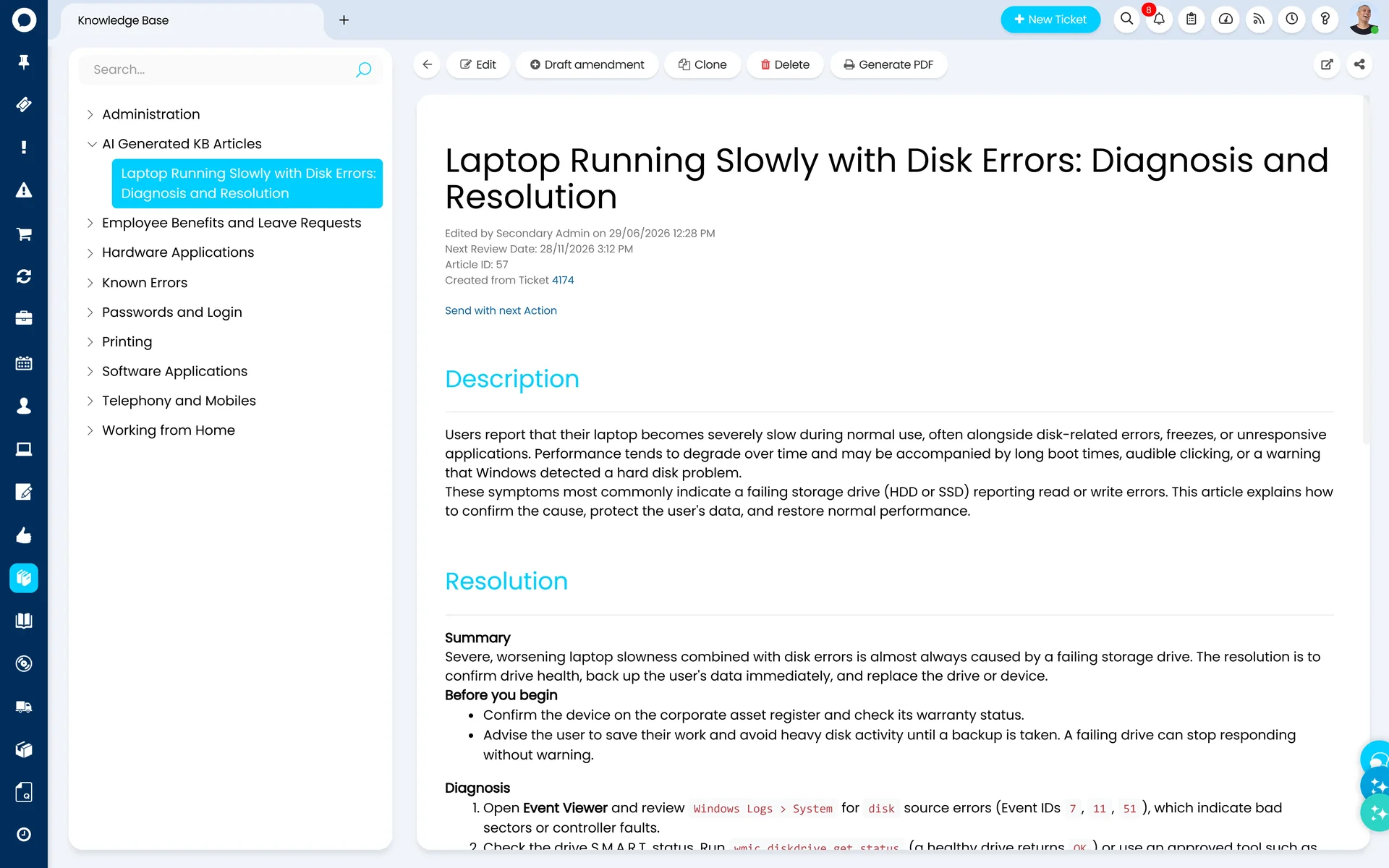
After issue resolution, Halo AI drafts knowledge articles using RAG, complete with structure, steps, and tags. Fully controlled and reviewed by your team, so your KB grows with every closure.
A resolved ticket becoming a draft knowledge article — real Halo product view.
Emotion AI & Smart Email Detection
Halo AI reads the human side of every interaction: understanding sentiment, measuring satisfaction, and even knowing when a "Thank you" is just a "Thank you."
Sentiment Analysis
Every user message is assessed and summarised into how they are feeling, with a satisfaction score from 1 to 10, giving service teams early warning of dissatisfied users.
AI-Powered Surveys
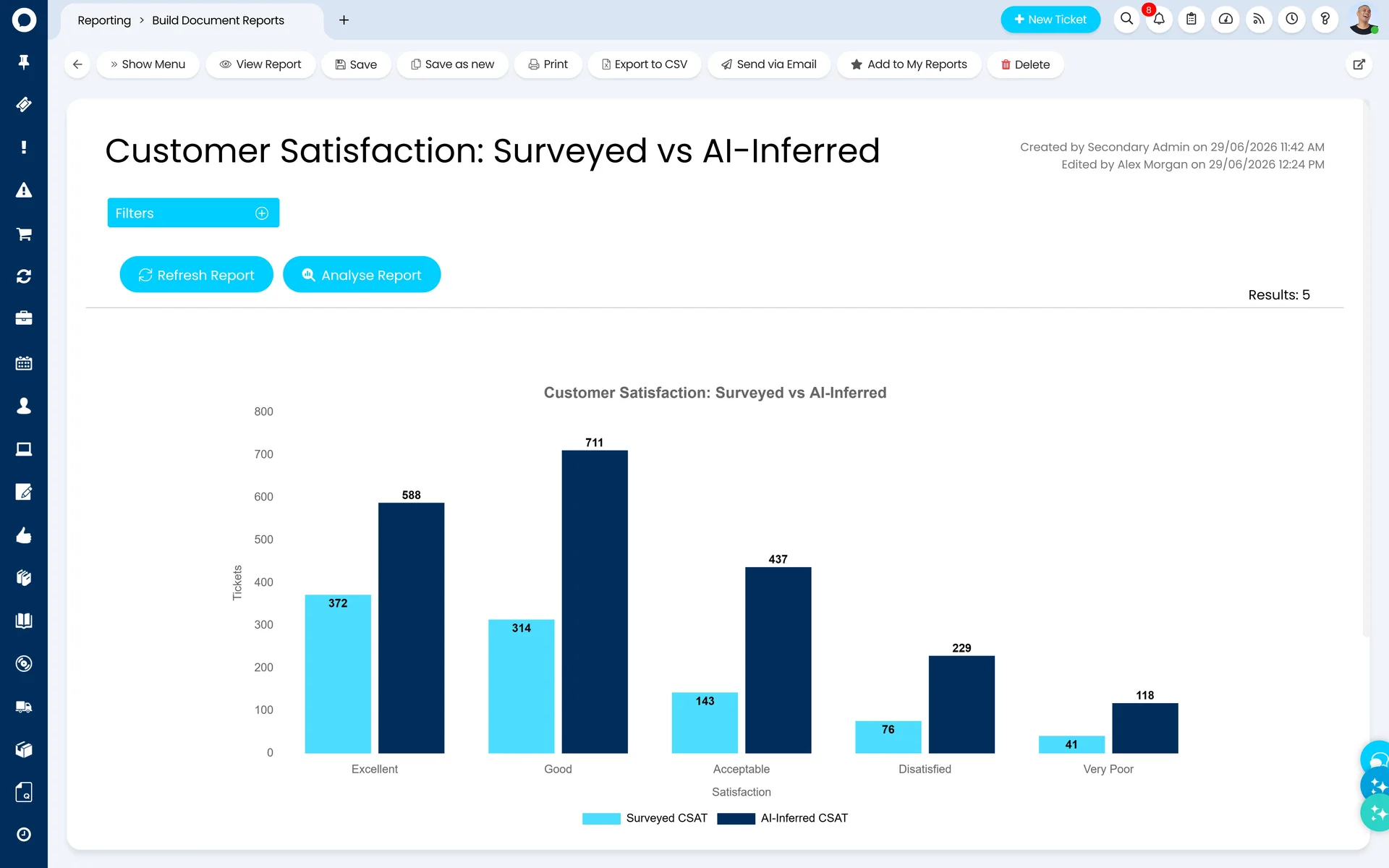
Halo AI evaluates the agent-user conversation to generate a satisfaction score and summary, replacing traditional surveys with continuous, automatic feedback on every closure.
Thank You Detection
AI detects when an incoming email reply is simply a "Thank you" and prevents it from re-opening a closed or pending closure ticket, eliminating false re-opens and keeping queues clean.
Thank You Detection
Incoming email replyTicket status: Closed
"That worked! Thank you."
Halo AI reads the reply and classifies it as an acknowledgement rather than a new request or a returning fault.
Ticket stays closed
No re-open, no reassignment, no queue noise.
Resolved
Illustration of the thank-you detection behaviour described here — not a product screenshot.
Platform Intelligence
Platform Themes: Patterns You'd Never Spot by Hand
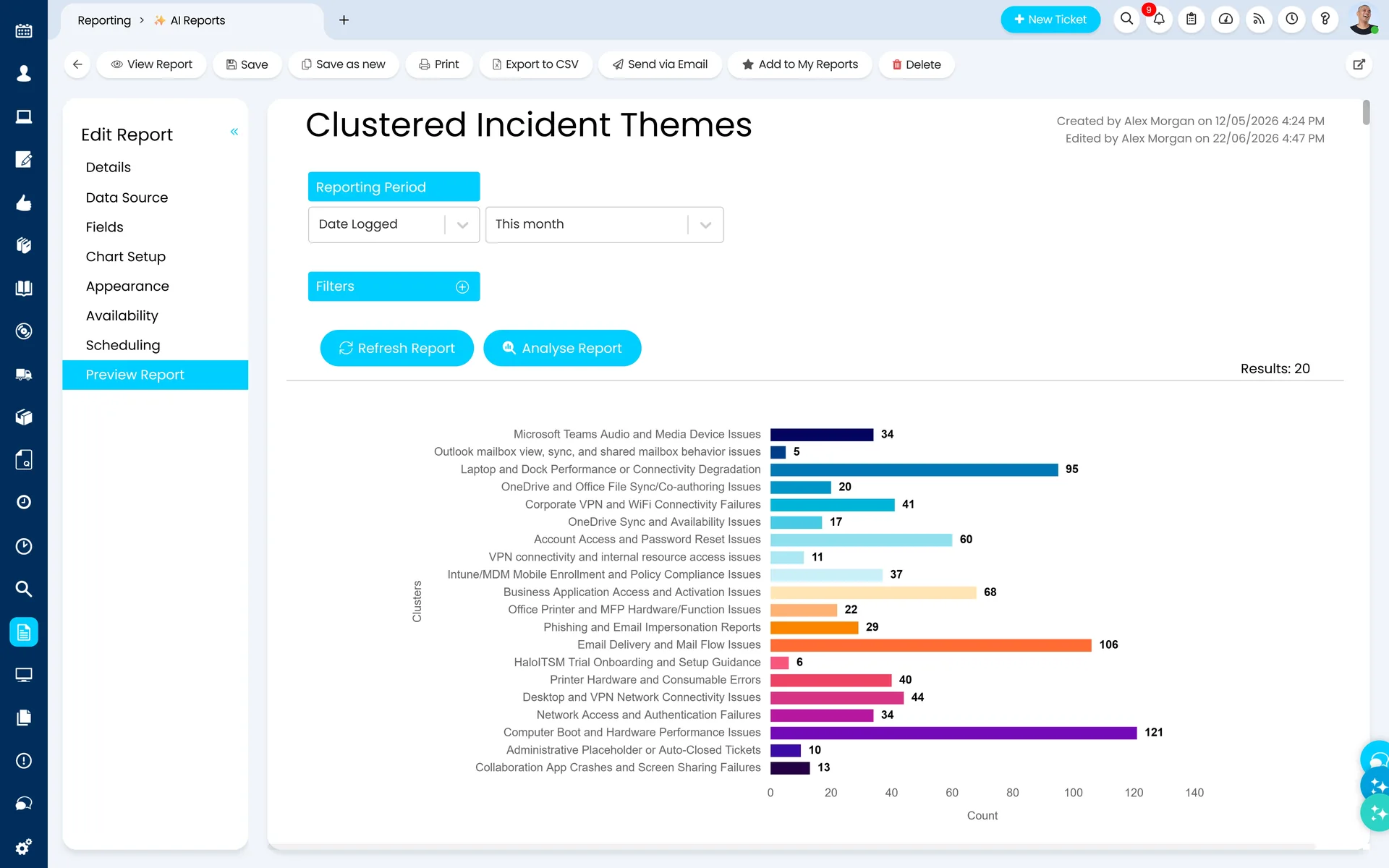
Recurring problems rarely announce themselves. They arrive as fifty separately logged tickets, spread across teams, weeks, and wording. Platform Themes runs unsupervised machine learning across any process in your platform and surfaces the high-volume patterns — no rules to write, no reports to build, no hunches required.
Combined with automatic problem creation, that turns pattern detection into action: the cluster is spotted, the problem record is raised, and your team works the cause instead of the symptoms.
Unsupervised machine learning — finds clusters you didn't know to look for
Any process, not just incidents — run it across the processes that matter to you
Feeds problem management — clustered incidents become ITIL-aligned problem records automatically
Clustered incident themes detected by unsupervised machine learning.
Ready-Made AI
The Ability Library
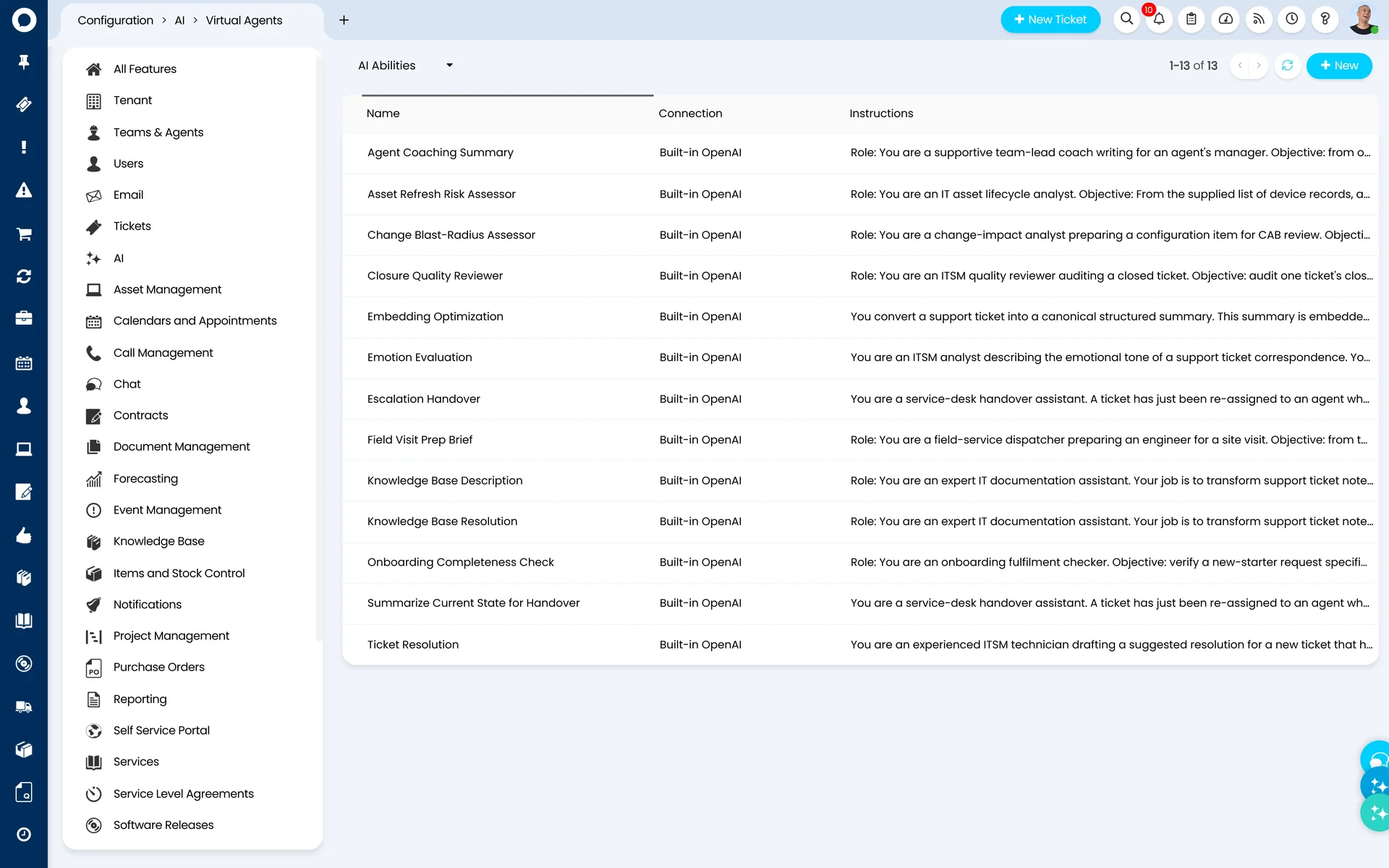
Pre-built AI abilities you can browse, filter, and deploy straight into your environment — plus the framework to build your own, so you can embed AI reasoning inside any workflow.
AI Report Analysis
Halo evaluates your service data, flags anomalies, and surfaces actionable recommendations in plain language — right inside your reporting environment.
Satisfaction Surveys
Intelligent CSAT and NPS surveys that trigger at the right moment. Halo analyses sentiment and flags at-risk relationships before they slip.
Thank You Detection & Knowledge Base Creation
The abilities covered on this page — clean queues and self-building knowledge — live in the same library, switched on rather than built.
An Expanding Repository — and a Framework to Build Your Own
Halo maintains a growing repository of AI abilities to browse, filter, and deploy — and natively provides the structure to build your own, embedding reasoning within any of your workflows.
Seen in Action: AI Report Analysis
Instead of digging through dashboards, ask Halo what the data says. AI Report Analysis reads your reports, highlights the trends and bottlenecks that matter, and returns plain-language recommendations your service leaders can act on.
Halo ITSM offers three AI connection options, including one that is completely free as part of your standard licence.
Recommended
Halo's OpenAI Connection
£0
Included in your Halo licence
Halo ITSM provides its own connection to OpenAI, completely free of charge. No additional costs, no credentials required. Ideal for customers wanting AI without extra expense.
Your OpenAI
Customer's OpenAI Connection
Usage-based via OpenAI
Bring your own OpenAI account for greater model control. Pricing is per token processed, estimated using OpenAI's pricing calculator based on your expected volume.
Your Azure
Customer's Azure OpenAI
Usage-based via Azure
Integrate your Azure OpenAI account for enterprise-grade infrastructure and data residency control. Costs depend on model choice and token volume via Microsoft's Azure portal.
Halo AI isn't a walled garden. Connect any agent, anywhere, to the Halo platform — and control every permission it holds.
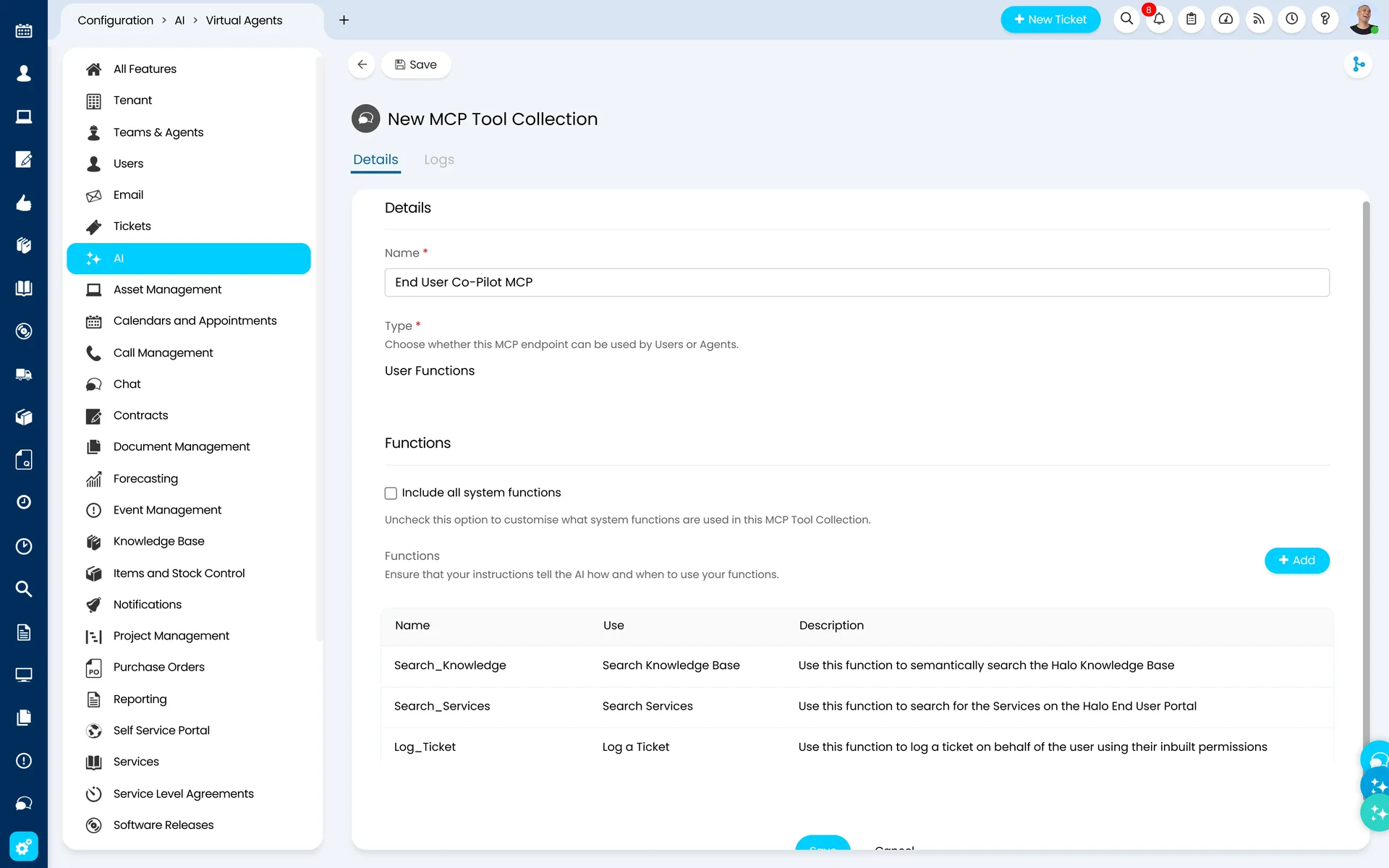
Native MCP Servers, Built Inside Halo
Build native MCP servers directly inside Halo — nothing bolted on in the middle. Connect Claude, Copilot, and Codex directly, choose which tools each agent can use, and let Halo manage secure sign-in for end users and service teams alike.
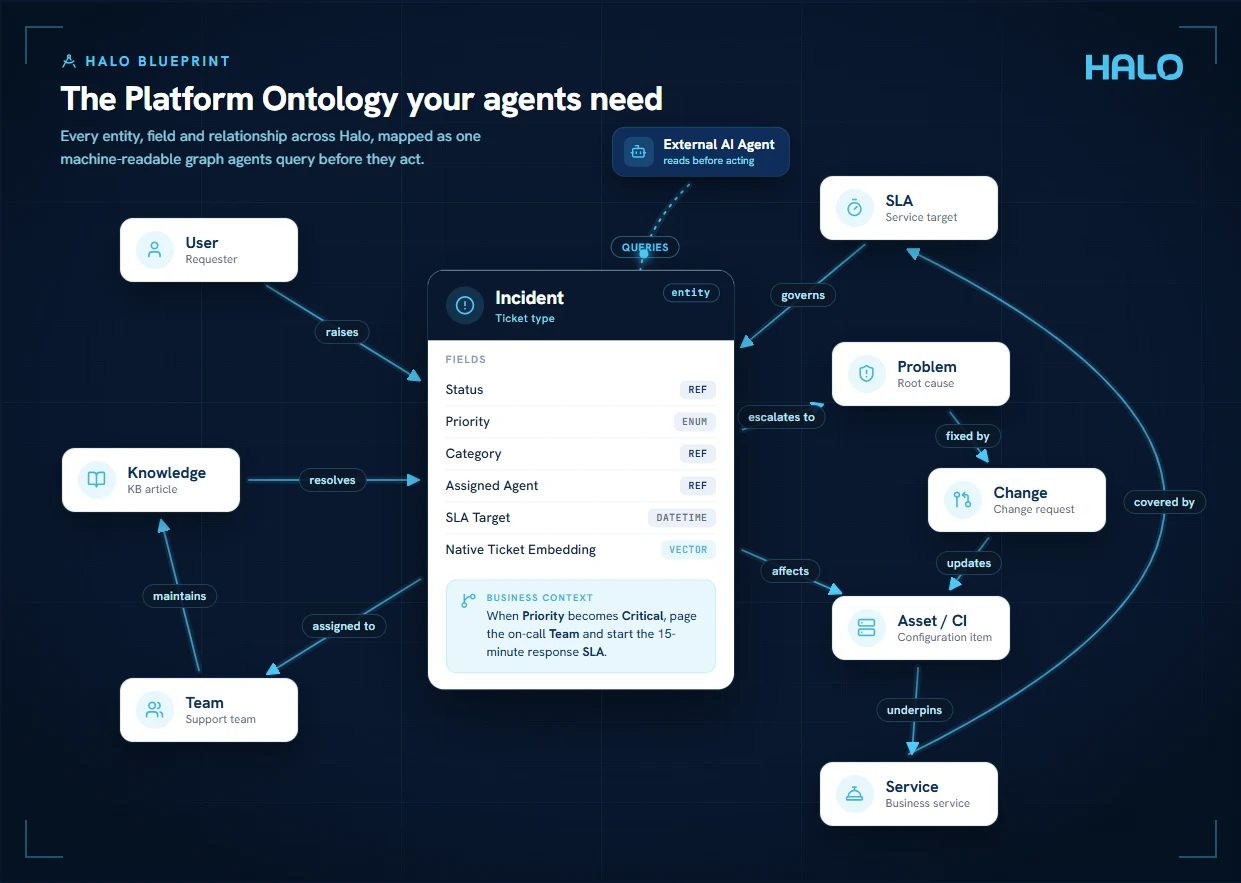
The Halo REST API opens the entire platform: anything a person can do, an agent can do too. Official Halo Skills — launching soon on Halo's roadmap — teach agents to use it correctly, and Halo Blueprint comes next: a semantic map of how your data and processes interact, so external agents understand the structure behind each action.
Skills provide the reach; Blueprint provides the understanding.
Getting AI Right
The honest truth about AI ROI.
Most AI business cases are built on the wrong premise. Here's what the evidence actually shows — and how to set yourself up to succeed.
Quality, not headcount
Recent research shows that organisations implementing AI in service management are not seeing significant workforce reductions. What they are seeing is measurably better quality of service — fewer repeat incidents, more consistent resolutions, stronger problem management. Build your business case around quality improvement, not cost reduction.
Your AI is only as good as your data
AI doesn't generate new knowledge — it works with what's already in your system. If tickets are poorly documented, resolutions aren't captured, and your knowledge base is thin, AI amplifies that gap rather than filling it. The prerequisite for effective AI isn't the technology — it's data discipline. Investing in good logging, structured closures, and a maintained knowledge base is what makes AI powerful.
Empower first-line, don't remove it
The service desk agents working on tickets today are the people feeding the AI model for tomorrow. Removing first-line support to save cost cuts off the very learning loop that makes AI better over time. The smarter approach: use AI to free your team from the most repetitive tasks, so they spend more time on complex work — and document it better. That's the flywheel that improves quality continuously.
Why Halo includes AI at no extra cost
Halo made AI standard across every licence specifically to remove the ROI justification problem. If AI carries an additional cost, you're forced to build a business case around financial return — which pushes you toward the wrong metrics. When it's included, you can focus on what matters: using it, learning from it, and letting quality improvements speak for themselves over time. That's the right way to think about it.
FAQ
Frequently Asked Questions
What is Halo AI and how does it work?
Halo AI is a suite of artificial intelligence capabilities built natively into the Halo platform. It uses machine learning and natural language processing to automate ticket classification, suggest knowledge articles, predict resolution times, and surface insights from service data — all without requiring third-party AI tools or integrations.
What is the difference between Conversational Agents and Process Agents?
Conversational Agents are the AI agents your people talk to — the End-User Virtual Agent works across web chat, Teams, Slack, and the self-service portal, while the Fulfiller Operations Agent works alongside your team inside the ticket. Process Agents act on their own without being asked: named agents including the Dispatch, 1st Line Support, Major Incident, Knowledge, and Change Management Agents respond to what's happening across the platform and run on your schedule. Every agent operates within the permissions you define through role-based access controls, and all of them are included in the standard Halo licence.
How quickly does AI ticket triage start delivering results?
From day one, if you use the prompt-based method — it classifies tickets against your category list, priorities, impacts, and urgencies with no ticket history required. The second method, historical ticket matching, compares each new ticket against your resolved tickets using vector scores and typically needs 6–12 months of good ticket history to reach full accuracy, with match thresholds tuned to around 0.8–0.9 for the best suggestions. Best practice is to run both: the prompt-based method delivers immediately while historical matching gets sharper with every closure.
Do I need technical expertise to use Halo AI?
No. Halo AI is designed to work out of the box within your existing Halo ITSM environment. Allied ESM configures and optimises the AI features during implementation, so your team benefits from automation immediately without needing data science skills or custom development.
Can Halo AI replace our service desk agents?
Halo AI is designed to augment your team, not replace it. It handles repetitive, time-consuming tasks like ticket routing, first-response suggestions, and data entry — freeing agents to focus on complex issues that require human judgement and relationship management.
How does Halo AI improve over time?
Halo AI learns from your specific service data. As more tickets are logged, resolved, and categorised, the model becomes increasingly accurate at predicting categories, flagging anomalies, and recommending next best actions — meaning performance improves the longer you use it.
Can we connect our own AI tools and agents to Halo?
Yes. Halo supports native MCP servers built directly inside the platform, so tools like Claude, Copilot, and Codex can connect without middleware — with you choosing exactly which tools each agent can use and Halo managing secure sign-in. Beyond MCP, the Halo REST API opens the entire platform to agents, with official Halo Skills and Halo Blueprint (a semantic map of your data and processes) on Halo's roadmap to help external agents use it correctly. See our Halo MCP page for the detail.
How should we measure the ROI of Halo AI?
The most common mistake is building an AI business case around headcount reduction. Research increasingly shows this overstates the benefit — you're unlikely to remove significant staff as a result of AI alone. What you will see is improved quality: fewer repeat incidents, more consistent resolutions, better use of your knowledge base, and higher end-user satisfaction. Measure AI success through service quality KPIs — resolution time, repeat contact rate, knowledge article usage, and CSAT — rather than trying to attribute cost savings that may not materialise.
Is Halo AI included in the standard Halo licence?
Yes — Halo AI is included as standard in every Halo licence at no extra cost. Halo's philosophy is all-inclusive pricing, and that extends to AI: every capability is part of the standard licence, with no paywalls and no feature tiers. By default, Halo provides its own built-in OpenAI connection free of charge. If you prefer to use your own OpenAI or Azure OpenAI credentials, that option is also available — but it is a choice, not a requirement.
Unlock Halo AI Across Your Enterprise
As certified Halo partners with deep service management expertise, Allied ESM helps you discover, configure, and maximise Halo AI for your specific environment, so you realise value quickly, not months down the line.
Want to go further? Connect any AI tool directly to Halo.
New
Halo MCP lets ChatGPT, Claude, or Copilot raise tickets, search your knowledge base, log time, and action requests — directly, through conversation. No middleware, no custom code.