CRM

Halo CRM Accounts & Relationships.

Every organisation Halo touches — customer or prospect — lives on one record: its sites, its contacts, its CRM notes, its account managers, and every deal, contract and support ticket tied to it. No second system to check, no overnight sync keeping a CRM and a service desk in step, because there isn't a second system. It's the same database.

Hierarchy / Organisation, site & user structure Relationships / Top Levels, parent, partner, supplier One record / Sales, service & contracts together
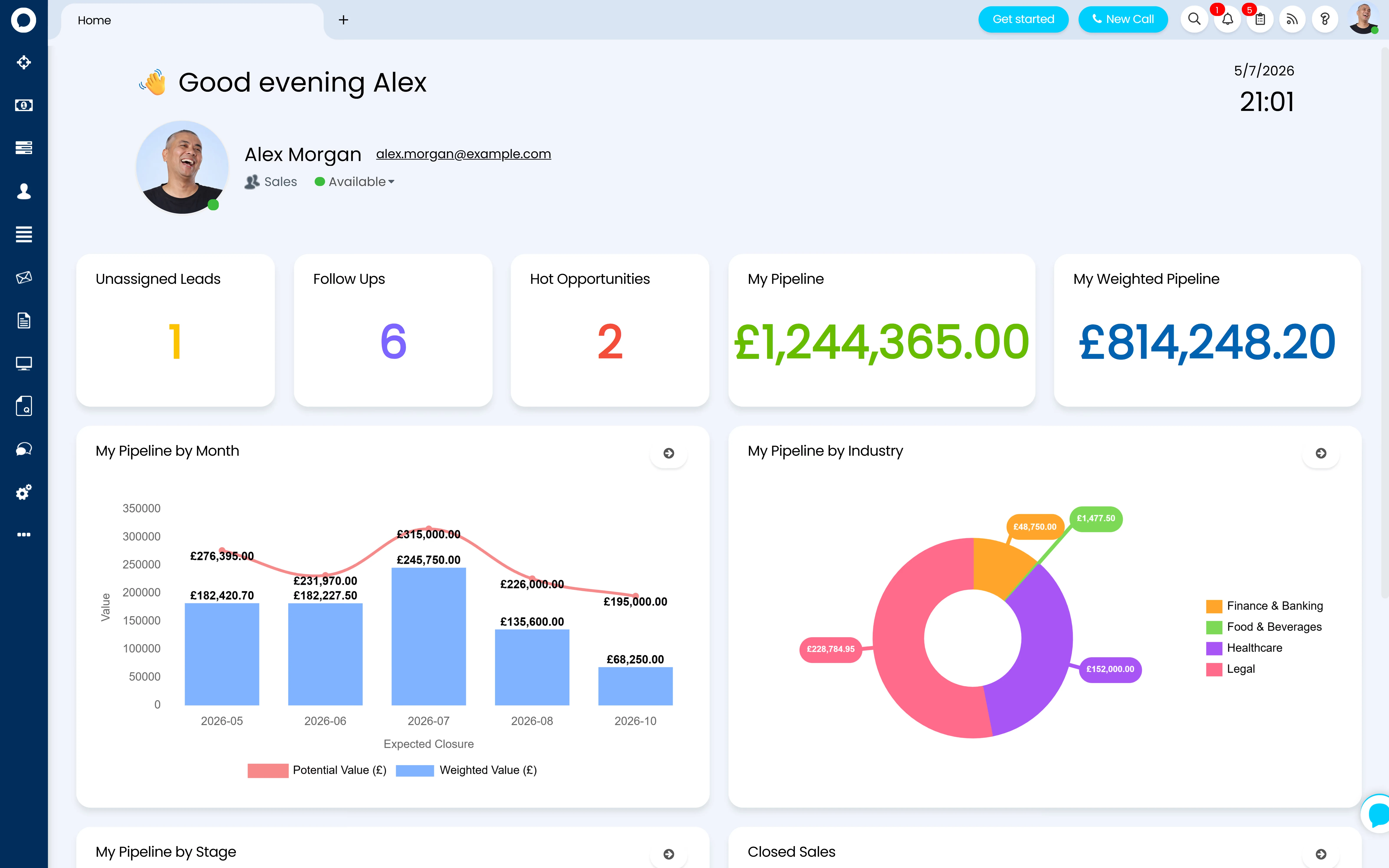
Halo CRM sales home dashboard — leads, follow-ups and pipeline value by month, industry and stage

The cost of a fragmented customer record

Under half of sales teams trust their own data

Most organisations run the account record in one system and the support relationship in another — and pay for the gap twice, in bad data and in an account manager walking into a call blind.

47%

The share of sales respondents who believe their organisation has high-quality data — just under half. 13% rate their data quality as poor outright.

Source: Gartner, State of Sales Operations Survey, 2020

$12.9m

The average annual cost Gartner's own research attributes to poor data quality across an organisation.

Source: Gartner, Data Quality research, 2020

Halo's answer is structural, not another sync job: the organisation, its sites, its contacts, and every deal, ticket and contract tied to it live on one record in one database — nothing to keep in step, because there's nothing else it needs to match.

The customer record

Organisation, site, user — one hierarchy, one record

Every organisation Halo supports sits in the Customers area with the same three-tier structure underneath it: the organisation itself, one or more sites, and the users at each site. Search finds a customer by name or address, and every list shows which Top Level it sits under alongside a snapshot of its open tickets. CRM Notes track the relationship over time — satisfaction scores, next call dates that can auto-create follow-up tickets, and @mentions that pull colleagues in — logged against the organisation or against an individual site or user.

  • Sites & users nest under every organisation, with tab layouts and field visibility configurable per entity
  • CRM Notes carry satisfaction tracking, next-call scheduling and automatic follow-up tickets
  • Important Customer flagging surfaces VIP accounts in ticket rules, search results and agent pop-ups
Top Level — "Managed Clients"
Organisation — Acme Manufacturing Ltd ★
Site — London HQ
Site — Manchester
User — Contact
User — Contact
User — Contact
User — Contact

Account managers, eight ways

The Assigning an Account Manager dropdown on every customer record supports eight roles — Primary Agent, Secondary Agent, Account Manager, Regional Manager, Logistics Manager, Sales Representative, Account Owner and CXM Lead — each with its own auto-assignment and default-agent behaviour.

Customer Areas, filtered by team

Customer Areas work like ticket areas for the account list itself: filter by important customer, account manager, Top Level or customer relationship, and restrict the whole area to a team or role so agents only see the accounts they own.

CRM Notes as structured history

Satisfaction level, next call date and an Extra Details field turn a note into structured history, not a text dump — with an AI Client Profiling option that can auto-generate a note summarising a customer's recent ticket experience.

Your Customer — Acme Manufacturing Ltd
ParentAcme Holdings Group
SubsidiaryAcme Manufacturing (NI)
SupplierNorthgate Logistics
PartnerBridge Consulting

Structure & relationships

Group structures and linked organisations, built in

Real customers aren't always one flat organisation. Top Levels add a grouping layer above the customer record itself — a holding group above its subsidiaries, a region above its local offices, or simply Managed vs Ad-Hoc clients — with its own overrides for mailboxes, billing class and notifications, and a combined Overview that rolls activity up across every customer underneath it. Where two organisations need to be linked without folding one into the other, the Relationship field on the customer record does that job — flagging one organisation as a prospect, customer, supplier or any relationship type you configure, filterable in lists and ticket rules alike.

  • Top Levels group companies — settings overrides and combined reporting roll up automatically across every customer in the group
  • Customer relationships flag how one organisation relates to another, configurable beyond the default prospect/customer split
  • Organisation Contracts carry their own SLA overrides, agreed cost and hours, and a renewal cycle driven by automated tickets ahead of the end date

Top Level structures

Group companies, managed-vs-ad-hoc segmentation, or regional structures set up with the right overrides and combined reporting from day one.

Relationship types & rules

Prospect, customer, supplier and any custom relationship type you need, configured as filter and ticket-rule criteria so lists and automations use them correctly.

Contracts & renewal cycles

Organisation agreements built with the right SLA overrides, agreed values and automated renewal reminders, so nothing lapses unnoticed.

One record, every team

The account manager sees the deal and the support ticket — because it's the same record

This is the difference a single platform makes. An account manager opening an organisation in Halo isn't looking at a CRM extract synced from a service desk overnight — they're looking at the live record. The Sales tab shows every opportunity tied to that organisation, open or closed. The Tickets tab shows every support ticket, incident and request. The Contracts tab shows what's under agreement and when it renews. And because Mail Campaigns and Distribution Lists sit in the same platform, engagement is visible against the same organisation too. Walk into a renewal call already knowing the customer has two open incidents and didn't open the last campaign email, and the conversation changes.

The customer service and support side of this story lives on Halo CSM; this page covers the account record itself. See the sales side working today on Pipeline & Opportunity Management → and Campaigns & Sequences →

Acme Manufacturing Ltd
Customer Record
Sales tab2 open opportunities, £48k pipeline
Tickets tab1 open incident, 3 closed this month
Contracts tabManaged Service, renews March
Campaign activityOpened last sequence email

Data in, data out

Getting your customer data into Halo — and keeping it clean

A new CRM is only as good as the record it starts with, and Allied ESM treats migration and hygiene as part of getting Halo live, not an afterthought.

1

Import or migrate — customer records import via CSV, through integrations including Xero, QuickBooks and Microsoft CSP, or via a structured migration from tools including Salesforce, HubSpot, ConnectWise, Autotask, ServiceNow and Freshdesk, using Halo's own downloadable import templates.

2

Route inbound email automatically — Sales Mailboxes connect an agent's own Microsoft 365 or Google inbox to Halo and match incoming email to the right opportunity by address-and-subject or by sender domain, so several contacts at the same organisation land on one thread, not three.

3

Convert prospects without re-keying — with Accounts and Prospects enabled, a prospect carries the same CRM notes, users and activity as a full customer from day one; converting it on a won deal turns the account into a customer with everything already on the record carrying over.

Data hygiene that holds

Import templates, field mapping and Top Level assignment set correctly on the way in, so duplicate organisations and mismatched sites don't accumulate the way they did in the last system.

Migrating from Salesforce or HubSpot

Allied ESM can scope and deliver a structured migration from Salesforce, HubSpot or another CRM as a fixed-price engagement, including mapping existing account relationships and Top Level structures into Halo. See Salesforce to Halo →

Configured by Allied ESM

The account record is where most CRMs quietly fall apart — Halo's doesn't have to

Hierarchy, ownership, migration and inbound matching are all configuration decisions. Get them right on day one and the record stays trustworthy as the business grows.

Record structure & hierarchy

Top Levels, site and user tab layouts, screen layout profiles and the field visibility that keeps every organisation's record consistent as more accounts are added.

Account ownership & areas

Account manager types mapped to how your teams actually work, plus Customer Areas that filter the account list by owner, Top Level or relationship so nobody's guessing who owns what.

Migration & data hygiene

Import mapping, Top Level assignment and de-duplication handled on the way in from Salesforce, HubSpot or your previous system, so the record starts clean.

Mailboxes & inbound matching

Sales Mailbox connections, matching rules and email rule configuration so inbound enquiries land on the right organisation automatically, not in a shared inbox nobody owns.

Allied ESM designs and configures all of this as part of a fixed-price Halo CRM implementation — so you know the full cost before work begins. Where you need integrations or custom automation on top, Allied ESM can scope and deliver that as part of your project.

Frequently asked questions

Accounts & relationships in Halo — answered directly.

What's the difference between an organisation, a site and a user in Halo?
The organisation is the customer record itself — the record Top Levels sit above. Sites are locations or divisions under it, and users are the individual contacts at each site. CRM Notes, tickets, contracts and opportunities can all be logged at organisation, site or user level depending on how granular you need the record.
Can Halo handle group company or subsidiary structures?
Yes, via Top Levels — an extra grouping layer above the customer record for holding groups, regions, or managed-vs-ad-hoc segmentation, with its own overrides and a combined view that rolls activity up across every customer underneath it. A "Top Level" setting also lets a ticket span sister companies within the same group where that's needed.
Can we see support tickets on the same record as the sales pipeline?
Yes — that's the point of one platform. Every organisation's record carries a Tickets tab for support activity, a Sales tab for opportunities, a Contracts tab, and — where Mail Campaigns are in use — campaign engagement, all on the same customer, in the same database, with nothing synced from a separate system.
Can we migrate our existing customer data into Halo?
Yes. Customer records import via CSV, via integrations including Xero, QuickBooks and Microsoft CSP, or via structured migrations from Salesforce, HubSpot, ConnectWise, Autotask, ServiceNow and Freshdesk. Allied ESM can scope and deliver the migration as a fixed-price engagement, including mapping your existing account relationships and Top Level structures. See Salesforce to Halo →
How does Halo handle a shared sales inbox?
Sales Mailboxes connect an agent's own Microsoft 365 or Google mailbox to Halo and match incoming email to the right opportunity automatically, either by exact address-and-subject match or by sender domain — so multiple contacts at the same organisation land on the same thread rather than scattering across separate ones.
How do you stop duplicate or messy customer records building up?
Correct import mapping and Top Level assignment at migration is the main defence, alongside the Relationship field for distinguishing prospects from customers and Customer Areas for keeping ownership clear. Allied ESM scopes data hygiene as part of every migration engagement rather than treating it as a clean-up job after go-live.
How much does Halo CRM cost?
Halo is priced on one all-inclusive monthly licence — accounts, pipeline, quoting, campaigns, AI, reporting and 250+ native integrations are all included, with named and concurrent licence options. See Halo's all-inclusive UK pricing →

Keep going: the rest of the Halo CRM story

One Record Your Whole Business Can Trust

From account hierarchy and ownership through migration and inbound mailbox matching, Allied ESM delivers Halo CRM implementations on fixed-price engagements — so you know the full cost before work begins.

Book a Consultation

Official Halo Partner

Allied ESM is a pure play Halo partner — licensing, implementation, consulting & managed services.