HaloPSA

Billable Time Tracking.
No Hours Missed.

HaloPSA captures time automatically across every ticket, project, and client interaction — and maps it directly to your billing model. Every billable minute is recorded, approved, and invoiced.

Talk to an Expert
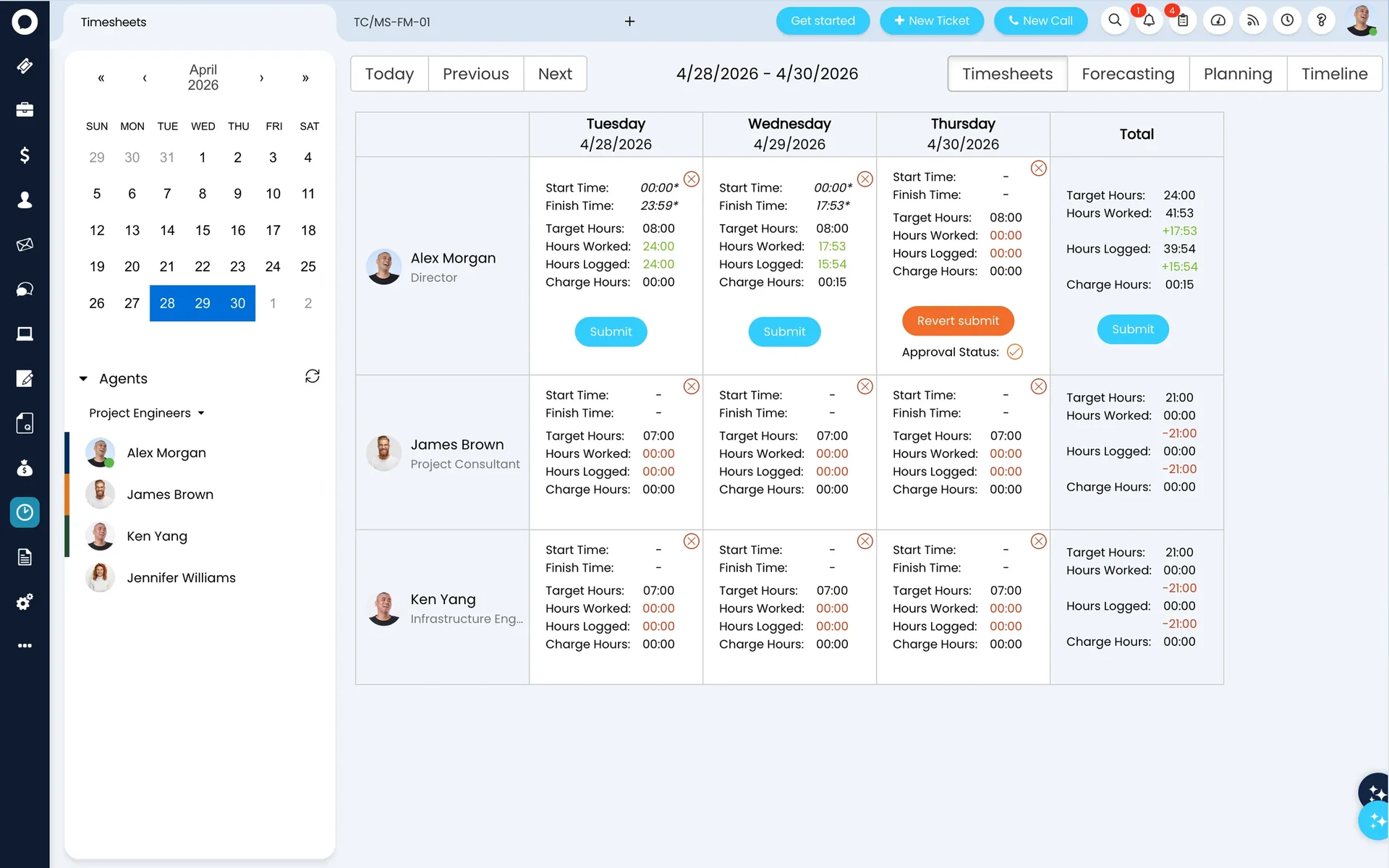
HaloPSA Time Tracking — timesheets view
Real-time utilisation tracking

Time tracking that works for MSPs

Automatic Time Capture

Timers start and stop with ticket actions — no manual entry required.

Timesheet Approval

Engineers submit time, managers review and approve before billing locks.

Utilisation Reports

Billable vs non-billable hours per engineer — in real time.

Billing Integration

Approved hours flow to the billing engine automatically — no manual steps.

From time logged to invoice — no manual steps

Engineer logs time

Against a ticket, project, or activity in real time

Timesheet submitted

Weekly or per-ticket — flexible to your workflow

Manager approves

Review and approve before billing locks

Flows to billing

Billable hours added to the next invoice run automatically

Connects to

Frequently asked questions

HaloPSA time tracking — answered directly.

Does HaloPSA track time automatically?
Yes. HaloPSA can capture time automatically as engineers work on tickets. Timers start when a ticket is opened and stop on closure or pause — reducing manual entry while improving accuracy.
Can we see utilisation across the whole team?
Yes. HaloPSA's utilisation report shows billable vs non-billable hours across every engineer — so you can see who is over-capacity and who has headroom, in real time.
How does time tracking connect to billing?
Approved time logs flow directly into the billing engine. Billable hours appear on the next invoice run automatically — no manual export, no reconciliation.
Can managers approve timesheets before they are billed?
Yes. HaloPSA supports a timesheet approval workflow. Engineers submit their time, managers review and approve, and only approved time flows into billing.
Can engineers log time against multiple clients in a single day?
Yes. There are no restrictions on how many time entries an engineer can create across different clients or tickets in a single day. Each time log is attached to a specific ticket and client, so utilisation and billing reports stay accurate regardless of how the day is split. HaloPSA's built-in timer can be paused and restarted, making it straightforward to switch between clients without losing track of time.
How does HaloPSA handle non-billable time?
Time entries in HaloPSA can be marked as billable or non-billable at the point of logging. Non-billable time is still recorded for utilisation purposes — you can see the full picture of how your team's hours are spent — but it is excluded from invoice calculations automatically. Common non-billable categories include internal projects, training, and time covered under flat-fee or unlimited support contracts.

Also in HaloPSA

Every module included. One licence.

Service Desk Billing Time Tracking Contracts CRM Projects Stock Customer Portal

Stop losing billable hours.

Allied ESM configures HaloPSA time tracking to match your workflow — from timers to approved timesheets to invoices. Fixed price. Expert team.

Talk to an Expert