HaloPSA

Automated MSP Billing. Zero Manual Invoicing.

HaloPSA generates invoices automatically from your contracts and approved time logs. Xero, QuickBooks, and Sage integration included — no spreadsheets, no chasing hours.

Talk to an Expert
HaloPSA Billing — automated invoice generation
Auto-generated invoices

What's included

The billing engine MSPs have been waiting for

Contract-Driven Invoicing

Recurring invoices generated automatically from your contracts — monthly, quarterly, or annual.

Time-to-Bill Automation

Approved time logs flow directly into billing — nothing slips through.

Accounting Integration

Push invoices to Xero, QuickBooks, or Sage with two-way sync.

Xero integration guide →

Usage & Overage Billing

Define thresholds per contract — HaloPSA calculates overage automatically.

How billing rates work

Configurable charge types — built for MSP complexity

HaloPSA ships with five default charge types. Each is fully configurable — set your own rates, define minimum billing increments, choose how time is rounded, and add out-of-hours rates where needed.

Remote Support

Work performed remotely. Set a standard hourly rate, define the minimum billing increment (e.g. 15 or 30 minutes), and choose whether time rounds up, down, or to the nearest block.

On-Site Support

Work at the client's premises — typically billed at a higher rate than remote. Configure a separate on-site rate and an optional out-of-hours rate for weekend or evening callouts.

Internal / Non-Billable

Time tracked for internal work, training, or non-client tasks. Logged against tickets for visibility but excluded from billing runs automatically.

Project Time

Time logged against project tasks. Can be billed at a project rate separate from the standard support rate, or bundled into a fixed-price project invoice.

Custom Charge Types

The five defaults are just the starting point. Create as many additional charge types as your business needs — each with its own rate, rounding logic, and out-of-hours configuration.

Implementation tip

Set out-of-hours work as a separate charge type rather than a multiplier — it gives you clean line items on the invoice and makes it easier to audit what was billed at premium rates.

How it works

From contract to invoice — automatically

Contract set up

Rates, schedule & billing model defined once

Time logged

Engineers log hours against tickets in real time

Manager approves

Time reviewed and approved before billing runs

Invoice sent

Generated & pushed to Xero / QuickBooks automatically

Batch billing

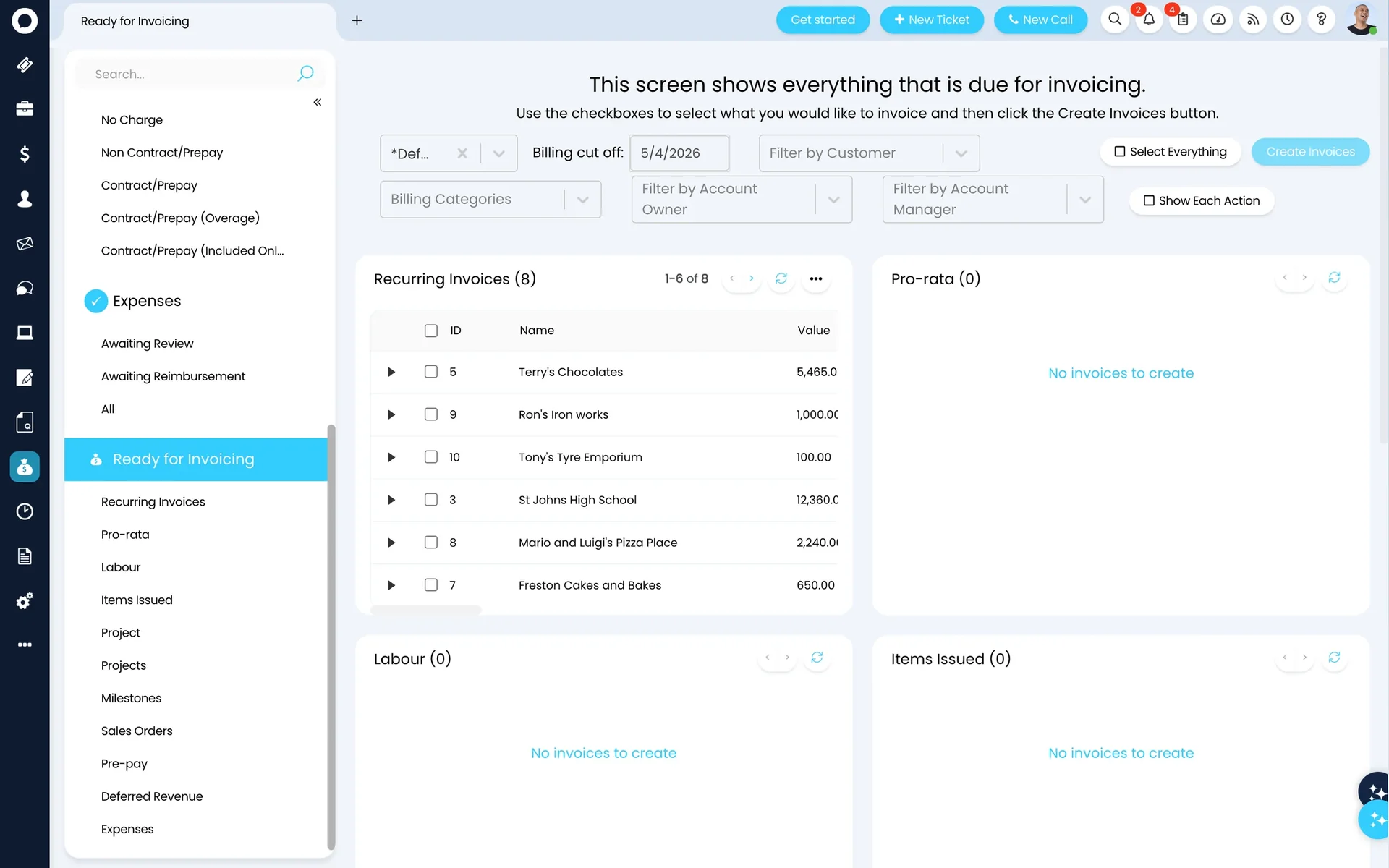
The ready-for-invoicing queue

When billing runs, all approved time entries and contract charges land in the ready-for-invoicing screen. Filter by client, date range, or charge type, review the line items, then generate all invoices in one action. Every invoice posts to your accounting system immediately.

Ready for Invoicing 14 items
All clients May 2026
Client Type Hours Amount
Acme Corp Remote Support 12.5 £1,875.00 Ready
Buildco Ltd Managed Services £3,200.00 Ready
Fenwick Group On-Site + Overage 8.0 £2,140.00 Ready
Total (14 invoices) £31,640.00 Generate All

Illustrative — the actual queue reflects your live time entries and contracts. Each invoice posts to Xero, QuickBooks, or Sage in real time.

Dynamic billing

Subscription billing that moves with your clients

For managed services contracts, HaloPSA can pull live seat counts from your RMM, your Microsoft CSP dashboard, or Entra ID — and bill based on actual headcount, not a fixed figure agreed months ago.

A client adds ten new devices in March? The March invoice reflects it automatically. If a client downsizes, their next invoice adjusts just as cleanly. No spreadsheet reconciliation, no end-of-quarter surprises.

Live seat count pulled from RMM, Intune, or Entra ID

Proration calculated automatically for mid-month changes

Microsoft CSP licence billing supported natively

Buildco Ltd — Managed Services

March 2026

48 seats × £65/seat

£3,120

April 2026

52 seats × £65/seat (+4 devices)

£3,380

May 2026

52 seats × £65/seat — auto-generated

£3,380

Seat count pulled from RMM. No manual update required.

Get paid faster

NEW IN v2.220

Automated invoice reminders — configurable per client

HaloPSA now sends invoice reminders automatically — no chasing required. Configure three reminder types globally, then override the settings for individual clients who need different treatment.

New Invoice Notification

Sent the moment an invoice is generated. Includes the PDF and a payment link — clients can pay immediately without logging into a portal.

Account Summary Statement

A consolidated view of all open invoices sent on a schedule you define. Useful for clients with multiple monthly invoices — one clean view of what's outstanding.

Due Date Reminder

Triggered a configurable number of days before or after the due date. Set a balance threshold — e.g. only send if outstanding exceeds £500 — to avoid chasing small amounts.

Per-client override

Set a global reminder schedule, then override it for individual clients. Larger enterprise accounts can be opted out of automated reminders if you manage those relationships differently.

Payment collection

From invoice to payment — without a phone call

HaloPSA connects to payment platforms so clients can pay directly from the invoice email or the customer portal. Payments post to your accounting system with the correct bookkeeping entries — including journal entries for any card surcharges.

Pay by card from the invoice

Every invoice email includes a secure payment link. Clients click, enter card details, and the invoice closes — no portal login, no manual reconciliation on your side.

Autopay for recurring contracts

Set up card-on-file autopay for managed services clients. The monthly invoice generates, processes, and closes automatically — zero manual steps.

Credit card surcharging

Configure a surcharge rate and HaloPSA calculates it automatically, presenting it to the client before they pay. The fee posts to Xero or QuickBooks as a separate journal entry.

Automatic receipt confirmation

Payment receipts sent automatically on confirmation. The invoice status updates in HaloPSA and your accounting platform simultaneously — your books stay clean without any manual posting.

Part of the complete HaloPSA platform

Connects to every module you rely on

Frequently asked questions

HaloPSA billing — answered directly.

Can we bill different clients in different currencies?
Yes. HaloPSA supports multi-currency billing, so you can invoice UK clients in GBP, EU clients in EUR, and US clients in USD from the same instance.
What happens if a client goes over their contracted hours?
HaloPSA tracks consumption against the contract and calculates overage automatically. You can configure whether overage is billed at the standard rate or a separate rate.
Does HaloPSA support recurring monthly billing for managed services?
Yes — recurring billing is a core feature. You define the schedule in the contract (monthly, quarterly, annual) and HaloPSA generates the invoice on time, every time.
How long does billing automation take to set up?
Allied ESM configures billing as part of the standard implementation. Most clients have their first automated invoice run live within the first 8 weeks.
Can we set different rates for out-of-hours or weekend work?
Yes. HaloPSA supports out-of-hours rates on any charge type. The recommended approach is to configure out-of-hours as a separate charge type rather than a multiplier — it gives you clean, auditable line items on the invoice that are easier to explain to clients.
What is the minimum billing increment and can we change it?
Minimum billing increments are configurable per charge type. Common settings are 15-minute or 30-minute minimums. You can also set rounding rules — round up, round down, or round to nearest — so the billing behaviour matches your commercial agreements precisely.
How do automated invoice reminders work for clients who pay late?
HaloPSA (from v2.220) sends reminders automatically — a new invoice notification on creation, account summary statements on a schedule you define, and due date reminders triggered a set number of days before or after the due date. You can set a minimum balance threshold so small amounts do not trigger unnecessary chasing. Each client can also have their own reminder configuration.
Can clients pay invoices online without calling us?
Yes. Each invoice email includes a secure payment link — clients can pay by card immediately without logging into a portal or contacting you. You can also configure autopay for recurring managed services contracts, so the invoice generates, processes, and closes without any manual steps. Payments sync to Xero, QuickBooks, or Sage automatically.

Also in HaloPSA

Every module included. One licence.

Service Desk Billing Time Tracking Contracts CRM Projects Stock Customer Portal

Stop leaving billable hours on the table.

Allied ESM configures HaloPSA billing to match your contracts, your rates, and your accounting system. Fixed price. Done in weeks.

Talk to an Expert