HaloPSA

MSP Project Management.
Delivery and Billing in One.

HaloPSA's project module gives your delivery team Gantt charts, Kanban boards, and milestone tracking — all linked directly to billing. Time logged on tasks flows to invoices automatically. No separate project tool needed.

Talk to an Expert
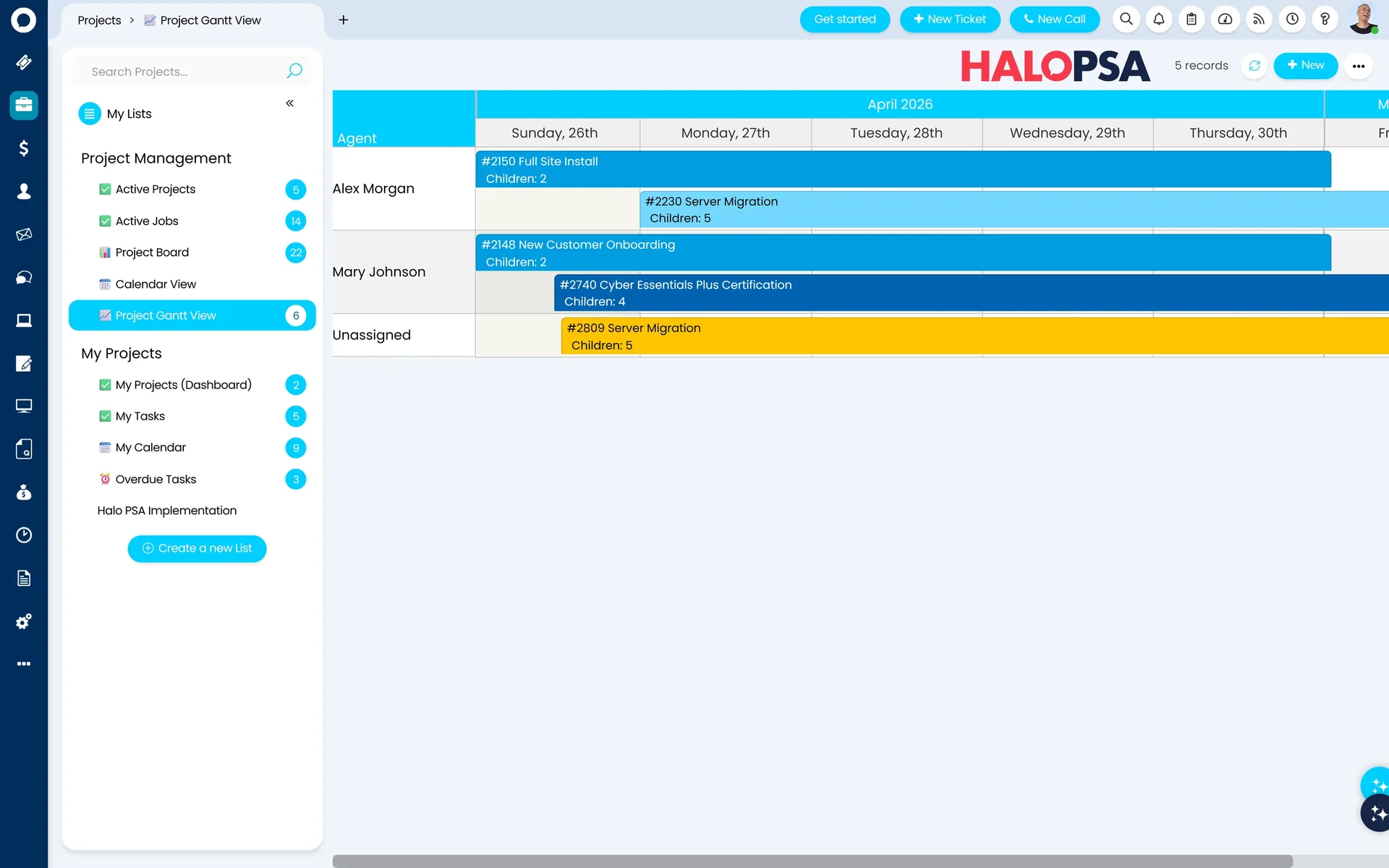
HaloPSA Projects — project board view
Kanban, Gantt & milestones

What's included

Project tools built for MSP delivery

Gantt & Kanban

Switch between timeline and sprint views without losing a single task or dependency.

Milestone & Budget

Track budget against actuals in real time — know your position before scope creeps.

Engineer Assignment

Spot engineer overload across live projects and rebalance workload without a spreadsheet.

Billing Integration

Time logged on tasks flows into billing automatically — no manual steps between project and invoice.

Templates & AI

Projects that build themselves

HaloPSA can read the statement of work from a just-won deal and automatically create the project structure — milestones, subtasks, assignments, and to-do lists — without a project manager lifting a finger.

For repeat project types, you build the template once. Every subsequent project of the same type deploys instantly from it. Phases, dependencies, and stage-gate to-do lists are all pre-baked — so engineers know exactly what to do from day one.

AI reads the SOW and generates the task structure automatically

Templates with nested milestones, child tasks, and milestone dependencies

Stage-gate to-do lists enforced before engineers can progress to the next phase

Historical project patterns used to seed new projects of the same type

Server Migration — Project Template

Phase 1 — Discovery & Planning

2 tasks
Kickoff call scheduled
Current environment documented

Phase 2 — Migration

3 tasks Phase 1 required
Server provisioned and configured
Data migrated and verified
Client sign-off received

Phase 3 — Handover & Closure

2 tasks Phase 2 required

Deployed automatically when a server migration quote is accepted.

Quote to delivery

Quote accepted. Project deployed. Zero admin.

When a client accepts a quote in HaloPSA, the system fires automatically: sales order created, projects deployed from templates, hardware consignment raised, team assigned. Your engineers get their tasks without a project manager doing any setup work.

Quote created

Product bundles pre-packaged for consistent proposals

Client accepts

Signed via the customer portal — sales order auto-created

Projects deployed

Templates fire per product line — milestones, tasks, assignments

Engineers notified

Tasks in their queue — ready to start with no PM setup needed

Project Setup Wizard NEW IN v2.220

Need to customise the project structure for a specific client before it deploys? The Project Setup Wizard lets you review and adjust tasks, milestones, and assignments directly from the sales order — before the project fires.

Task routing

Three ways to get the right engineer on the right task

When a project task is created, HaloPSA can assign it manually — or automatically using one of three routing modes. Set the default per project type, or mix and match across your templates.

Load Balancing

The next task goes to whoever has the least work currently in their queue. No manager required — the system self-distributes across the team automatically.

Round Robin

Tasks rotate sequentially through the team — each engineer gets the next job in turn. Simple, fair, and zero configuration needed day to day.

Skills-Based Matching Recommended

HaloPSA reads the task subject and body, matches it against engineer skill profiles, checks calendar availability, and assigns to the most qualified available engineer — automatically.

Skills profiles + qualification expiry

Skills are weighted and can carry expiry dates — so a Microsoft Azure certification that expired last year won't route cloud migration tasks to an engineer who's no longer qualified. The system keeps itself accurate without any manual maintenance.

Project billing

Bill projects your way — not the software's way

The budget from the accepted quote flows directly into the project — no re-entry, no discrepancy. From there, you choose exactly how and when to invoice. HaloPSA supports every billing model MSPs use in practice.

100% Upfront

Invoice the full project value at the point of sale — before work begins. Useful for hardware-heavy projects where you're committing to costs immediately.

Percentage Deposit

Invoice a percentage upfront — e.g. 30% of hardware on day one, with labour billed on completion. Granular control down to individual line items on the sales order.

Milestone-Based

Trigger an invoice automatically when a project milestone is marked complete. Phase one done — invoice raised. Keeps cash flow aligned with delivery progress.

As Work Is Completed

Bill on open work — invoice approved time as it accumulates rather than waiting for full project completion. Popular for longer engagements where cash flow matters.

Server Migration — Budget vs Actuals

Budget (from quote)40 hrs
Logged to date28 hrs
Remaining12 hrs

Budget flows automatically from the accepted quote. No manual entry.

Client visibility

Your clients can follow the project in real time

HaloPSA includes a fully branded customer portal with a dedicated project view. Clients log in with SSO, see the project board, track milestone completion, update tasks, and sign off on phases — without emailing your team for a status update.

If you're billing on milestone completion, the portal gives clients a clean, real-time view of where each phase stands — which speeds up approval and gets you paid faster.

Branded portal with SSO — no separate login to manage

Live Gantt and milestone view — always current, no manual updates

Clients can update tasks and approve phases directly in the portal

Acme Corp Portal

Server Migration Project

In Progress

Phase 1 — Discovery & Planning

Completed 12 May 2026

Phase 2 — Migration

In progress — 4 of 6 tasks complete

Phase 3 — Handover & Closure

Awaiting Phase 2 completion

Branded portal — SSO-enabled, always live.

Part of the complete HaloPSA platform

Connected to everything that matters

Time tracked on project tasks flows straight to billing. Contracts set the rules. The service desk stays connected. Every part of delivery is visible in one platform.

Frequently asked questions

Does HaloPSA support both Gantt and Kanban views for projects?
Yes. HaloPSA projects can be viewed as a Gantt chart for timeline planning or a Kanban board for sprint-style delivery — you switch between views without any data loss.
How does project time link to billing?
Time logged against project tasks flows directly into the billing engine. Billable project hours appear on the client's next invoice run automatically.
Can we assign tasks to specific engineers?
Yes. Tasks can be assigned to individual engineers or teams. HaloPSA shows workload across all active projects so managers can identify capacity issues before they become problems.
Can Allied ESM help us manage client delivery projects in HaloPSA?
Yes. Allied ESM uses HaloPSA's project module to manage its own implementation projects. We can train your team to do the same and configure project templates aligned to your delivery methodology.
Can HaloPSA create the project structure automatically from a statement of work?
Yes. HaloPSA's AI can read the statement of work attached to a project and automatically generate the task and milestone structure. You can also point it at historical projects of the same type — it will use those patterns to seed the new project. Either way, the project manager skips the manual setup entirely.
What happens automatically when a client accepts a quote?
When a quote is accepted in HaloPSA, the system can automatically create the sales order, deploy the project templates linked to each product line, raise consignment and purchase orders for hardware, and assign the projects to the right teams. Your engineers receive their tasks without a project manager doing any manual setup. The Project Setup Wizard (new in v2.220) lets you review and customise the project before it fires, if needed.
How does intelligent task routing work in practice?
When a task is created, HaloPSA scans the subject and body for keywords, matches them against engineer skill profiles, checks each qualified engineer's calendar for availability, and assigns the task to the best-qualified available person. Skills can carry expiry dates — so outdated certifications don't route tasks to engineers who are no longer qualified. You can also use load balancing (least work in queue) or round robin as simpler alternatives.
Can clients see project progress without us sending status reports?
Yes. HaloPSA includes a branded customer portal with a live project view. Clients log in via SSO, see the Gantt chart and milestone progress in real time, and can update tasks or sign off on phases themselves. If you're billing on milestone completion, this means clients can approve progress directly in the portal — which speeds up sign-off and gets you paid faster.

Also in HaloPSA

Every module included. One licence.

Service Desk Billing Time Tracking Contracts CRM Projects Stock Customer Portal

Deliver projects. Invoice automatically.

Allied ESM implements HaloPSA project management as part of every PSA engagement — so delivery and billing are connected from day one.

Talk to an Expert