HaloPSA

Multi-Client Service Desk.
Built for MSPs.

HaloPSA's service desk gives your team a single queue across every client — with SLA tracking, priority routing, and a branded customer portal all included. No bolt-ons, no per-client add-ons.

Talk to an Expert
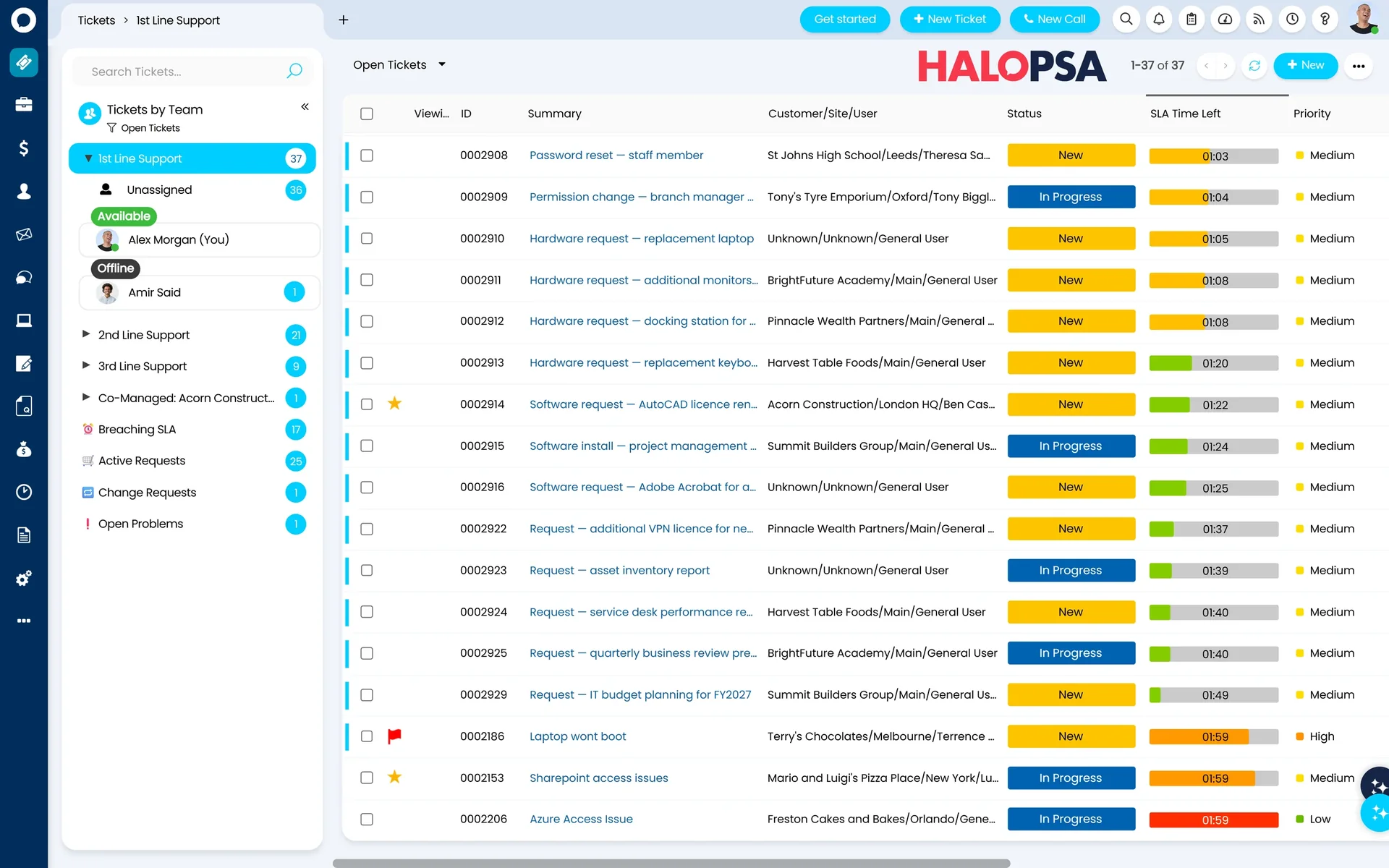
HaloPSA Service Desk — multi-client queue view
Live SLA tracking

What's included

Everything your service desk needs, in one platform

Multi-Client Queue

All clients in one queue — filter by customer, SLA status, or engineer.

SLA Tracking & Alerts

Per-contract SLA targets with automatic breach warnings before they happen.

Automated Routing

Route tickets by client, skill, or type — without manual triage.

Customer Self-Service Portal

Branded portal for each client to raise tickets and check status.

Ticket Intelligence

Everything the technician needs — before they say a word

When a ticket opens, HaloPSA auto-matches the sender's email address to the client record and instantly surfaces their contract, recent tickets, and assets from your RMM — all in the right-hand panel. No searching, no tab-switching.

Pop-up notes flag VIP users, unsupported devices, or anything else your team needs to know the moment the ticket is opened. Collision detection shows if a colleague is already viewing or acting on the same ticket.

Auto-match by email — client, contract, and assets loaded instantly

Collision detection — see who else is viewing or acting on the ticket

VIP and unsupported-user pop-up notes shown the moment the ticket opens

Remote access tools (Splashtop, TeamViewer, RDP) launched directly from the ticket

Outlook not loading — Ben Harris, Acorn Construction
P2 — SLA 1h 24m remaining Gold Contract
Sarah M. is currently viewing this ticket

Client Context

Acorn Construction Ltd
Ben Harris — VIP User
Gold Managed Service
Dell Latitude 5540 (Halo Assets)

Recent Tickets

#4821 — VPN issue (closed)
#4756 — Password reset (closed)
#4699 — Printer offline (closed)
Splashtop TeamViewer RDP

Time Capture

Technicians log time without ever reading a contract

HaloPSA's dual-timer system captures time automatically. Technicians say what they did and how long it took. The platform handles whether it's covered, billable, or chargeable based on the client's contract — with no input from the engineer.

Viewing Timer

Starts counting the moment a technician opens the ticket — capturing all time spent reading and preparing.

Doing Timer

Starts when the engineer commits to an action — for teams who prefer to capture only active working time.

Contract Handled Automatically

Time flows to billing automatically — covered, billable, or chargeable determined by contract rules, not the technician.

Pick the mode that fits your team

Both timers are configurable per team. Some prefer to start capturing as soon as the ticket opens. Others prefer to start when work begins. HaloPSA supports both — and you can change the default at any time.

Phone & CTI Integration

Pick up the phone. HaloPSA already knows who it is.

Integrate HaloPSA with 3CX, Microsoft Teams, or other phone systems. When an inbound call arrives, a screen pop opens automatically — matching the caller ID to the client record and starting the timer in the same motion.

Call scripting walks engineers through structured triage or escalation steps on screen. Lateral keyword analysis detects when multiple customers are calling about the same issue — flagging a potential major incident before the fifth call arrives.

Screen pop on inbound call — client matched by caller ID automatically

Timer starts when you answer — time captured for billing without any extra step

Lateral keyword analysis — detects emerging major incidents across multiple clients

Hang up → ticket logged automatically with the time captured

Inbound call — 01623 *** *** MATCHED
BH
Ben Harris
Acorn Construction Ltd · Gold Contract
00:00:07

Open Tickets

#4821 — Outlook not loading (P2 — open 42 min)

Call Script — Level 1 Triage

Q1 Can you confirm the issue started today?
Q2 Has any software been installed recently?
Q3 Does the issue affect other users on site?
Lateral keyword match: 3 other clients reporting Outlook issues in the last 20 min. Consider raising a Problem ticket.

Halo AI

AI that categorises and assigns tickets — automatically

HaloPSA's AI triage reads each ticket as it arrives, categorises it, suggests an assignee, and estimates time to resolve — before a human touches it. Recognised by Gartner in its 2024 Magic Quadrant for AI in ITSM.

Historical Vector Triage

Converts your historical ticket data into vector scores. When a new ticket arrives, HaloPSA finds the five most similar past tickets and uses them to suggest category, assignee, and estimated resolution time.

This is the preferred method. It learns from your team's patterns — the way your best engineers resolve tickets becomes the default for new ones.

Requires 6–12 months of ticket history for best results.

LLM-Based Triage  Works from day one

Uses a large language model to read the ticket subject and body in plain English — no historical data needed. From go-live day, new tickets are automatically categorised, prioritised, and routed to the right team or engineer.

Ideal for new HaloPSA customers who haven't yet built up ticket history, or teams migrating from another platform.

No historical data required — immediate results from go-live.

AI Triage in action

Ticket received: “I'm trying to log into Outlook but it's not working. I have a deadline today. Please help.”
Category
Email & Messaging
Priority
P2 — High
Assigned to
Bruce (L2 Eng.)
Est. resolution
45 min

All steps completed before an engineer reads the ticket.

Part of the complete HaloPSA platform

Connects to every module you rely on

Every ticket logged in the service desk is linked to the client's contract, so SLA commitments are enforced automatically. Time logged against tickets flows straight into billing — no manual export, no spreadsheet.

Frequently asked questions

HaloPSA service desk — answered directly.

Can we manage multiple clients from a single HaloPSA instance?
Yes. HaloPSA's multi-tenancy means all your clients live in one instance with full data separation. Each client sees only their own tickets, and your team sees everything in one queue.
Does the customer portal support our branding?
Fully. You can white-label the portal with your logo, colours, and domain — or your client's branding if you offer managed portals.
How does SLA tracking work across different contract types?
SLAs are defined at the contract level. Each client can have different response and resolution targets, and HaloPSA enforces them ticket by ticket — with breach warnings sent to the right people.
Can Allied ESM help us migrate our existing tickets and client data?
Yes. Allied ESM includes a data migration workstream in every implementation. We handle client records, open tickets, and historical data — so go-live day is clean.
Does HaloPSA integrate with phone systems like 3CX or Microsoft Teams?
Yes. HaloPSA integrates with 3CX, Microsoft Teams, and other phone systems. When an inbound call arrives, a screen pop opens automatically — matching the caller by number, starting the timer, and creating a ticket when the call ends. All time is captured for billing without any manual step.
Does HaloPSA use AI to triage and assign tickets?
Yes. HaloPSA includes two AI triage methods: historical vector scoring (learns from your past tickets, preferred for established MSPs) and LLM-based triage (works from day one, no historical data needed). Both automatically categorise, prioritise, and assign tickets before a technician opens them.
How does time capture work — do technicians need to understand contracts?
No. Technicians simply log what they did and how long it took. HaloPSA handles whether the time is covered, billable, or chargeable based on the contract configuration in the background. You can choose between a viewing timer (starts when the ticket opens) or a doing timer (starts when work begins).
What happens if two engineers open the same ticket at the same time?
HaloPSA's collision detection shows a banner inside the ticket when a colleague is already viewing or acting on it — preventing duplicated work and confused handoffs.

Also in HaloPSA

Every module included. One licence.

Service Desk Billing Time Tracking Contracts CRM Projects Stock Customer Portal

Ready to run a tighter service desk?

Allied ESM implements HaloPSA for MSPs across the UK. Fixed price. Defined timeline. Expert team.

Talk to an Expert