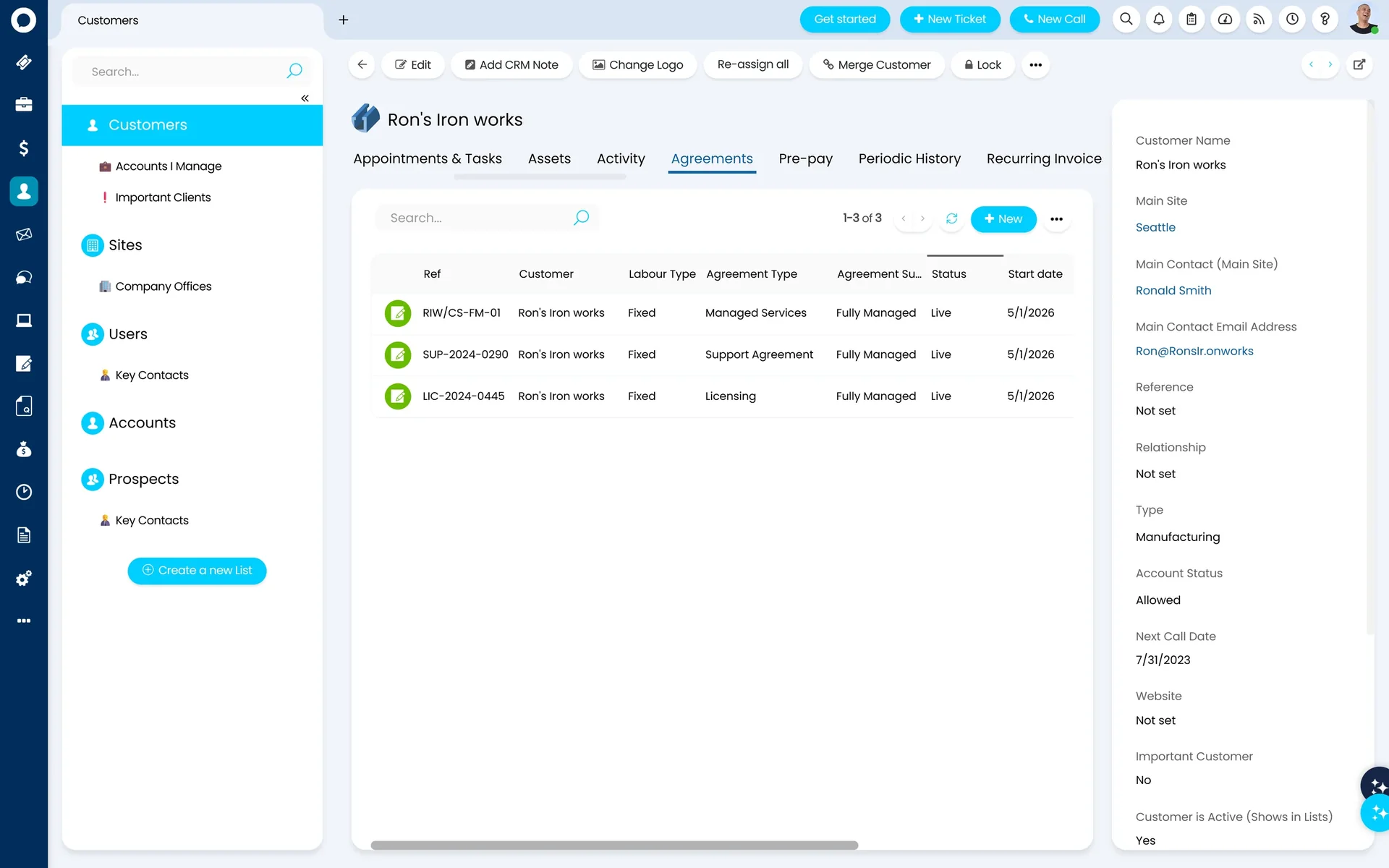
HaloPSA manages every client contract — retainers, block hours, subscriptions, and SLA targets — and drives your billing automatically from the moment a contract is set up. No manual intervention, no missed renewals.
Build once, apply in seconds — templates for every MSP contract type.
Automated Billing Schedules
Retainers, milestones, and usage charges invoiced automatically — no manual triggers.
SLA Definition & Enforcement
Every ticket measured against the right client SLA, automatically.
Renewal Management
Upcoming renewals flagged across your entire client base before they lapse.
How billing works
Every MSP billing model. One platform.
HaloPSA supports every way MSPs charge for their services. Each model is configured independently per client — and each drives invoicing automatically, without manual reconciliation at month end.
Model 1
Pay-As-You-Go (PAYG)
Every billable action logged by a technician against a ticket is captured and flows directly to an invoice. Time entries attach to the ticket, the system identifies the client's billing rate, and charges are generated automatically. Nothing falls through the cracks.
Best for: ad-hoc support, break-fix work, project overruns
Model 2
Managed Service Retainer
A fixed monthly fee covers an agreed scope of support. Billing rules define which ticket types and charge types are included — all matching labour entries flow to the contract, not to a separate invoice. Work outside scope remains PAYG or can be excluded entirely.
Best for: fully managed clients with all-inclusive monthly agreements
Model 3
Block-Hour (Prepaid) Agreements
Clients purchase a bank of hours upfront. As work is completed, hours are drawn down from the prepaid balance. HaloPSA tracks remaining hours in real time and alerts you when balances run low — so you can top up before a client hits zero.
Best for: clients who want cost certainty without full managed services
Model 4
Subscription / Per-Device Billing
Recurring invoices can be priced dynamically from a live count of users or devices — pulled directly from your RMM (e.g. NinjaOne), your Microsoft CSP integration, or Entra ID. As client headcount grows or shrinks, the invoice quantity adjusts automatically. No spreadsheet reconciliation at month end.
Best for: per-seat or per-device managed service contracts
Billing rules
What goes on contract. What gets billed separately.
Billing rules tell HaloPSA how to handle every time entry a technician logs. They run in sequence — as soon as an entry matches a rule, that outcome applies. The right structure is always the same: exceptions first, catch-all last.
Rules are configured once in a billing template and applied to your entire client base in a single click. When your pricing changes, update the template — not each customer record individually.
Implementation tip: Use separate out-of-hours charge rates rather than time multipliers. Multipliers applied to retrospectively-logged time produce confusing invoice numbers — separate rates give clients a clear, predictable bill.
Example: Platinum Managed Services template
1
On-site support (any ticket type)
Out-of-scope — always charged separately
→ PAYG invoice
2
Out-of-hours remote support
Premium rate — billed at out-of-hours charge rate
→ PAYG invoice (out-of-hours rate)
3
Remote support on Incidents
Fully managed — covered by the MSA
→ Captured to contract
✦
Everything else
Catch-all — anything not matched above
→ PAYG invoice
1. Create a billing template
Define billing rules once — what goes to contract, what stays PAYG, what's excluded for each service tier.
2. Apply to a customer — contract creates automatically
Assign the template and HaloPSA creates the contract agreement automatically. No separate step, no risk of admin error.
3. Update all customers in one click
Change what's included in your managed service, hit Update Customers, and HaloPSA pushes the change across your entire client base instantly.
Billing templates
Configure once. Deploy to your entire client base.
Most PSA tools require you to configure billing rules customer by customer. HaloPSA uses billing templates — a single configuration that deploys across all clients simultaneously.
When you onboard a new client, their contract is up and running the moment you assign the template. When your pricing changes, one update pushes to everyone. No manual work, no inconsistency across your client base.
You can maintain multiple templates — Platinum, Gold, Silver, PAYG — each with its own billing rules. A client's active agreements determine which rules apply, so the same template serves all tiers without separate configuration per customer.
Renewals
Renewals managed before they become problems.
HaloPSA tracks contract and recurring invoice line end dates across your entire client base and fires automated tasks before anything lapses — to the right person, with the right checklist, at the right time.
The automation is a ticket template with a to-do list — exactly the right structure for a renewal workflow. Configure it to fire 90 days out, 30 days out, or both. Set different rules per contract type so managed service renewals trigger a different workflow to block-hour top-ups.
The same mechanism covers recurring invoice line end dates — so if a subscription line stops generating, you know in advance. You're not left paying for something a client is no longer being charged for.
Automated ticket — Contract renewalDue in 7 days
Triggered: 90 days before Acorn Construction MSA expiry
Renew: Acorn Construction — Platinum MSA (expires 31 Jan)
Confirm renewal terms with client
Issue renewal quotation in HaloPSA
Update contract end date
Extend recurring invoice line end date
Confirm any pricing adjustments with finance
Profitability
Know which contracts are profitable. Fix the ones that aren't.
HaloPSA tracks agent costs against each contract — so you can compare what you're charging against what it's actually costing you to deliver. Most MSPs find at least one client that's been under-priced for months.
Client A
Platinum MSA
Profitable
Monthly revenue£2,500
Labour cost£1,680
Cost ratio: 67% — margin: 33%
Client B
Gold MSA
Review needed
Monthly revenue£1,800
Labour cost£1,620
Cost ratio: 90% — margin: 10%
Client C
Silver MSA
Repricing needed
Monthly revenue£950
Labour cost£1,140
Cost ratio: 120% — losing £190/month
Data shown is illustrative. HaloPSA agent cost tracking compares real labour cost against contract revenue, per client.
SLA enforcement
The right SLA for every client. Enforced on every ticket.
SLA targets are defined at the contract level — not as a global default applied to everyone. Each client's agreement specifies its own response and resolution times by priority. When a ticket arrives, HaloPSA identifies the client, reads the active contract, and enforces the right SLA automatically.
Platinum clients get a 1-hour P1 response. Silver clients get 4 hours. HaloPSA applies the right target every time, to every ticket, without a technician needing to check what agreement is in place.
Breach escalation: Configurable escalation rules fire when a ticket is approaching breach — alerting the right person with time to recover, not after the SLA has already been missed.
Acorn Construction — Platinum MSAActive
Priority
Response
Resolution
P1 Critical
1 hour
4 hours
P2 High
2 hours
8 hours
P3 Medium
4 hours
24 hours
P4 Low
8 hours
72 hours
Brightfield Ltd — Gold MSAActive
Priority
Response
Resolution
P1 Critical
4 hours
8 hours
P2 High
8 hours
24 hours
P3 Medium
1 business day
3 business days
SLA targets shown are illustrative. Each client contract is configured independently in HaloPSA.
Connects to
Every module that touches billing or time.
Contracts sit at the centre of HaloPSA. The moment a contract is configured, it drives behaviour across the whole platform — automatically, without manual handoffs.
Billing
Every billable charge flows from contract to invoice automatically. Billing rules on the contract determine what gets invoiced — no manual reconciliation at month end.
Time entries are matched against the client's billing template the moment they're logged. Contract or PAYG — the system decides automatically based on what the contract covers.
SLA targets defined in the contract enforce the right response and resolution times on every ticket raised by that client. No manual lookup — the service desk reads the contract automatically.
When a quote is accepted in the CRM, HaloPSA creates the contract automatically. From first contact to active agreement — no duplicate data entry, no gap between sales and operations.
Project time and milestones flow back through the contract's billing rules — keeping out-of-scope project work visible and ensuring every billable hour finds the right invoice.
HaloPSA supports all common MSP contract types: managed service retainers, block-hour agreements, subscription/per-device billing, and pay-as-you-go. Each is configured independently per client and drives invoicing automatically — no manual month-end reconciliation.
How do billing rules decide what goes on contract vs what gets invoiced separately?
Billing rules run in sequence, top to bottom. Each rule specifies a condition — charge type, ticket type, time of day — and an outcome: captured to contract, PAYG invoice, or excluded. As soon as a time entry matches a rule, that outcome applies and the system stops checking. The recommended structure is exceptions first (on-site support, out-of-hours), catch-all last. Rules are configured once in a billing template and applied across all clients simultaneously.
Can HaloPSA bill based on live user or device counts from our RMM?
Yes. Recurring invoice quantities can be driven dynamically from a live count of users or devices — pulled from your RMM (e.g. NinjaOne), your Microsoft CSP integration, or Entra ID. As headcount changes, the invoice quantity adjusts automatically. Proration is handled natively for mid-month changes, eliminating the spreadsheet reconciliation most MSPs do at month end.
If I change what's included in my managed service, do I need to update every client?
No. HaloPSA billing templates have an Update Customers button. Change the template — add a new exclusion, adjust charge types, change what goes to contract — and click once. HaloPSA applies the change across your entire client base. This is particularly valuable when you have 50 or more clients on the same pricing model.
How does contract renewal management work?
HaloPSA uses automated ticket templates triggered by contract end dates. Configure how many days in advance the alert fires — 90 days, 30 days, or both — and what the renewal to-do list includes. The trigger applies per contract type, so managed service renewals can drive a different workflow to block-hour top-ups. The same mechanism covers recurring invoice line end dates, so you're alerted before a billing line stops generating too.
Are SLAs tied to contracts in HaloPSA?
Yes. SLA targets are defined at the contract level — each client contract specifies its own response and resolution times. HaloPSA enforces these ticket by ticket, automatically applying the right SLA based on who raised the ticket and what agreement they are covered by.
Can I track whether each managed service contract is actually profitable?
Yes. HaloPSA includes agent cost tracking at the contract level. Configure the cost of each agent's time — with start and end dates to account for pay changes — and the system compares that against contract revenue per client. The result is a clear view of which contracts are profitable and which need repricing. Pre-built contract profitability reports are available in the Halo community repository.
Can Allied ESM help configure our contracts in HaloPSA?
Yes. Contract configuration is a core part of every Allied ESM implementation. We map your existing agreements, configure billing templates and rules, set up renewal automation, and connect your accounting package — all from day one. Fixed price, clear timeline.