CSM

Halo CSM Omnichannel & Live Chat.

Your customers don't stick to one channel — and if switching from live chat to email means repeating themselves, the experience feels broken. Halo CSM puts email, live chat, WhatsApp, SMS, phone and social into one queue, on one continuous thread, so context follows the conversation wherever it moves. The live chat widget embeds on any website, telephony pops the call screen from Teams, Zoom, 8x8, RingCentral, 3CX and Genesys, and WhatsApp and SMS run through Halo's native Twilio integration — all included in one all-inclusive Halo CSM licence, with no separate chat tool and no per-channel add-on.

Channels / Email, chat, WhatsApp, SMS, phone & social Live Chat / Embeddable widget, any site Included / One licence, no per-channel add-ons
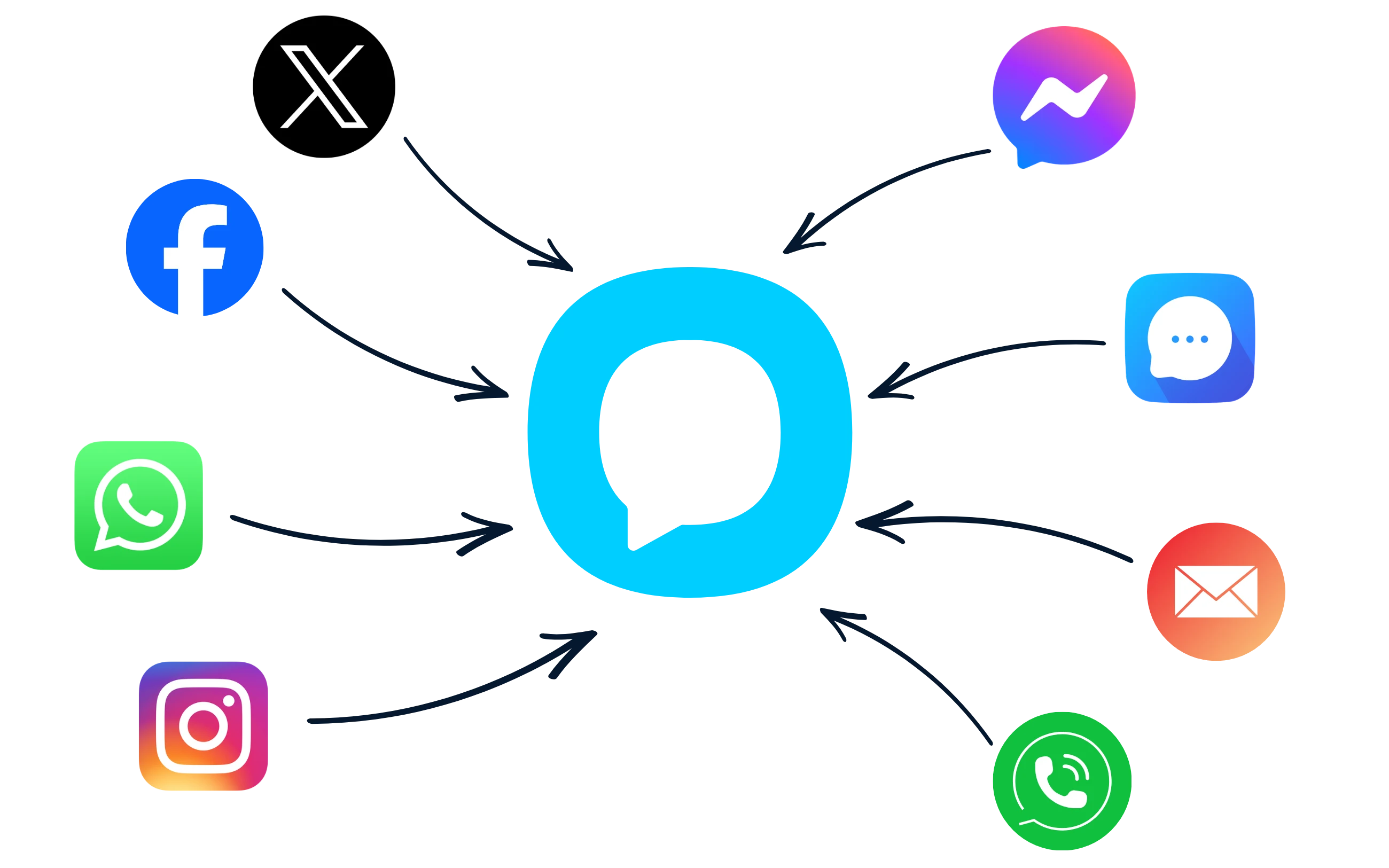
Halo CSM omnichannel — every channel feeding one queue

The cost of switching channels

Customers switch channels — and repeat themselves

A customer who starts on live chat and ends up on the phone shouldn't have to explain the problem twice. Most stacks make them do exactly that.

74%

Of consumers say they get frustrated when they have to repeat information they've already given.

Source: Zendesk, CX Trends 2026 (vendor research)

84%

Of service and support leaders agree that customers have higher expectations for service now than in the past.

Source: Gartner, 2024

Halo's answer is structural, not another integration: every channel writes to the same ticket, on the same thread, so the context a customer gave on chat is still there when they call.

Every channel, one thread

One conversation, wherever it moves

Email, live chat, WhatsApp, SMS, phone and social all feed the same queue in Halo CSM. However a conversation starts, every reply, transfer and escalation stays on the same ticket — so an agent picking up a call already has yesterday's WhatsApp thread in front of them, and nobody is asked to explain the problem twice.

  • Chat, WhatsApp, SMS, Facebook and phone in one unified workspace, with call pop-ups from Teams, Zoom, 8x8, RingCentral, 3CX and Genesys
  • Full history — every past ticket, chat and call — surfaced automatically the moment a customer gets in touch on any channel
  • No separate chat tool, WhatsApp platform or shared inbox to license, learn or keep in sync with the ticketing system

Running an internal IT service desk too? See Halo's employee-facing email integration and AI chatbot for the ITSM equivalents — this page covers the channels your paying customers use.

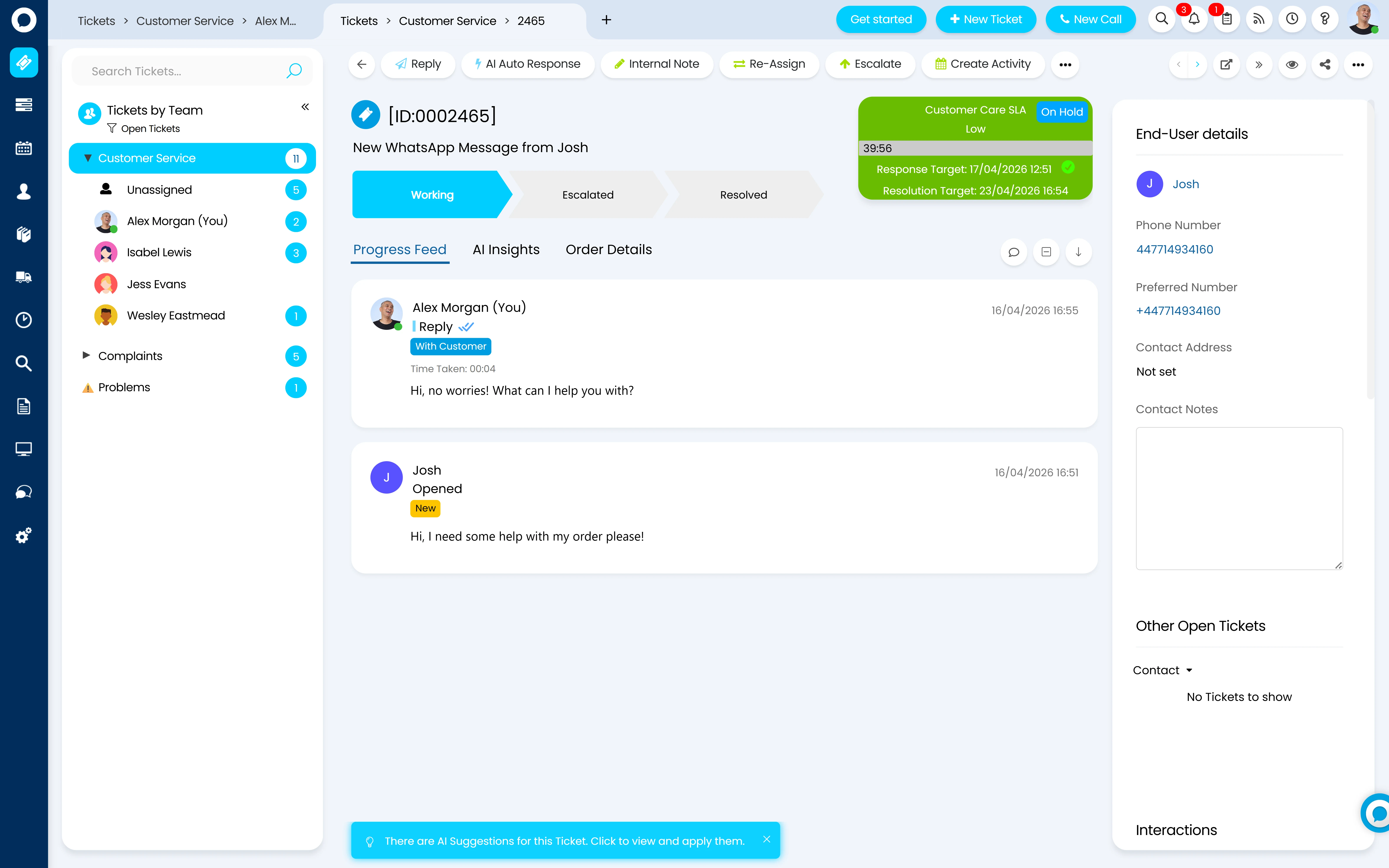
Halo CSM WhatsApp conversation feeding the same ticket thread

Email & Mailboxes

Mailboxes connect via Office 365/Azure, Google or standard IMAP/SMTP. Email Rules turn incoming mail into tickets — matching on from address, subject or body, mapping fields like agent and category straight from the email text, and running in sequence order so the right rule catches the right email. A Check Ticket Details rule can even reply automatically to a status-check email, useful for account managers who want an update without logging into the portal.

Voice & Telephony

Call pop-up integrations with Microsoft Teams, Zoom, 8x8, RingCentral, 3CX, Genesys and Intermedia Contact Centre open the Halo call screen the moment a call is answered, matching the caller to a user by phone number automatically. Call Scripts guide agents through a structured set of questions, writing each answer straight to a ticket field, so the call and the ticket are built in the same motion.

Live Chat

Real-time chat on the self-service portal or embedded on your own website, with agent availability tied to team status — a shaking bubble alerts every available agent on the assigned team, and the first to click gets the chat. Covered in full depth below.

WhatsApp & SMS

Both run through Halo's native Twilio integration. Twilio for WhatsApp Business creates a ticket from every inbound WhatsApp message and lets agents reply from inside Halo — with multiple WhatsApp numbers supported and closed tickets re-opened automatically for a returning sender. Twilio SMS works the same way for text messages, connected via your Twilio Account SID and API key.

Facebook, Slack & Teams

Facebook messages, posts and comments convert into tickets automatically, with comment threads carried through as actions and a dedicated reply action to respond without leaving Halo. For customers who collaborate with you directly in Slack or Microsoft Teams, both connect natively too — useful for B2B accounts running support through their own workspace.

Branded Customer Portal

The live chat bubble, ticket history and knowledge base all sit inside the same branded self-service portal — your colours, your logo, your domain. It's one more entry point into the same single queue, not a separate system with its own inbox to check.

Live chat in depth

Chat that's configured, not just switched on

A Chat Profile controls everything about how live chat behaves — its name, whether it's restricted to authenticated portal users or open to anyone, and a Working Hours setting so the chat bubble only appears when someone can actually answer it. When a user starts a chat, it can route straight to a team: every available agent in that team sees the chat icon shake, and the first to click takes it — the customer is notified and the chat stops ringing for everyone else.

  • Multiple Chat Profiles — different personas, working hours and routing per brand, department or customer type
  • Team-based routing — chats assigned to the right team, with agent availability tied to online/away status
  • Canned messages — pre-written replies agents can drop into a chat, editable before sending rather than firing straight off
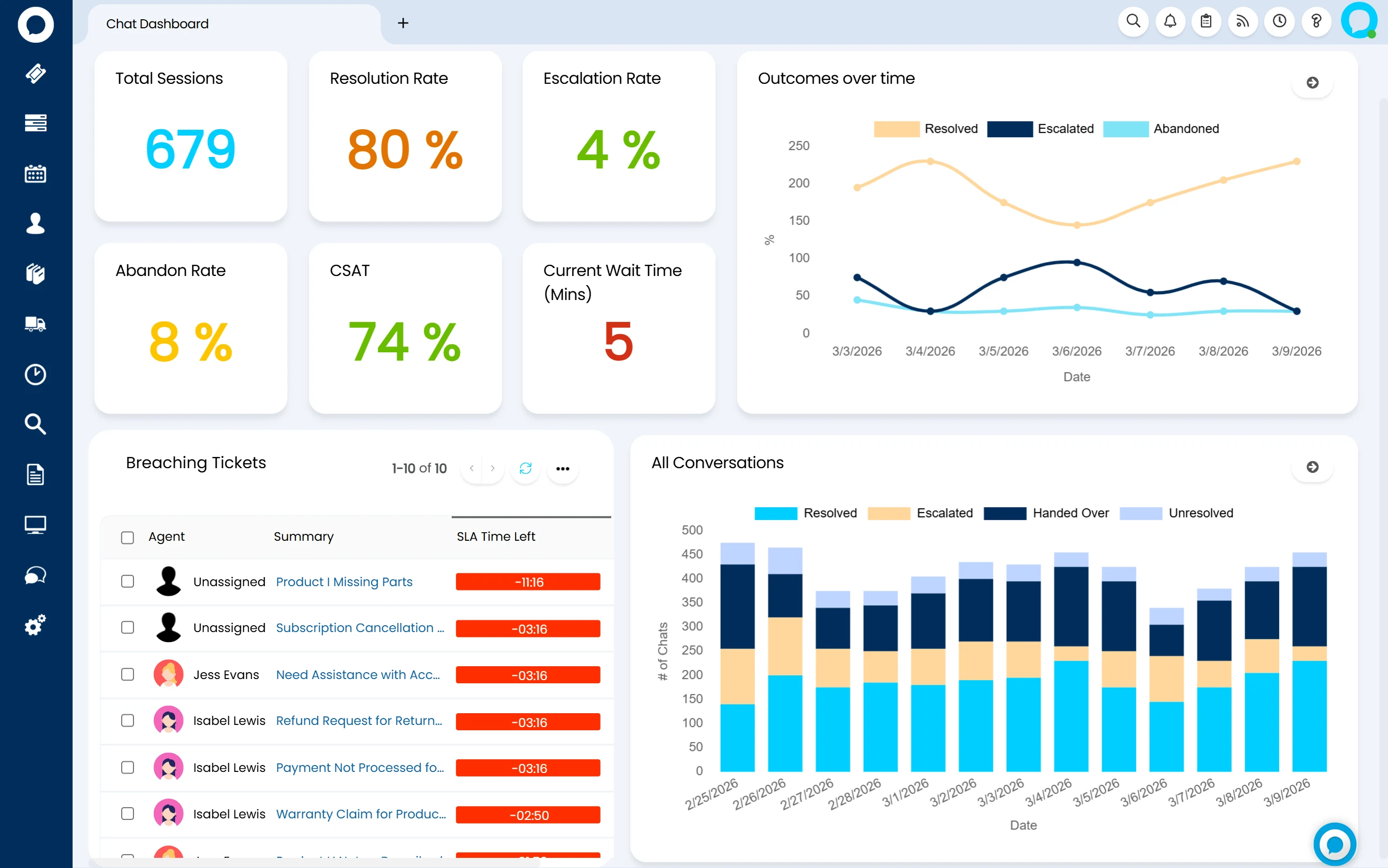
Halo CSM live chat dashboard — agent chat workspace

Embed on any website

Each Chat Profile has a read-only HTML embed script for adding the chatbot to an external site, plus a Global CORS whitelist so only your approved domains can load it. The chat isn't locked to the Halo portal — it can sit on your marketing site, a product site, or any domain you control.

Widget properties, fully styled

The embeddable widget takes brand colour, light or dark theme, bubble position, custom icon and window size as configuration properties — down to the sound the chat makes on a new message. It's built to look like it belongs on your site, not a bolted-on third-party tool.

Identity matching via JWT

When a logged-in customer opens chat on an external site, Embeddable Chat User Matching uses a JWT identity token to match the conversation to their existing Halo user record — so a customer already signed into your portal or app doesn't have to re-identify themselves to start a chat.

AI on the conversation

AI that reads the conversation, not just routes it

Every channel on this page feeds AI that's already reading the conversation as it happens — classifying, prioritising and flagging, so the right person acts before a customer has to ask twice. The chatbot and virtual agent that can resolve a conversation end to end are their own story, covered separately on Halo CSM's AI Virtual Agents & Chatbot page — this is what AI does to every conversation, human or automated, once it's in the queue.

Intent routing

Halo AI classifies and routes every incoming request the moment it arrives, regardless of which channel it came in on — applying the right category, team and next step automatically instead of waiting for an agent to triage it manually.

Priority prediction

On arrival, Halo AI analyses the ticket content and suggests the right priority level, reducing misclassification. It also checks similar past tickets' SLA history — if comparable requests previously breached, it flags the risk immediately rather than after the fact.

Sentiment flags for at-risk customers

Halo AI reads the tone of incoming messages across the conversation and flags when a customer sounds frustrated or at risk of churning — so a manager or senior agent can step in before the relationship, not just the ticket, is lost.

AI handoff summaries

When a conversation is escalated, reassigned, or picked up on a shift change, Halo AI generates an instant summary of everything that's happened so far — the receiving agent gets what they need without reading back through the whole thread, and the customer never notices the handoff.

These are part of the same AI engine that powers triage, summarisation and predictive analytics across the rest of Halo. See Halo AI → for the full platform intelligence story.

Configured by Allied ESM

Six channels, one queue — designed to actually work that way

Every channel on this page is configuration, not code. But getting mailboxes, telephony, chat and routing right on day one is the difference between one queue your team trusts and six inboxes nobody fully owns.

Mailboxes & email rules

Mailbox connections set up correctly for Office 365, Google or SMTP, and email rules built and sequenced so the right emails become the right tickets — with field mapping, asset matching and automatic status-update replies configured around how your inbox actually works today.

Telephony & call handling

Call pop-up integration wired to your existing phone system — Teams, Zoom, 8x8, RingCentral, 3CX or Genesys — plus call scripts built around your actual support questions, so the call screen and the ticket populate together from the first ring.

Chat profiles & widget deployment

Chat Profiles configured with the right working hours, routing and canned text, and the embeddable widget styled and deployed on your website — including the identity-matching setup so logged-in customers don't have to re-identify themselves.

Routing, SLAs & escalation paths

Team assignment rules, SLA targets per priority and channel, and escalation paths that match how your service actually runs — so a WhatsApp message and a phone call are held to the standard you want, not whatever the default happens to be.

Allied ESM designs and configures all of this as part of a fixed-price Halo CSM implementation — so you know the full cost before work begins. Where you need custom integrations or automation on top, Allied ESM can scope and deliver that as part of your project.

Frequently asked questions

Omnichannel & live chat in Halo CSM — answered directly.

Which channels does Halo CSM support?
Email, live chat, WhatsApp, SMS, phone and Facebook, plus Slack and Microsoft Teams for B2B customers who collaborate with you directly in those tools. Telephony connects via call pop-up integrations with Teams, Zoom, 8x8, RingCentral, 3CX, Genesys and Intermedia Contact Centre. Every channel feeds the same ticket queue.
Can we embed live chat on our own website, not just the Halo portal?
Yes. Every Chat Profile has a read-only HTML embed script for adding the chatbot to any external website, with a Global CORS whitelist restricting which domains can load it. The widget's colour, theme, position and size are all configurable, and logged-in users can be identity-matched to their Halo record via a JWT token so they don't have to re-identify themselves.
Do we need a separate chat tool alongside Halo?
No. Live chat, the embeddable widget, chat profiles, canned text and the AI virtual agent are all part of the Halo CSM licence — there's no separate chat product to buy, license per agent, or keep synchronised with your ticketing system.
How does WhatsApp and SMS work in Halo?
Both run through Halo's native integration with Twilio. Twilio for WhatsApp Business creates a ticket from every inbound WhatsApp message and lets agents reply from inside Halo, with multiple WhatsApp numbers supported. Twilio SMS works the same way for text messages via the Twilio API — Halo also supports email-to-SMS as a fallback, though Twilio's own API is the more reliable delivery method and the one Halo recommends.
Does context follow the customer across channels?
Yes. Every channel writes to the same ticket record, so a conversation that starts on live chat and continues by phone or WhatsApp stays on one thread with full history — the agent picking it up sees everything that happened before, on any channel, without asking the customer to repeat it.
What telephony integrations does Halo support?
Call pop-up integrations with Microsoft Teams, Zoom, 8x8, RingCentral, 3CX, Genesys and Intermedia Contact Centre — the Halo call screen opens automatically when a call is answered, matching the caller to a user by phone number. Call Scripts then guide agents through a structured set of questions, writing answers directly to ticket fields.
How much does Halo CSM cost?
Halo is priced on one all-inclusive monthly licence — every channel, the live chat widget, AI, and 250+ native integrations are all included, with named and concurrent licence options. See Halo's all-inclusive UK pricing →

Keep going: the rest of the Halo CSM story

See Halo CSM AI Virtual Agents & Chatbot for the automated side of this conversation — agents that log tickets, check status and hand off to a human. And Customer Self-Service & Help Centre for the branded portal and knowledge base that stops a conversation starting at all.

One Queue, Every Channel Your Customers Use

From mailboxes and telephony through live chat, WhatsApp and routing, Allied ESM delivers Halo CSM omnichannel set-up on fixed-price engagements — so you know the full cost before work begins.

Book a Consultation

Official Halo Partner

Allied ESM is a pure play Halo partner — licensing, implementation, consulting & managed services.