CSM

Halo CSM Customer SLAs & Escalations.

This isn't the internal target your service desk holds itself to — it's the commitment written into a customer's contract. Halo CSM lets you build a different SLA for every customer or tier, override it per organisation, run it on that customer's own workdays and timezone, and escalate through a defined warning path before a target is ever breached — not after. If you're looking for Halo's internal ITSM SLA engine for employee tickets, that's covered separately on Halo SLA Management. This page is what happens when the person on the other end of the ticket is a paying customer, not a colleague.

Per-contract / Different targets for every customer Escalation / Three-stage warning before a breach Visible / Portal timers & adherence reporting
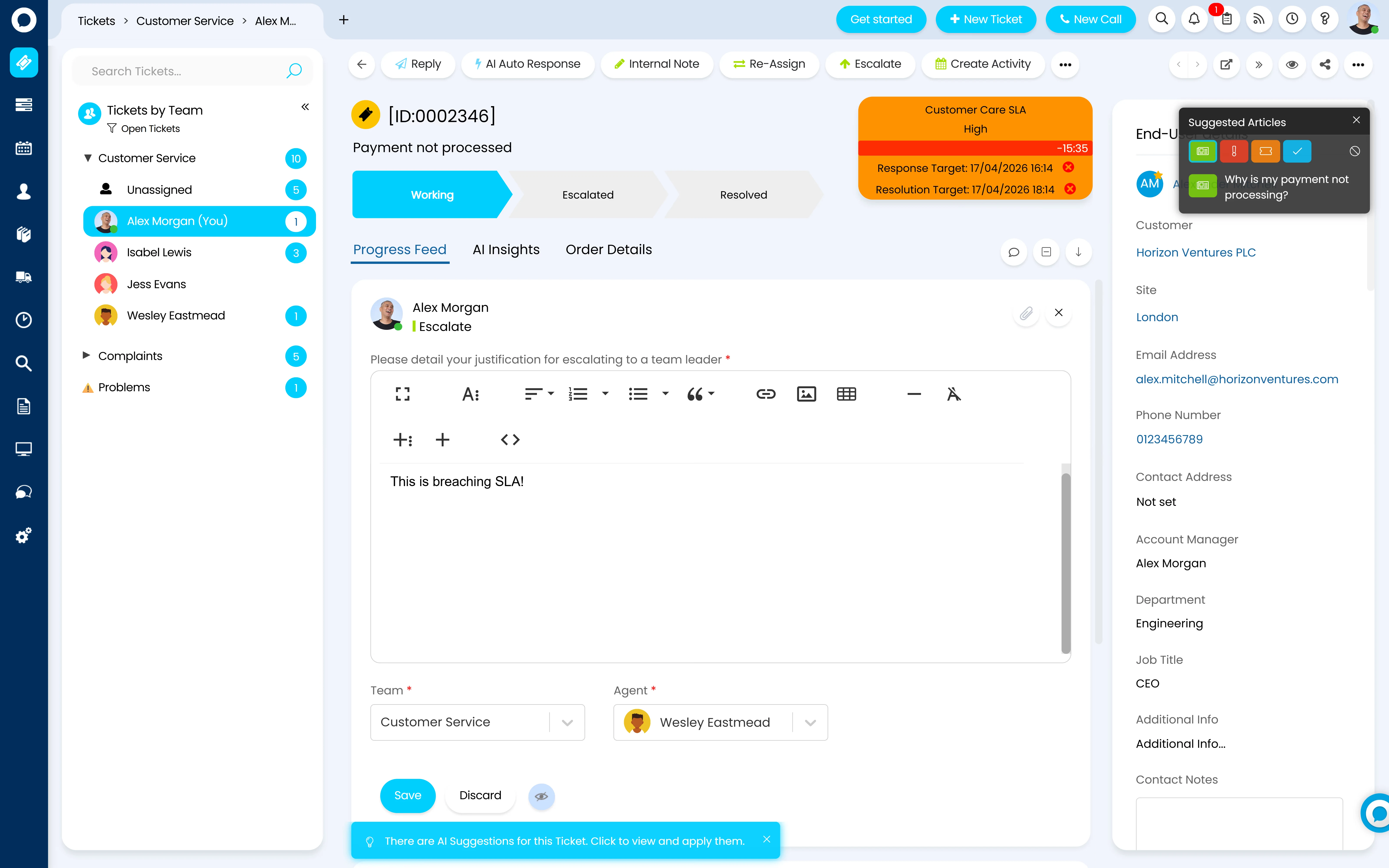
A breaching Halo CSM ticket — a Customer Care SLA card showing High priority with the response and resolution targets both missed and the countdown at minus 15:35, while the agent escalates the ticket to a team leader with the justification "This is breaching SLA!"

Proof, not a promise

99% SLA adherence, on a system you can actually see it in

Every vendor claims their SLA engine works. This is what it looked like for a real customer running theirs on Halo.

99%

Glossify's SLA adherence rate running customer service on HaloCRM — alongside a 5-hour average resolution time and 87% of customers rating their support "excellent."

Source: Halo customer case study, Glossify (HaloCRM)

84%

Of service and support leaders agree that customers have higher expectations for service now than in the past.

Source: Gartner, 2024

Expectations are rising and the margin for missing a commitment is shrinking. That makes the SLA engine underneath your customer promises a genuine differentiator, not paperwork — provided it can actually reflect the contracts you signed.

SLAs that match your contracts

One customer, one contract, one set of targets — repeated correctly for every other one

Halo doesn't force every customer onto the same clock. Multiple SLAs can be defined and run simultaneously, each with its own priority tiers and its own response and resolution targets per tier — so a premium contract can carry a 1-hour response target while a standard customer runs to 4 hours, both applied automatically with no per-ticket configuration. SLAs are assigned at the site or customer level, so the right contract follows the right customer by default, and can be overridden further down the hierarchy — by ticket type, ticket template, agreement or ticket rule — for the exceptions every real book of business has.

  • Multi-contract support runs several SLA agreements at once, applying the right rules to the right customers automatically — no manual switching between contracts
  • A customer with named-account status can carry Priority Escalation, so every ticket they log lands at an elevated priority automatically, with the priority field locked so it can't be accidentally downgraded
  • Where a rule and an agreement both try to set a ticket's SLA, whichever applied last wins — set up correctly once, not fought over on every ticket

Illustration

Three customers, three sets of targets

Customer / SLA Priority Response Resolution
Northwind Holdings Premium Care SLA P1 1 hour 4 hours
P2 4 hours 1 working day
Beacon Retail Group Standard Support SLA P1 4 hours 1 working day
P2 8 hours 3 working days
Halewood Logistics Essential Cover SLA P1 8 hours 2 working days
P2 1 working day 5 working days

Targets are set per SLA and can be overridden per organisation — and further down by ticket type, ticket template, agreement or ticket rule.

Illustration of an SLA structure — not a product screenshot.

Workdays & timezones per customer

Workdays define the hours an SLA ticks down, day by day, with a holidays tab (bulk-importable by country and region) and configurable breaks. Each SLA carries its own time zone, so a customer contract can run on their working hours, not yours — and a setting exists to run the countdown on the assigned team's hours instead of the customer's, useful when a follow-the-sun team supports a customer in a single region.

Holds when the clock should stop

Ticket status controls the SLA timer — a status like "With Customer" pauses it, and the timer resumes the moment the customer replies. Agents can set an Auto Release date when placing a ticket on hold, and SLA hold reminders chase the customer automatically at a configured interval, closing the ticket if there's still no response after a set period.

Overrides at every level

SLA defaults can be set at site, ticket type, ticket template, agreement, ticket rule and asset level, following a defined hierarchy — so a specific contract, product line or asset can carry its own target without rebuilding the whole SLA structure around one exception.

Escalation before breach, not after

A defined warning path, not a red icon nobody noticed

Halo's SLA escalation runs on a three-stage lifecycle — built from native warning thresholds, notifications and workflow automations. No custom development required to stand it up.

First warning

Fires at a configurable point — a percentage of the SLA elapsed (e.g. 50%) or a fixed number of hours before the deadline. The early alert, sent while there's still real time to act.

Second warning

Fires at a higher threshold (e.g. 75% elapsed) — the final prompt before breach, typically routed to a team leader or supervisor rather than the assigned agent alone.

Breach, and what fires next

At 100% of the target, breach triggers whatever automated action you've built in — reassignment, a priority change, or a notification to a named escalation contact — so a missed target starts a workflow rather than sitting quietly on a report.

OLAs for the internal handoffs

Operational-Level Agreements put a target time on a workflow's own Stages or Steps — how long a tier-1 to tier-2 handoff should take, for instance — tracked separately from the customer-facing SLA, so an internal delay shows up before it eats into the time you promised the customer.

Both warning thresholds support percentage or time-based triggers, and each one fires its own notification — email, in-app pop-up or portal alert — so the right person hears about the right stage, not everyone hearing about everything. Halo AI adds a step earlier still: on arrival, a new ticket is checked against similar past tickets' SLA history, and if comparable requests have previously breached, automations can trigger immediately rather than waiting for the first threshold to fire.

Proving it to the customer

An SLA nobody can see isn't much of a commitment

A contract that promises a response time but never shows the customer whether it was hit is asking to be taken on trust. Halo's ticket details view can display SLA information directly in the branded self-service portal — see Halo CSM Self-Service & Help Centre for the portal that carries it — so a customer checking their own ticket sees the same countdown your team does, not a status page that's disconnected from the real target.

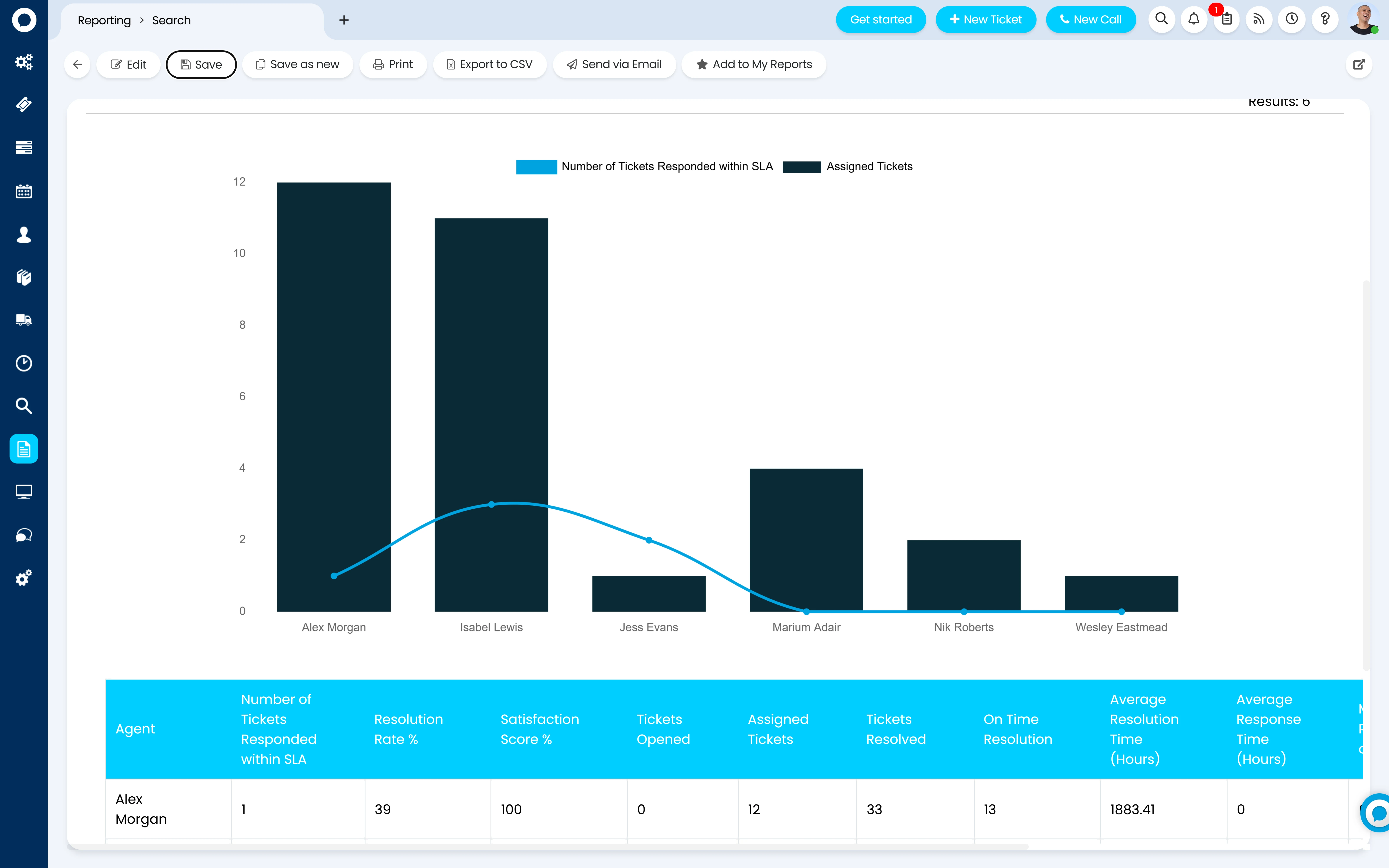
  • Breach and adherence reporting shows how the team is performing against targets at every priority level, not just an average that hides the ones that slipped
  • Service and application availability tracking measures uptime against a target period and percentage, evidencing that a service-level commitment is being met — and a strong uptime record can be shown to the customer as proof, not just held internally
  • Real-time, no-code dashboards mean a QBR pack pulls from live data rather than someone rebuilding a spreadsheet the night before — see Halo Reporting for the engine behind every number on this page
A Halo SLA adherence report by agent — a chart of tickets responded to within SLA against assigned tickets, above a table showing number responded within SLA, resolution rate, satisfaction score, tickets opened, assigned and resolved, on-time resolution, and average resolution and response times per agent

Configured by Allied ESM

Commitments built from what's actually in the contract

Every setting on this page is configuration, not code. But an SLA structure copied from a template, with no escalation path and no customer-facing visibility, is how you end up explaining a breach after the fact instead of before it.

SLA model & tier design

Mapping your actual contracts and support tiers into Halo's SLA and priority structure, including the overrides and Priority Escalation rules named accounts need.

Escalation rules & notification matrix

Setting warning thresholds, breach automations and OLAs on the workflow steps that matter, then building the notification matrix so the right person hears about the right stage.

Workdays, holds & timezone setup

Building the workday calendars, holiday imports and hold statuses each contract needs — including cross-timezone customers and follow-the-sun support models.

Reporting & customer-facing visibility

Building the breach and adherence dashboards your team needs internally, and the portal SLA visibility your customers see — so both sides are looking at the same number.

Allied ESM designs and configures all of this as part of a fixed-price Halo CSM implementation — so you know the full cost before work begins. Where you need custom integrations or automation on top, Allied ESM can scope and deliver that as part of your project.

Frequently asked questions

Customer SLAs and escalations in Halo CSM — answered directly.

Can different customers have different SLAs?
Yes. Multiple SLAs can be defined and run simultaneously, each assigned at the site or customer level, with its own priority tiers and its own response and resolution targets per tier. A premium contract can carry a 1-hour response target while a standard customer runs to 4 hours — both applied automatically, with no per-ticket configuration required.
Does the clock pause when we're waiting on the customer?
Yes. Ticket status controls the SLA timer — a status such as "With Customer" pauses it, and it resumes automatically the moment the customer replies. Agents can also set an Auto Release date when placing a ticket on hold, and SLA hold reminders chase automatically at a configured interval.
What actually happens as a breach approaches?
A three-stage lifecycle: a first warning at a configurable threshold (e.g. 50% of the SLA elapsed, or a set number of hours before the deadline), a second warning at a higher threshold (e.g. 75%) typically routed to a team leader, and a breach trigger at 100% that fires whatever automated action you've built — reassignment, a priority change, or an escalation notification. Each stage can have its own notification, sent by email, in-app pop-up or portal alert.
Can customers see their own SLA status?
Yes. The ticket details view in the branded self-service portal can display SLA information alongside status, so a customer checking their own ticket sees the same countdown your team does. See Halo CSM Self-Service & Help Centre for the portal itself.
What's the difference between an OLA and an SLA?
An SLA is the external commitment to the customer. An OLA (Operational-Level Agreement) puts a target time on an internal workflow Stage or Step — how long a tier-1 to tier-2 handoff should take, for example — tracked separately, so an internal delay shows up in reporting before it eats into the time you promised the customer.
Can we run different workdays and timezones per customer?
Yes. Workdays are configured with their own hours per day, a holidays calendar (bulk-importable by country and region) and configurable breaks, and each SLA carries its own time zone. A setting also exists to run the countdown on the assigned team's hours instead of the customer's — useful for a follow-the-sun team supporting a single-region customer.
How is this different from Halo's ITSM SLA page?
Halo's SLA Management page covers the internal ITSM engine — response and resolution targets your own service desk holds itself to for employee tickets, on one set of business hours. This page covers Halo CSM's customer-facing SLAs: multiple contracts running at once, different targets per paying customer, per-customer workdays and timezones, and SLA status shown back to the customer in their own portal.
How much does Halo CSM cost?
Halo is priced on one all-inclusive monthly licence — SLA management, multi-contract support, escalation automations and reporting are all included, with named and concurrent licence options. See Halo's all-inclusive UK pricing →

Keep going: the rest of the Halo CSM story

SLAs sit underneath everything else in Halo CSM — the channels tickets arrive on, the AI that helps resolve them, and the portal that shows the customer where things stand.

Service Commitments Your Customers Can See

SLA model design, escalation rules, workdays and customer-facing reporting — Allied ESM configures Halo CSM's SLA engine on fixed-price engagements, so you know the full cost before work begins.

Book a Consultation

Official Halo Partner

Allied ESM is a pure play Halo partner — licensing, implementation, consulting & managed services.