Included in every licence

Service commitments
your team can hit.

Halo's SLA management tracks response and resolution targets in real time — pausing the clock when tickets are waiting on customers, escalating automatically before a breach, and giving your team clear visibility of every commitment across every ticket.

Halo SLA management — shield representing service commitments met, surrounded by service desk icons
2
Core metrics
Auto
Hold & resume
Custom
Priority tiers
£0
Extra module cost

Two targets.
Full visibility. No guesswork.

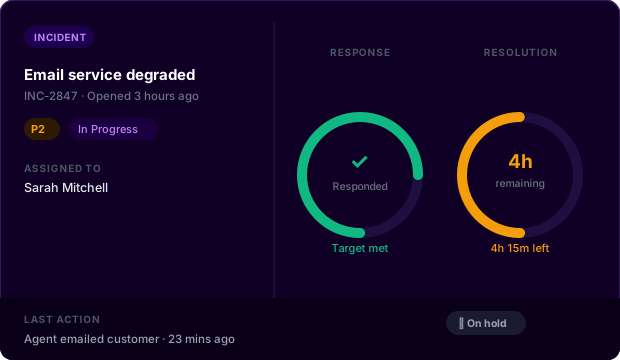
Every SLA in Halo tracks two metrics: an initial response time and a resolution time. Both are visible on every ticket, colour-coded by urgency, and ticking down only during the hours that count. If you only need to track resolution, the response target can be disabled entirely.

  • Response target: how quickly your team must acknowledge a ticket after it's logged — cleared when an agent sends an email or performs a designated response action.

  • Resolution target: the window in which the ticket must be resolved — paused automatically while waiting on the customer, resumed the moment they reply.

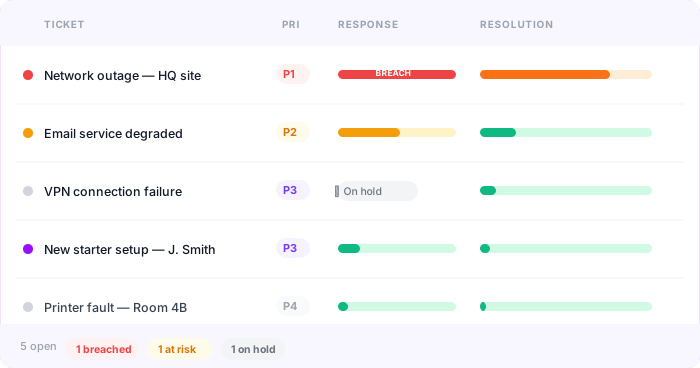
  • Colour-coded indicators show at-risk and breaching tickets at a glance across the queue — no hunting through lists to find what needs attention now.

Halo ITSM ticket queue showing SLA response and resolution targets with colour-coded status indicators
Halo ITSM ticket detail showing SLA ring timers for response and resolution with priority and hold status

P1 runs 24/7.
Everything else follows your hours.

Halo lets you define multiple SLAs, each with its own priority tiers. Every priority carries its own response and resolution targets — and can override your standard business hours, so critical tickets track around the clock while lower-priority work respects your working day.

  • Business hours configuration defines exactly when your SLA timer ticks — if a ticket arrives at 7pm, the clock starts at 9am the next morning.

  • Public holidays are configured once and honoured automatically — the SLA timer pauses on non-working days without any manual intervention.

  • Each priority tier gets a colour, a target window, and an optional 24/7 override — so your most critical tickets are always tracked to the right standard.

Everything SLA management needs.

Built in and ready from day one — no separate module, no extra licence.

Response & Resolution Tracking

Track both response and resolution targets independently on every ticket. Timers tick in real time, colour-code by urgency, and alert your team before a threshold is crossed.

Priority Tiers

Define as many priority levels as your operation requires. Each tier carries its own response and resolution targets, a colour code, and an optional 24/7 business hours override.

Business Hours & Holidays

Configure the exact hours your SLA timer should run, vary them by day, and record public holidays. The timer only ticks when your team is actually working.

Status-Based Hold & Resume

Ticket statuses control the SLA timer. Set any status — such as "With Customer" — to pause the clock. When the customer replies, the status updates and the timer resumes automatically.

Hold Reminders & Auto-Close

When a ticket is on hold awaiting a customer response, Halo automatically sends reminder emails at a configured frequency. If no response arrives within a set period, the ticket closes — keeping your queue clean.

Per-Customer SLA Assignment

Assign different SLAs to different customers or departments at the site level. Premium customers get tighter targets; standard tickets follow your default — managed automatically without per-ticket configuration.

SLA management is standard.
Not an add-on.

Priority tiers, business hours, hold and resume logic, breach alerts, and automatic hold reminders are all included in Halo's single monthly licence — no per-module fees, no hidden costs.

Real-time tracking

Every SLA ticks in real time. Agents see exactly how much time remains, and breach alerts fire automatically before the clock hits zero.

🔄

Smart pause & resume

The timer pauses when your team is waiting on the customer and resumes the moment they respond — no manual intervention, no skewed metrics.

📋

Applied by default

SLAs are assigned to ticket types and sites — every new ticket inherits the right SLA and priority automatically, with no per-ticket configuration needed.
Frequently asked questions

SLA management in Halo — answered directly.

Is SLA management included in Halo ITSM?
Yes. SLA management is fully included in every Halo ITSM licence at no additional cost. This covers priority tiers, business hours configuration, holiday calendars, status-based hold and resume logic, breach alerts, hold reminders, and per-customer SLA assignment. No separate SLA module is required.
Can Halo track different SLAs for different customers?
Yes. SLAs in Halo can be assigned at the site level, meaning different customers or departments can have different service commitments. A customer on a premium support agreement might have a 1-hour response target while a standard customer has a 4-hour target — both managed automatically without any per-ticket configuration.
How does Halo pause and resume the SLA timer?
The SLA timer is controlled by ticket statuses. Each status in Halo has an SLA hold setting — statuses like "With Customer" pause the timer, while statuses like "Updated" (triggered when the customer replies via email or the portal) resume it. The chain is automatic: an agent emails the customer, the status changes to "With Customer", and the timer pauses. When the customer replies, the status changes back and the timer starts again.
Can Halo run 24/7 SLAs for critical priorities?
Yes. Each priority tier within an SLA can override your standard business hours. A P1 can track around the clock every day of the year, while P2, P3, and P4 follow your configured working hours. This means you can commit to 24/7 response for critical issues without applying those hours to every ticket in your queue.
What happens when an SLA is about to breach?
Halo flags at-risk tickets with colour-coded indicators in the queue before a breach occurs. Escalation rules can be configured to notify team leads, reassign the ticket, or trigger other workflow actions when SLA thresholds are crossed — so issues are surfaced before they become complaints, without any manual monitoring required.

Also in Halo ITSM

Everything you need — included in one licence.

Incident Management Problem Management Service Request Self-Service Portal Change Management Knowledge Management Platform Reporting Asset Management Service Catalogue Contract & Supplier Management SLA Management

See SLA management in Halo.

Talk to an Allied ESM specialist and see how Halo tracks every service commitment across your operation — automatically.

Schedule a call