ITIL-Aligned · Included in every licence

Every service, every team.
One catalogue.

Halo ITSM includes a full service catalogue out of the box — structured request forms, automated multi-team fulfilment, department-level access controls, and CMDB-linked services. Included in every licence at no extra cost.
OOTB
Ready from day one
3-Tier
Service hierarchy
Multi
Dept & team support
£0
Extra module cost

Configure once.
Deploy across every team.

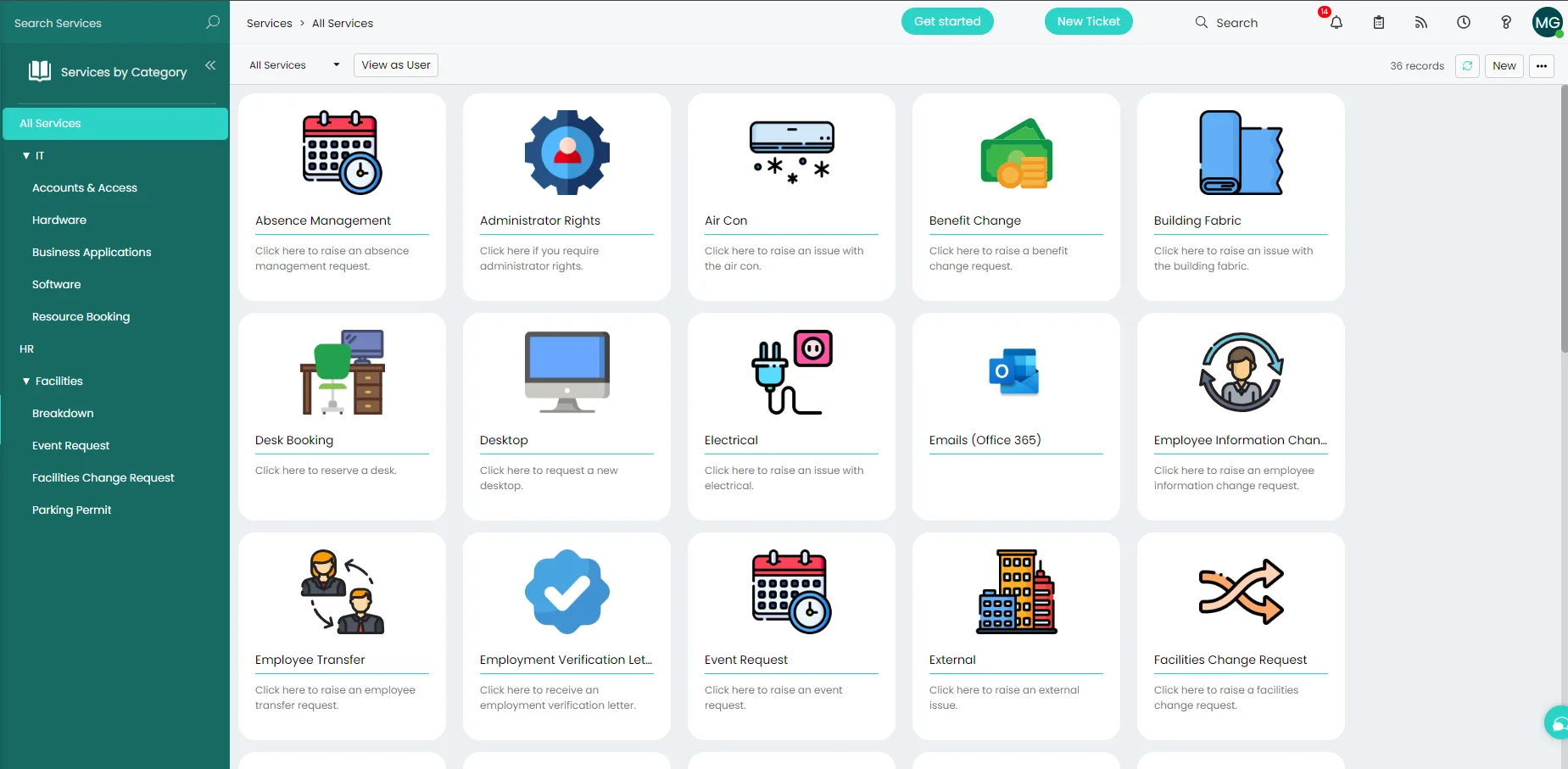
Halo's service catalogue is built around a three-tier structure — department, category, and service — so your catalogue mirrors how your organisation actually works. Services are configured in the admin interface and published to the portal immediately, with no code required at any step.

  • Three-tier hierarchy — departments contain categories, categories contain services. Up to three levels out of the box, matching any organisational structure.
  • Granular access control — restrict which services each team, department, or individual user can see and request. Visibility inherited from the service category, overridable at user level.
  • SLA per service — attach SLAs and OLAs directly to individual services so fulfilment targets are automatically applied when a request is raised.
Service Catalogue configuration in Halo ITSM
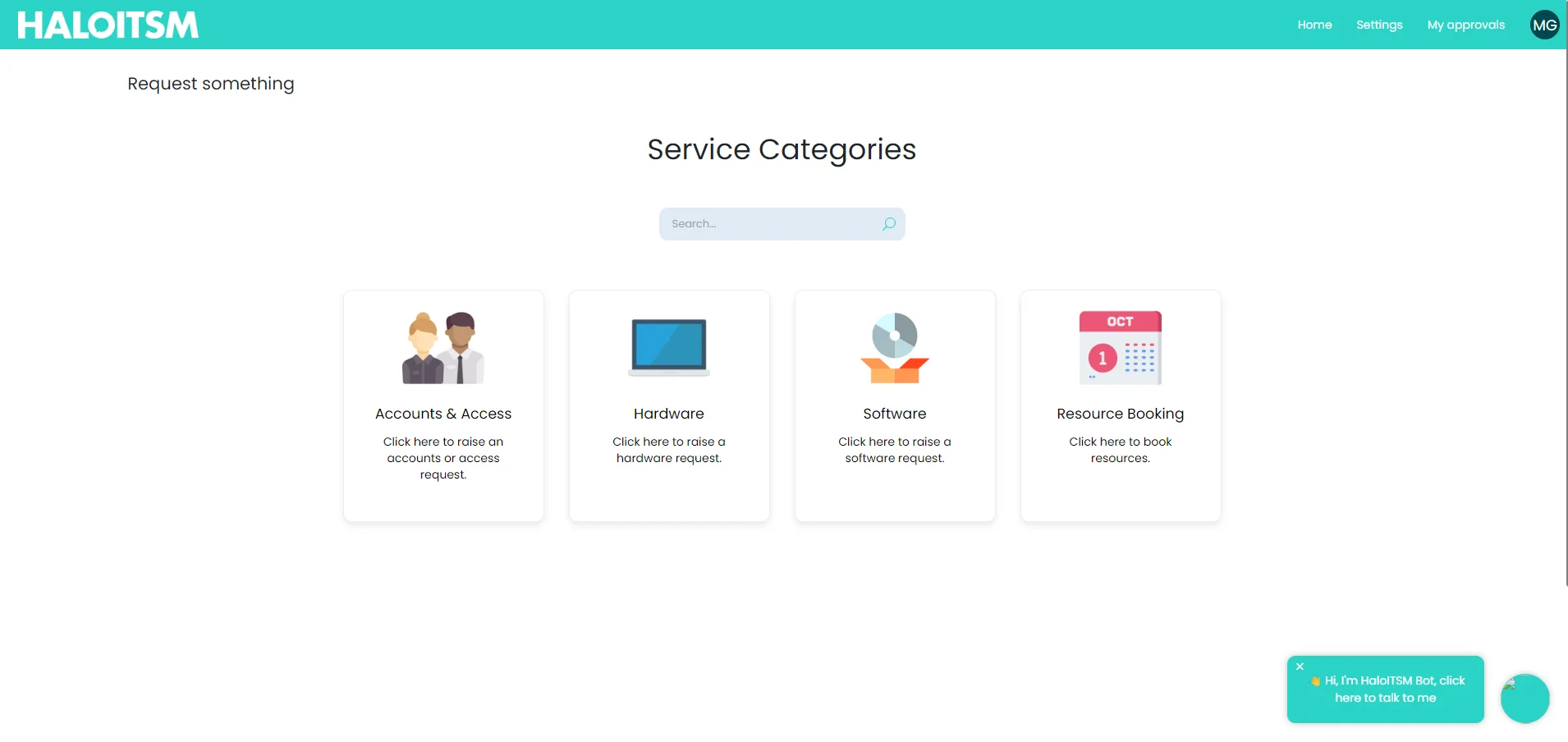
Service Catalogue on the Halo self-service portal

A catalogue your employees
will actually use.

Services appear in the portal exactly as they're configured — with names, descriptions, and images your employees recognise. The layout is branded to match your organisation, and users only see the services they're entitled to request. No clutter, no confusion.

  • Storefront layout — services displayed with name, description, and optional pricing. Users browse and select like an internal shop, with a summary confirmation before submitting.
  • Fully branded — logo, colours, and button layout configured to match your organisation. End-users experience an extension of your IT presence, not a generic tool.
  • CMDB-linked services — every service can be linked to asset types from the CMDB, so when a user raises a request, the relevant CI is automatically attached to the ticket.

New starter. Day one.
Fully automated.

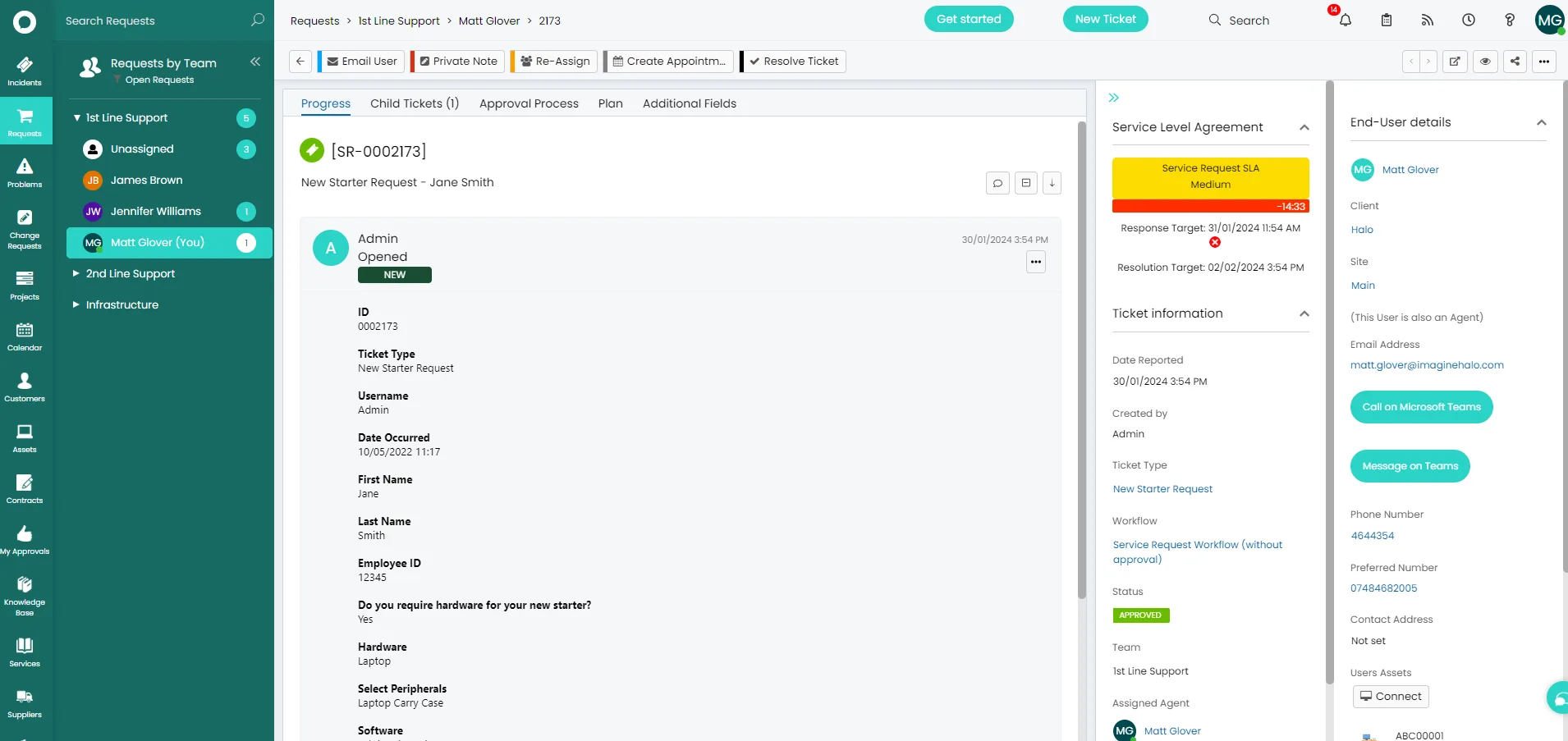
Complex multi-team requests — new starters, leavers, equipment provisioning — are handled through parent and child ticket relationships. One submission automatically spawns tasks for every team involved, routed to the right people without any manual intervention.

  • Parent & child tickets — a single request automatically creates and routes child tasks to IT, HR, Facilities, or any team — in parallel or in sequence, based on the workflow you define.
  • Dynamic forms — fields show or hide based on what the user selects. One ticket type handles multiple request variations without creating dozens of near-identical templates.
  • New starter OOTB — Halo ships with a pre-built onboarding workflow. Use it as-is or adapt it to your process — no build from scratch required.
New Starter request logged via the Service Catalogue in Halo ITSM

Everything in the service catalogue.

All capabilities included in every Halo ITSM licence — no extra modules, no per-feature pricing.

Three-tier hierarchy

Department → Category → Service. Organise your catalogue to match your org structure, with granular control at every level.

Department-level access

Each team only sees the services relevant to them. Access controlled by department, group, site, or individual — out of the box.

Dynamic forms

Fields show and hide based on selections. One ticket type handles multiple request variations without template sprawl.

Automated fulfilment

Workflow-driven routing from submission through every approval and task — no manual handoffs, no chasing between teams.

CMDB integration

Link every service to asset types in the CMDB. When a request is raised, the relevant CI is attached automatically — no manual selection.

SLA per service

Attach individual SLAs and OLAs to each service. Fulfilment targets are enforced automatically — no manual SLA assignment per ticket.

The service catalogue.
No extras. No add-ons.

🗂️

Ready from day one

Halo ships with a pre-built service catalogue including new starter, leaver, laptop request, and more. Use it immediately or adapt it to your process — either way you're live from day one.

ESM-ready out of the box

The catalogue isn't just for IT. HR, Facilities, Finance, and Legal can each have their own department catalogue — same platform, same portal, same licence. No per-department fees.

🛡️

No-code configuration

Every aspect of the catalogue — structure, forms, access controls, branding — is configured through Halo's admin interface. No developer required, no custom code, no professional services fees to get started.

Service catalogue in Halo — answered directly.

Yes. Halo ships with a pre-built service catalogue that includes common request types — new starter, leaver, laptop request, and more — configured and ready to use from day one. The catalogue is fully adaptable: you can edit existing services, add new ones, or restructure the hierarchy to match your organisation without any code or professional services involvement.

Yes. The service catalogue in Halo supports multiple departments and business units from a single instance. Access is controlled at department, group, site, or individual user level — meaning each team only sees the services relevant to them. IT, HR, Facilities, Finance, and Legal can each have their own catalogue section, all managed from the same admin interface and served through the same self-service portal.

Halo handles multi-team requests through parent and child ticket relationships. When a new starter request is submitted, Halo automatically creates child tasks for every team involved — IT account setup, equipment provisioning, HR onboarding, building access — and routes each to the right team simultaneously. Halo ships with an out-of-the-box new starter workflow that you can use immediately or adapt to your process. No manual handoffs, no chasing between teams.

Yes. Every service in the Halo catalogue can be linked to one or more asset types from the CMDB. When an end-user raises a request for a linked service, the relevant configuration item is automatically attached to the ticket. This removes the need for agents to hunt for the right asset and speeds up fulfilment by surfacing all the relevant context from the moment the ticket is raised.

Yes. The service catalogue — including multi-department support, dynamic forms, automated fulfilment workflows, CMDB integration, and SLA-per-service — is fully included in every Halo ITSM licence at no additional cost. There are no separate module fees to unlock catalogue functionality, and no limits on the number of services or departments you can configure.

See the service catalogue in Halo.

Talk to an Allied ESM specialist and see exactly how Halo's catalogue handles your request types and team structure.

Schedule a call