AI-Powered · Included in every licence

Knowledge that deflects tickets.
AI-powered, built in.

Halo ITSM includes a fully integrated knowledge base with AI-powered article suggestions. Surface the right answer before a ticket is raised, capture resolutions at closure, and cut inbound demand — no extra cost, no separate tool.
AI
Article suggestions
Inbound demand
Auto
Resolution capture
£0
Extra module cost
The Knowledge Loop

Stop solving the same problem twice.

Without a knowledge base, every agent starts from scratch every time. With one, each resolution makes the next one faster — and the one after that faster still.

Without a knowledge base

  • Same issue reported again. Agent rebuilds context from scratch.
  • Resolution buried in a closed ticket no one thinks to search.
  • New starters take months to reach the same quality as experienced agents.
  • AI has nothing to learn from — it surfaces weak suggestions or nothing at all.
  • Service quality depends entirely on who picks up the ticket.

With Halo's knowledge base

  • AI surfaces the resolution the moment the ticket is opened.
  • Every closure adds to the library — the KB gets richer automatically.
  • New starters resolve at the same quality as your best agents from week one.
  • AI suggestions improve continuously as your knowledge base grows.
  • End-users find answers on the portal before they raise a ticket.

The flywheel effect

A knowledge base compounds over time. The first hundred articles deflect a handful of tickets. The next thousand make your AI suggestions genuinely reliable. The combination of good resolution capture, review discipline, and AI surfacing creates a loop that improves service quality continuously — without adding headcount.

Organised, searchable,
and always up to date.

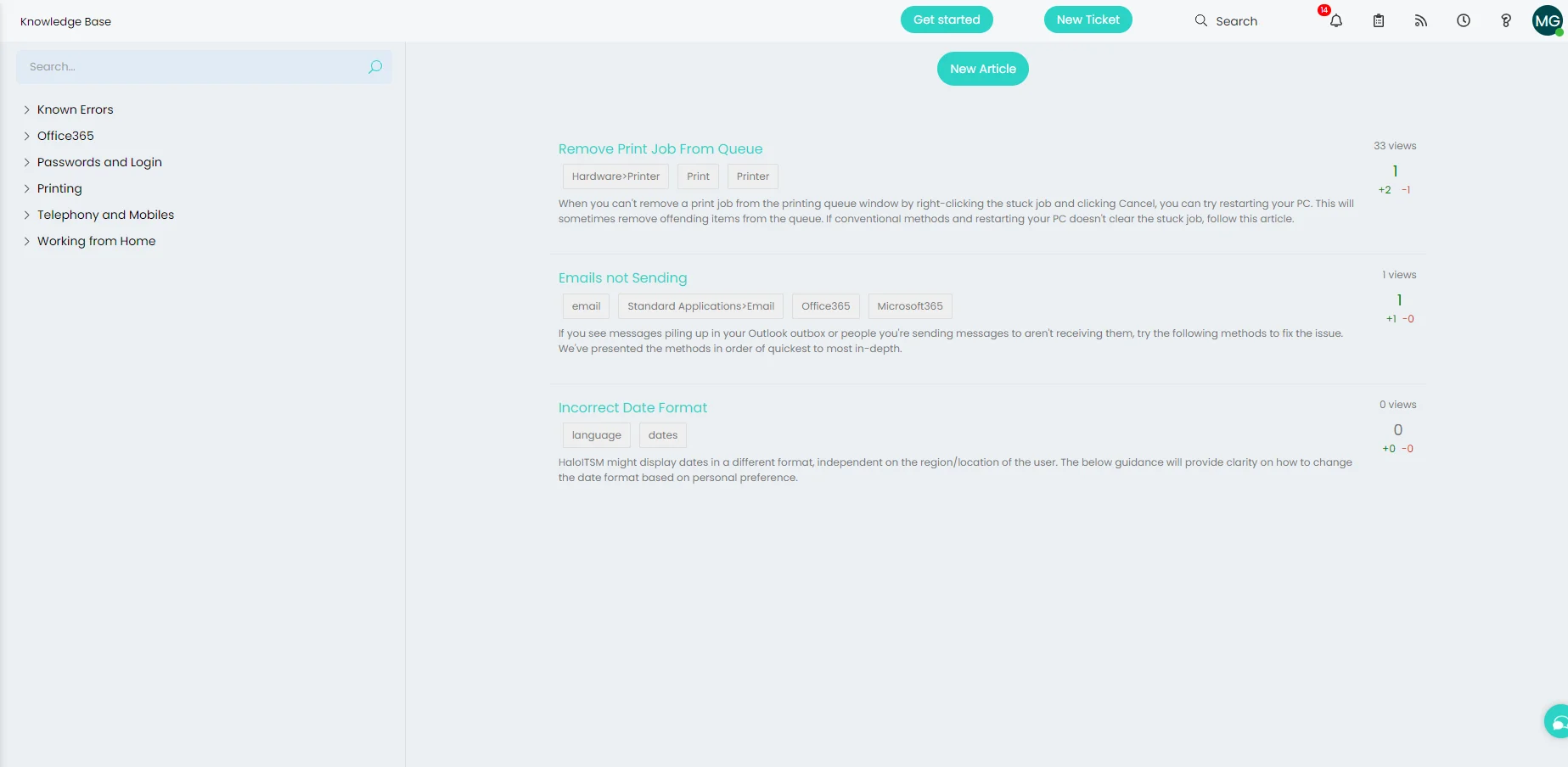
Halo's knowledge base is built into the platform — no third-party tool, no separate licence. Articles are organised into categories, tagged for fast filtering, and rated by the agents and end-users who use them. Every article shows view counts and feedback scores so your team can see what's working and what needs improving.

  • Category-based structure with full-text search — agents and end-users find answers in seconds, not minutes.

  • Tags, view counts, and helpfulness ratings on every article — see at a glance which knowledge is being used and which needs a refresh.

  • Separate visibility controls for agents and end-users — internal runbooks stay internal; public-facing articles go to the self-service portal.

Halo ITSM knowledge base screen showing categorised articles with tags, view counts, and helpfulness ratings
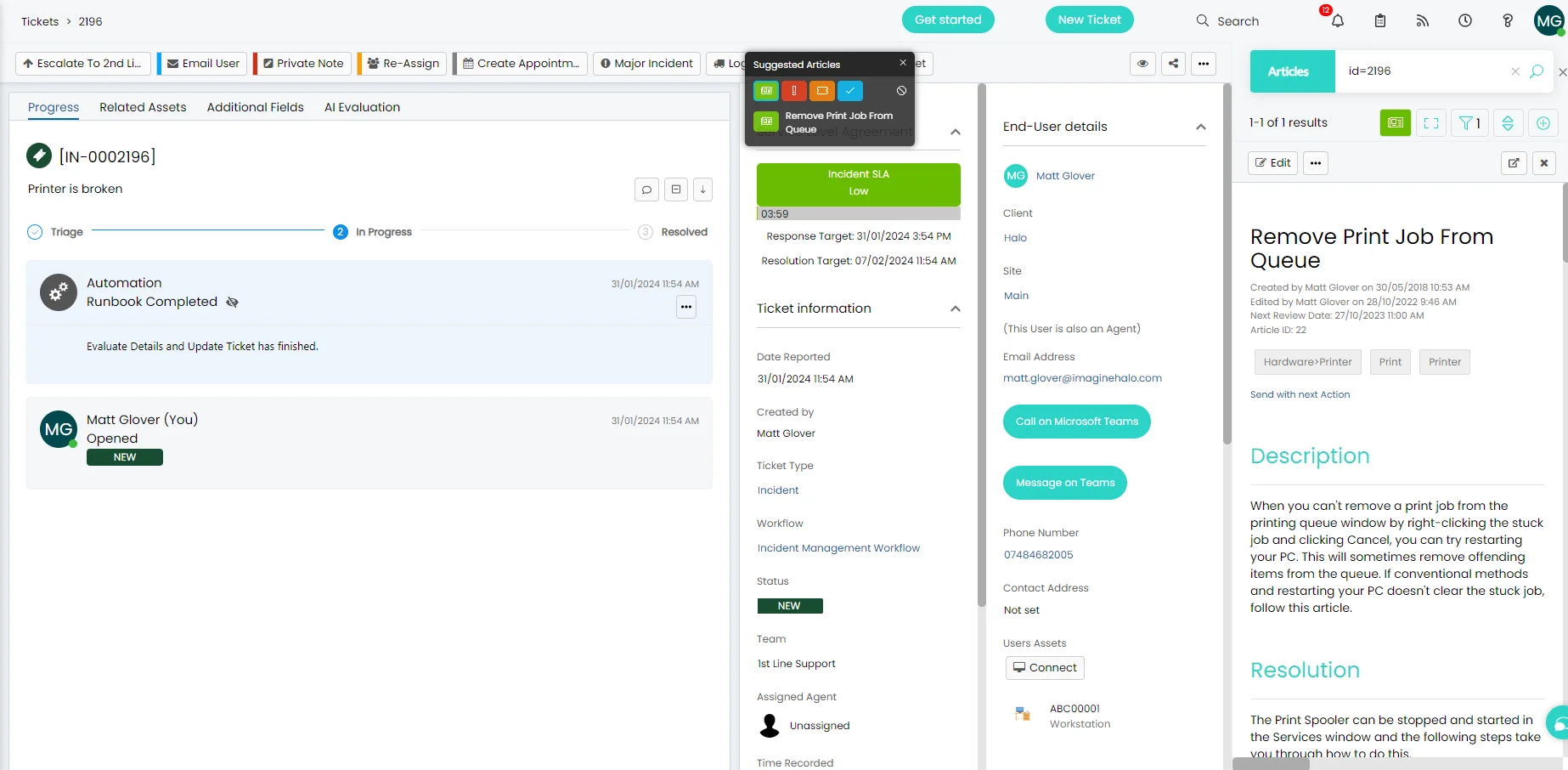
Halo ITSM AI-powered article suggestion appearing on an open incident ticket, showing the relevant knowledge base article inline

The right answer,
on the right ticket.

As soon as a ticket is opened, Halo's AI analyses the subject and description and surfaces relevant knowledge base articles directly in the ticket view. Agents see the answer without leaving the ticket — and can send the article to the end-user with one click.

  • Article previews appear inline — agents read the full description and resolution without opening a separate tab.

  • End-users on the self-service portal see relevant articles before they submit — deflecting demand before the ticket is ever raised.

  • No configuration needed — Halo's AI suggestion engine works from day one against your existing knowledge base content.

Turn every resolution
into reusable knowledge.

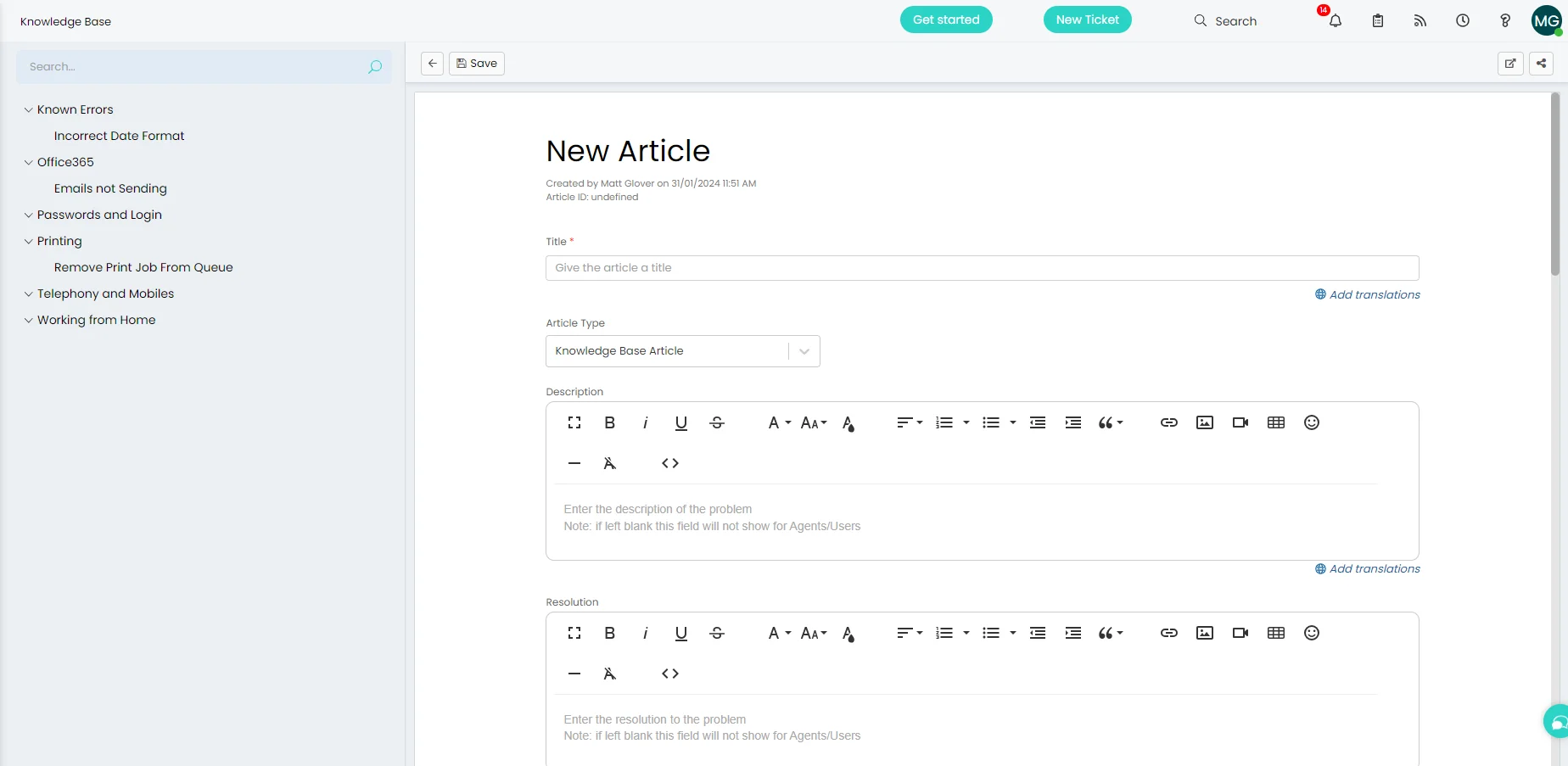
Halo prompts agents to contribute to the knowledge base at ticket closure — while the resolution is still fresh. A structured article form with separate Description and Resolution fields means every article is consistent, searchable, and immediately useful to the next agent who needs it.

  • Rich text editor with formatting, images, and code blocks — articles look professional without any extra effort.

  • Apply templates for consistent structure — new starters can contribute quality articles from their first week.

  • Review dates keep the knowledge base accurate — articles flag for review automatically so nothing goes stale.

  • Embed videos directly in articles — paste a URL and the video plays inline. End-users don't need to leave the article to watch it.

Halo ITSM new knowledge base article form with Title, Description and Resolution fields

Everything knowledge management needs.

Built in and ready from day one — no separate tool, no extra licence.

Full-Text Search

Agents and end-users search across all articles instantly. Results rank by relevance, tags, and helpfulness scores — the best answer surfaces first.

Helpfulness Ratings

Thumbs up/down feedback on every article. View counts and ratings surface what's working and flag what needs updating — continuously improving quality without manual audits.

Agent & End-User Visibility

Control which articles are internal and which appear on the self-service portal. Internal runbooks and troubleshooting guides stay private; public articles deflect end-user tickets.

Known Error Database

Link articles directly to Problem records. Known errors and workarounds are shared automatically with agents working on related incidents, reducing resolution time and repeat escalations.

Review Dates & Ownership

Set review dates on every article. Halo flags articles for renewal automatically, ensuring your knowledge base stays accurate as your environment changes — no manual calendar required.

Self-Service Portal Integration

Knowledge base articles appear natively on the self-service portal. End-users see relevant articles as they type their request — deflecting demand before the ticket is ever submitted.

Article Versioning

Create new versions of articles, compare changes side by side, and roll back if needed. When an article is linked to a ticket, Halo automatically serves the most recent published version — end-users always see the current answer.

Article Drafts & Review Queue

Articles created at ticket closure start as drafts and sit in a review queue before publishing. Knowledge managers approve before anything goes live — keeping quality high without slowing agents down at the point of closure.

Related Articles

Link articles to each other and Halo surfaces suggested follow-on reading at the bottom of every article — guiding agents and end-users through connected topics without needing to search again.

Find the gaps before
users give up and raise a ticket.

Halo logs every search made on the self-service portal — including searches that returned no articles. Your team can run reports to see exactly what users are looking for but not finding, and proactively create the missing knowledge before those searches turn into tickets.

  • Every portal search is stored — including the ones that returned nothing. No more guessing what your users need.

  • Run a report on failed searches to build a prioritised article backlog — the most common unmet searches become the next articles you write.

  • Shifts knowledge management from reactive (writing articles after tickets) to proactive (filling gaps before demand arrives).

Portal Search Log — No Results
"how to connect to VPN from home" 47 searches · 0 results
"outlook mobile setup" 31 searches · 0 results
"printer not found on new laptop" 28 searches · 0 results
"password reset not working" 19 searches · 0 results
Last 30 days → Create articles for these topics

Knowledge management is standard.
Not an add-on.

Halo's knowledge base, AI suggestion engine, and self-service portal integration are all included in the single monthly licence — no per-module fees, no AI surcharges.

🧠

AI article suggestions

Surfaces relevant articles on open tickets automatically — no configuration, no training required.

📚

Built-in, not bolted on

Fully integrated into the ticket workflow, the portal, and problem management — one platform, no integrations to maintain.

Demand deflection

Articles surface on the portal before a ticket is raised and on the ticket before an agent starts typing — cutting volume at both entry points.

Frequently asked questions

Knowledge management in Halo — answered directly.

Is the knowledge base included in Halo ITSM?
Yes. The knowledge base is fully included in every Halo ITSM licence at no additional cost. This includes the agent-facing knowledge base, the end-user portal integration, AI-powered article suggestions, review dates, ratings, and the known error database. No separate module or add-on is required.
How does Halo's AI article suggestion work?
When a ticket is opened, Halo analyses the ticket subject and description and matches it against your existing knowledge base. Relevant articles are surfaced directly within the ticket view — agents can preview the full article inline and send it to the end-user without leaving the ticket. The suggestion engine also surfaces articles on the self-service portal as end-users type their request, deflecting tickets before they are raised.
Can end-users access the knowledge base themselves?
Yes. Articles marked for end-user visibility appear on the Halo self-service portal. End-users can search, browse by category, and view articles before submitting a ticket. Articles rated as helpful by end-users rank higher in search results. Internal articles — runbooks, troubleshooting guides — can be restricted to agents only.
How does Halo link knowledge to problem management?
Problem records in Halo can be linked directly to knowledge base articles. When a known error is documented, the associated article is surfaced automatically on incidents linked to that problem — giving agents the workaround or resolution without needing to search for it. This reduces resolution time and prevents repeat escalations on known issues.
What makes a knowledge base actually useful?
The technology is the easy part. What makes a knowledge base genuinely useful is the discipline behind it: agents documenting resolutions properly at closure, not just marking tickets done. The quality of what goes in determines the quality of what the AI can surface. A thin or poorly documented knowledge base means weak suggestions and low deflection rates — regardless of how capable the AI is. The organisations that get the most from Halo's knowledge management start by building the habit of good resolution capture. After that, the system does the compounding work.
How do we keep the knowledge base up to date?
Every article in Halo can have a review date set. When the date is reached, the article is flagged for review — the assigned owner is notified to update or reconfirm its accuracy. View counts and helpfulness ratings also highlight articles that are frequently accessed but poorly rated, helping you prioritise quality improvements without a manual audit.

Also in Halo ITSM

Everything you need — included in one licence.

Incident Management Problem Management Service Request Self-Service Portal Change Management Knowledge Management Platform Reporting Asset Management Service Catalogue Contract & Supplier Management SLA Management

See knowledge management in Halo.

Talk to an Allied ESM specialist and see how Halo turns every resolution into reusable knowledge.

Schedule a call