Structured · Included in every licence

Every request handled.
Every time.

Halo ITSM includes full service request management with configurable forms, automated fulfilment workflows, multi-stage approval routing, and complete end-user visibility — all in one platform, included in every licence.

Auto
Fulfilment workflows
Multi
Stage approvals
SLA
Tracking built in
£0
Extra module cost

Every request visible.
Nothing outstanding.

Halo separates service requests from incidents — giving your team a clean, dedicated queue that shows every open request, its category, current workflow stage, assigned team, and SLA status at a glance. No more mixing routine requests with urgent incidents in the same view.

  • Dedicated service request queue — separated from incidents so your team can manage volume and SLAs without the noise of unrelated tickets.

  • Filter by request type, team, SLA status, or requester — the right view for every agent, from first-line fulfilment through to senior approval.

  • SLA tracking on every request — Halo monitors response and fulfilment times and alerts the team before a commitment is missed.

Halo ITSM service request queue showing open requests with category, workflow stage, assigned team, and SLA status
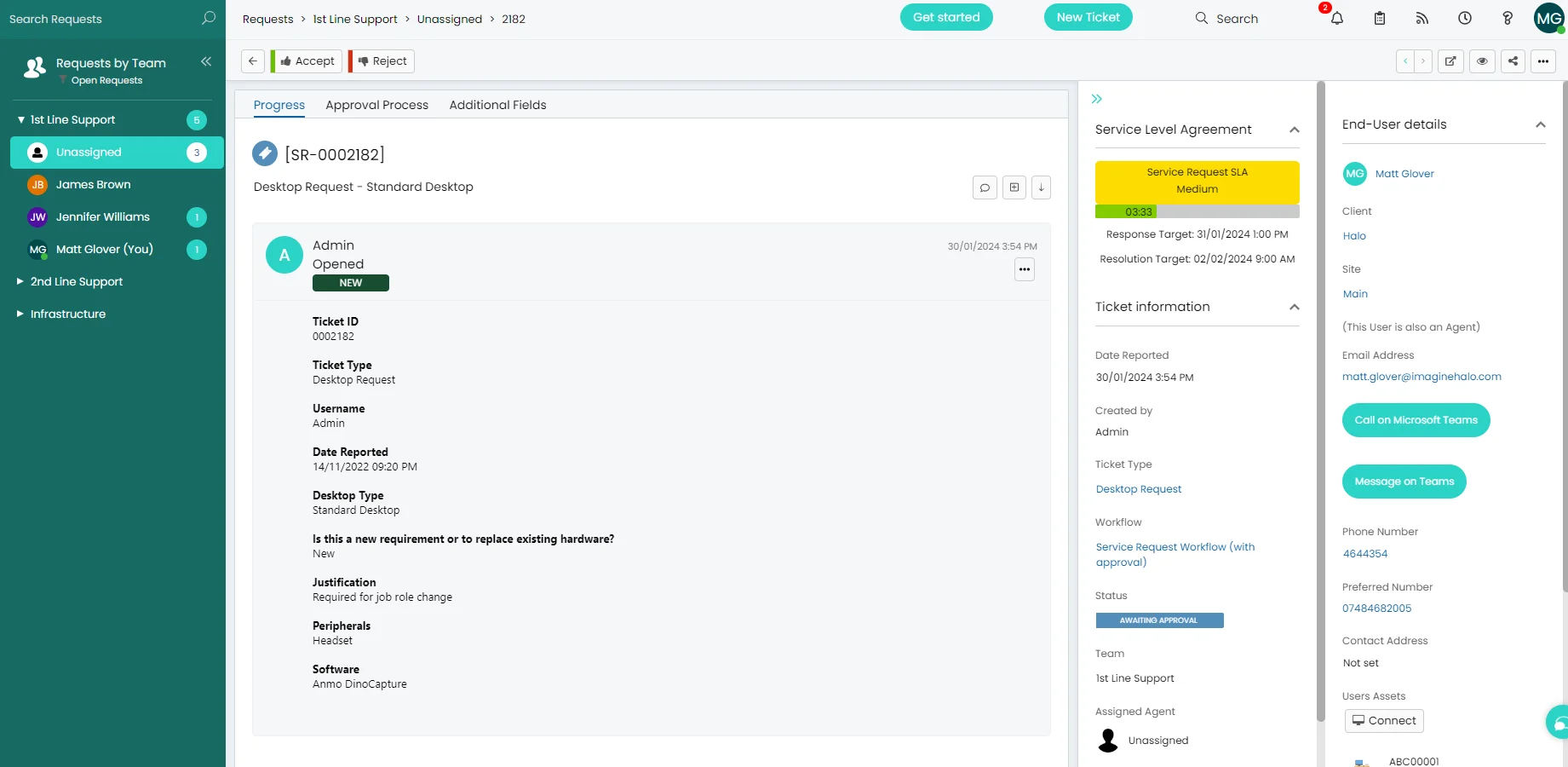
Halo ITSM service request ticket detail showing workflow stage, approval status, fulfilment tasks, and end-user communication thread

Workflow, approvals,
fulfilment — one view.

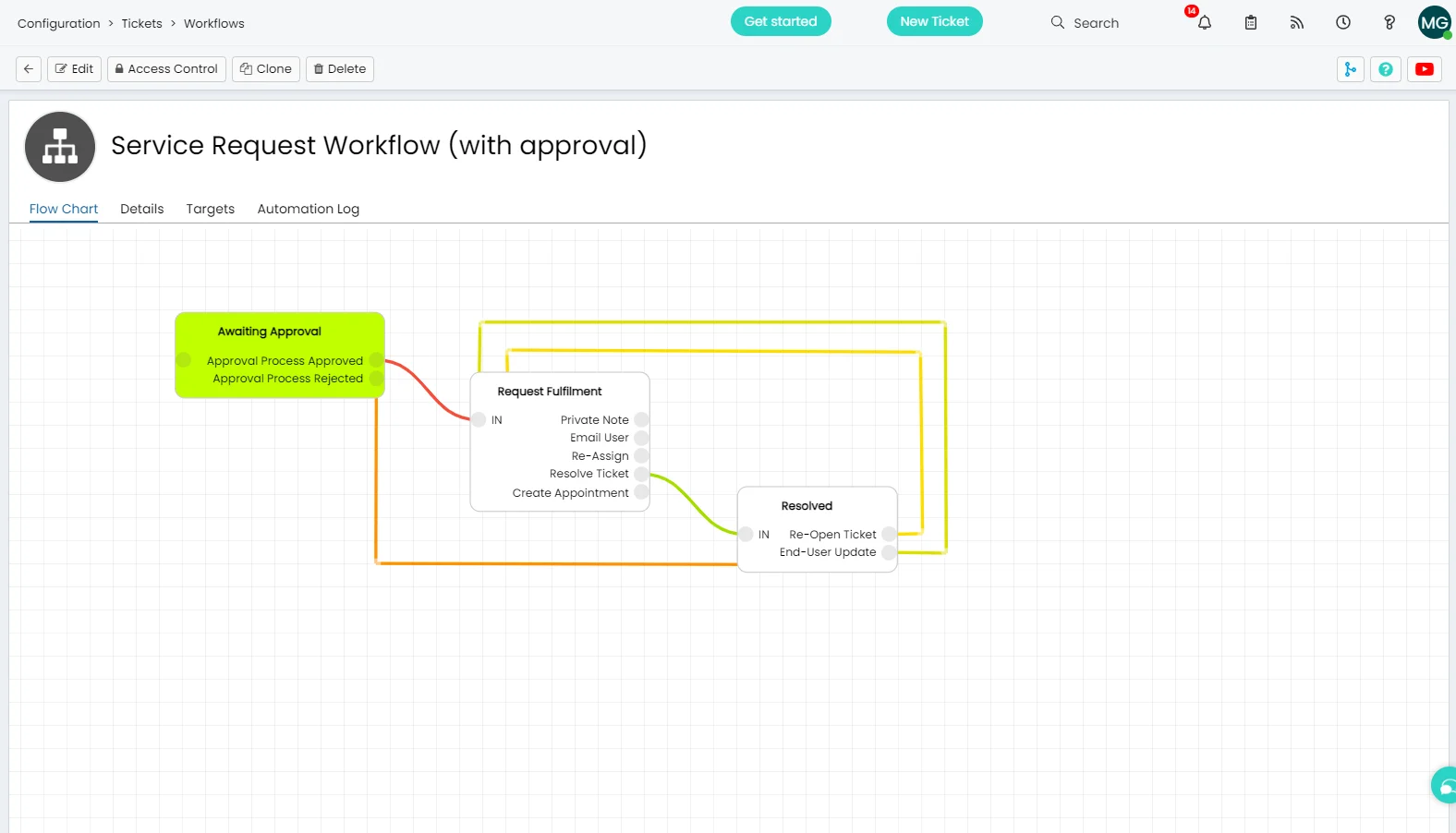
Halo's service request ticket brings together the full lifecycle in one screen — current workflow stage, pending approval tasks, assigned fulfilment steps, and the complete communication thread with the requester. Nothing is hidden in a separate system or a spreadsheet.

  • Workflow stage shown at a glance — agents see exactly where in the fulfilment process a request sits without having to read through every action note.

  • Approval tasks surface directly in the ticket — approvers are notified, action in the portal, and the workflow advances automatically on approval without any manual chasing.

  • End-user updates are sent automatically at each workflow stage — requesters are kept informed without any manual communication effort from the team.

The right fields.
Every request type.

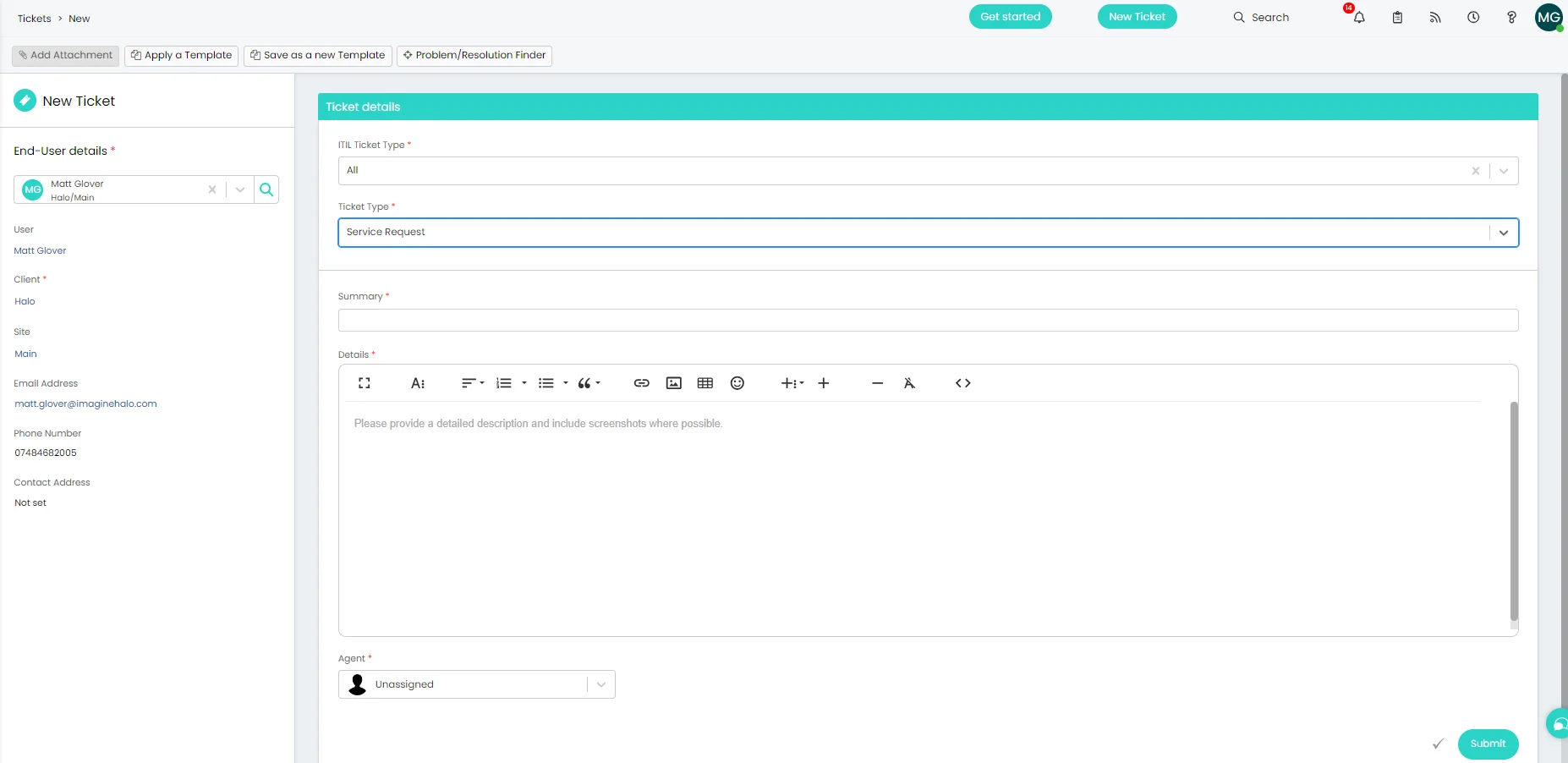
Every service request type in Halo has its own configurable form — with only the fields relevant to that request. New starter provisioning asks for start date, role, and equipment. Software access requests ask for the application and business justification. End-users get a clean, relevant form. Your team gets complete, consistent data every time.

  • Fully configurable forms per request type — no unnecessary fields, no free-text descriptions that leave your team guessing what's actually needed.

  • Dynamic field logic — show or hide fields based on previous answers. A hardware request for a laptop shows different options than one for a monitor.

  • Available from the self-service portal or raised by agents on behalf of end-users — consistent structured intake regardless of how the request comes in.

Halo ITSM new service request form showing configurable fields for request type, requester, and specific fulfilment details

Everything service request management needs.

Built in and ready from day one — no extra module, no separate workflow tool.

Service Catalogue Integration

Every request type in Halo maps to a service catalogue item — the right form, the right workflow, and the right team are all pre-configured. End-users browse and request without knowing anything about how IT works behind the scenes.

Multi-Stage Approvals

Build approval chains with multiple stages, parallel approvals, and conditional routing. Approvers are notified automatically and can action requests directly from the self-service portal — no Halo licence required.

Automated Fulfilment Workflows

Define fulfilment steps for every request type — tasks assigned automatically to the right teams in the right sequence. Password resets fulfilled in seconds; new starter provisioning completed across multiple teams without manual coordination.

SLA Tracking

Set fulfilment SLAs by request type or priority. Halo tracks every request in real time, alerts agents before breach, and escalates automatically when thresholds are crossed — so commitments are met without manual oversight.

Dynamic Forms

Show or hide fields based on previous answers. Mandatory fields enforce data quality at intake. Different request types get different forms — all configured without code, using Halo's built-in form builder.

End-User Visibility

Requesters track their own requests from the self-service portal — current stage, pending approvals, and estimated fulfilment. Automated updates at every workflow stage keep end-users informed without any effort from your team.

Service request management is standard.
Not an add-on.

The full service request lifecycle — catalogue integration, dynamic forms, approval chains, automated workflows, and SLA tracking — is all included in Halo's single monthly licence. No per-module fees, no workflow tool to licence separately.

📋

Structured intake, every time

Configurable forms per request type mean every request arrives with the right information — no back-and-forth to gather missing details before fulfilment can begin.

⚙️

Automated from approval to fulfilment

Multi-stage approvals and automated task assignment mean requests move through the workflow without manual chasing — from submission to closure.

£0

No separate workflow tool

Everything runs inside Halo — no third-party workflow or approval tool to licence, integrate, or maintain alongside your ITSM platform.

Frequently asked questions

Service request management in Halo — answered directly.

Is service request management included in Halo ITSM?
Yes. Service request management is fully included in every Halo ITSM licence at no additional cost. This covers the full request lifecycle — catalogue, dynamic forms, multi-stage approvals, automated workflows, SLA tracking, and end-user visibility from the self-service portal. No separate module or workflow tool is required.
How does Halo handle approvals for service requests?
Halo supports multi-stage approval chains configured per request type. Approvers are notified automatically when a request reaches their approval stage — they can approve or reject directly from the self-service portal without needing a Halo agent licence. Parallel approval (where multiple approvers must all agree) and sequential approval (where approval moves through a chain) are both supported. The workflow advances automatically on approval, with no manual intervention required from the service desk.
Can we have different forms for different request types?
Yes. Each service request type in Halo has its own configurable form built using the platform's no-code form builder. Fields can be mandatory, optional, or conditional — appearing only when a previous answer triggers them. This means a new starter request shows different fields than a software access request, and end-users only see what's relevant to what they're asking for.
How does service request management differ from incident management?
In ITIL terms, incidents are unplanned interruptions — something has broken and needs restoring to normal operation as fast as possible. Service requests are planned activities — a user needs something provided, changed, or provisioned. Halo handles both in separate queues with separate workflows, SLAs, and forms. This separation keeps your incident queue focused on genuine outages while service requests follow structured fulfilment paths. Both are included in the standard Halo licence.
Can end-users submit and track service requests themselves?
Yes. End-users submit service requests directly from the Halo self-service portal, choosing from your service catalogue. Once submitted, they can track the request through every stage — current workflow step, pending approval status, and estimated fulfilment — from their "My Tickets" view on the portal. Automated updates are sent at each stage so requesters are always informed without needing to contact IT.

See service request management in Halo.

Talk to an Allied ESM specialist and see how Halo handles every request — from submission to fulfilment — without the manual chasing.

Schedule a call