Halo ITSM includes ITIL-aligned change management as standard. Structured intake, visual workflows, CAB approval with voting, risk and impact assessment, backout plans — all in one platform. No extra module, no extra cost.
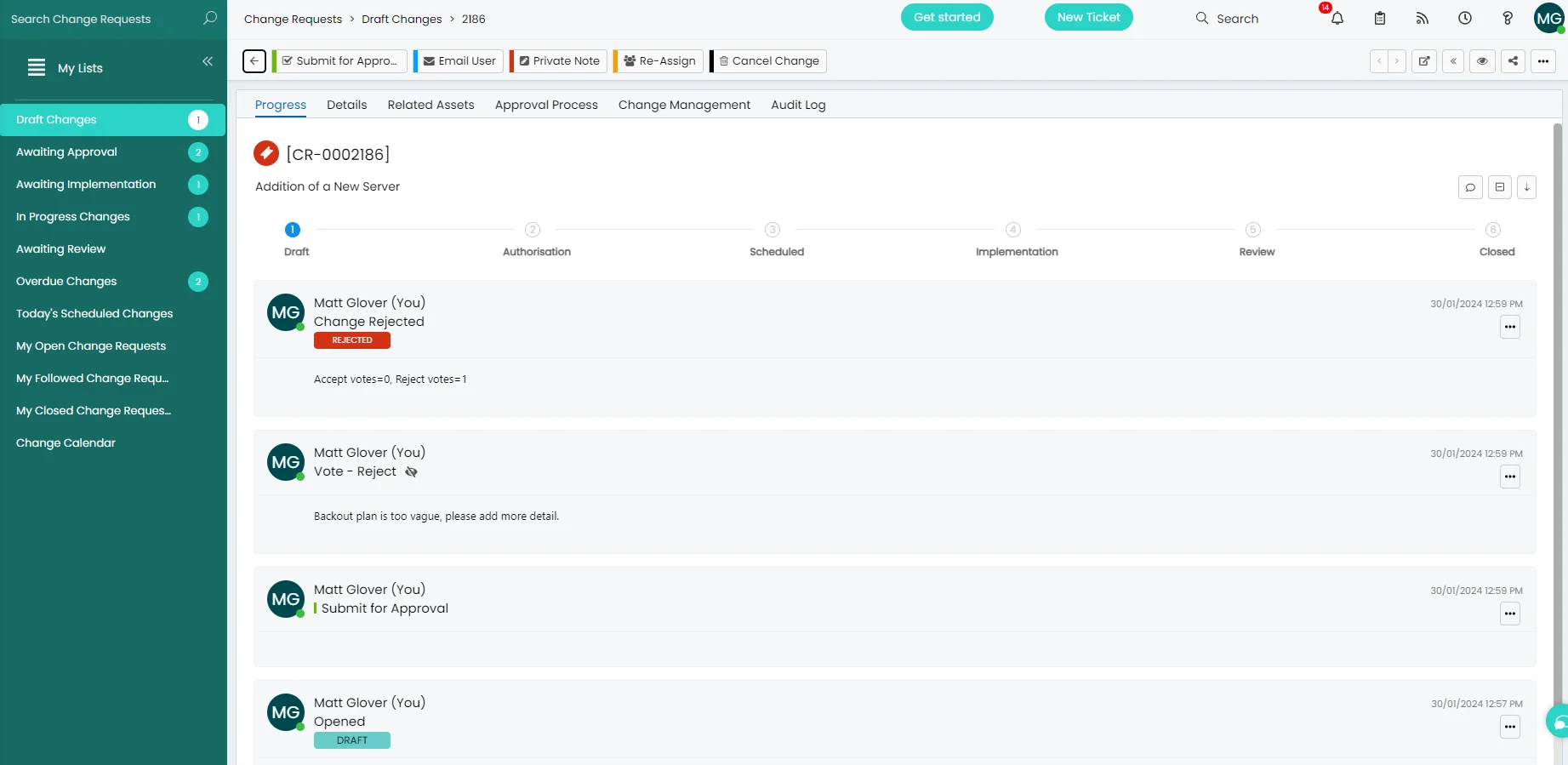
Every change request moves through a structured six-stage lifecycle — built in, not bolted on. At each stage, Halo enforces the right actions, captures the right data, and keeps a full audit trail automatically.
Changes start in Draft with no mandatory fields — giving you the flexibility to raise a record before you have all the information. Fields only become mandatory at the point of formal submission. This means you can assign it to a colleague to complete, gather information across teams, or hold it while you confirm scheduling — without blocking the process or losing the record.
CAB members vote directly in Halo — accepting or rejecting with a mandatory reason. Rejections are logged against the change record with the reviewer's comments, so nothing falls through the cracks.
Visual Workflow Builder
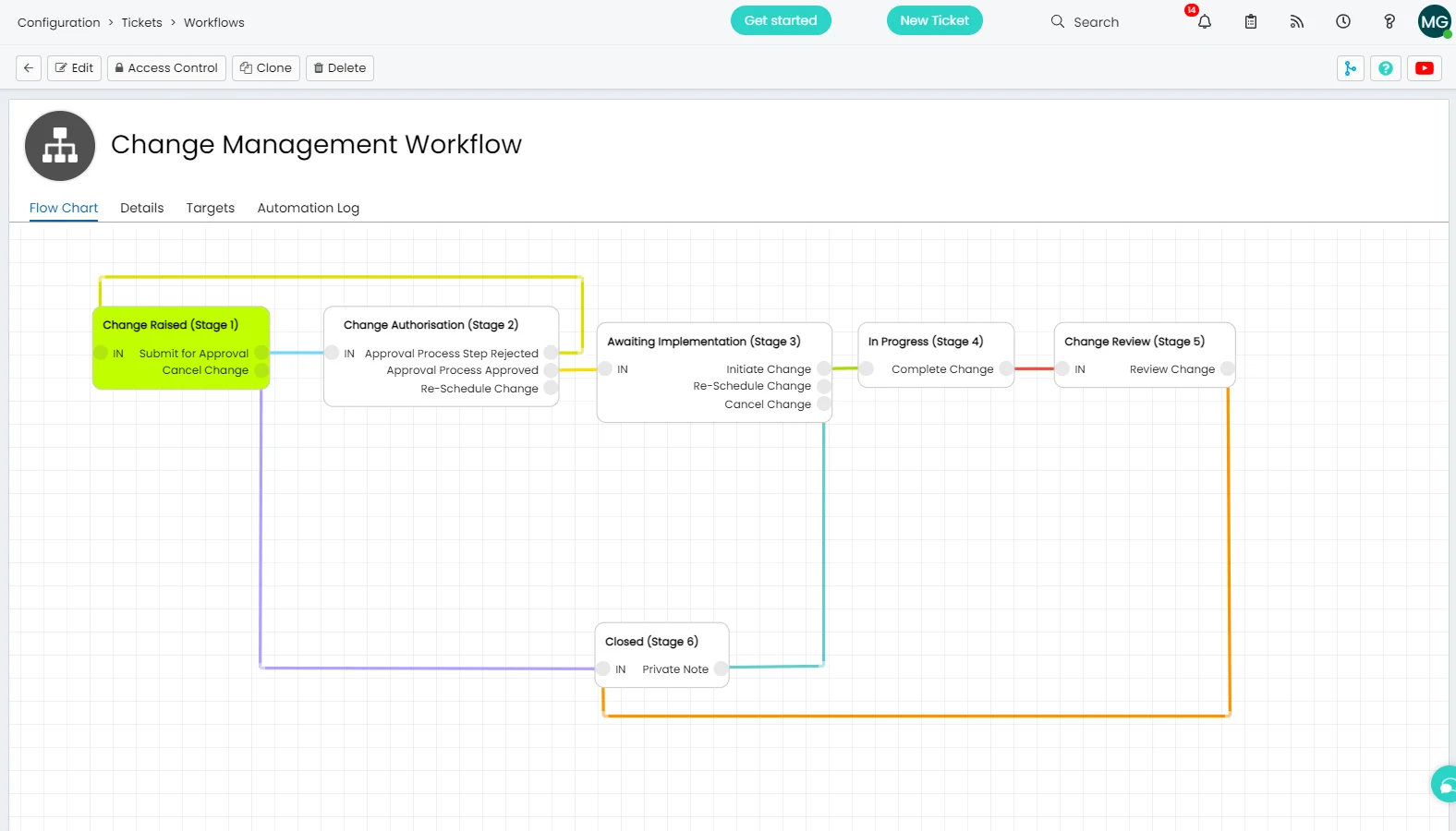
Your process, configured visually.
Halo's no-code workflow builder lets you map your change process exactly as it works in your organisation. Drag stages, define transitions, set automation rules — no developer required.
Standard, Normal, and Emergency change types — each with their own workflow, approval requirements, and risk thresholds.
Automation triggers at each stage — notify stakeholders, escalate overdue approvals, update linked assets, or fire webhooks to external systems.
Clone and adapt workflows for different teams, risk levels, or business units — no need to rebuild from scratch.
Structured Intake
Every field the CAB needs. From day one.
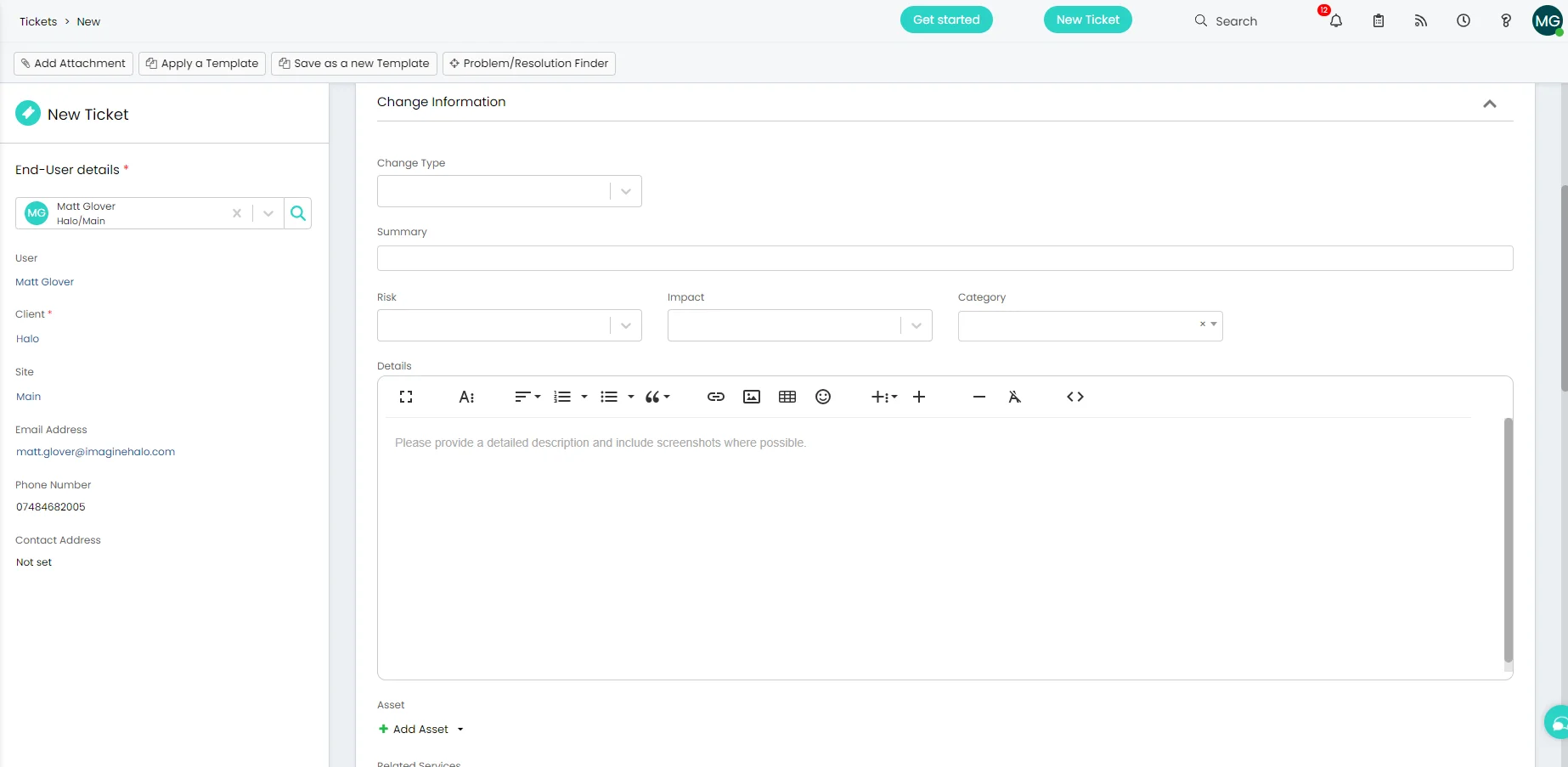
Halo's change request form is built around ITIL best practice. Every field your CAB needs to assess a change is captured at submission — no chasing for information later.
Change Plan — step-by-step implementation detail
Test Plan — validation approach before go-live
Backout Plan — rollback procedure if the change fails
Risk & Impact — structured assessment captured on submission
Downtime Required & Duration — scheduling and impact planning
Related Assets — linked directly to your CMDB records
Risk Scoring
Calculated risk. Not gut feel.
Halo calculates an aggregate risk score for every change automatically — based on weighted values from fields on the change form. The score is calculated at submission, visible on the ticket, and can drive routing decisions or trigger additional approval steps.
Each contributing field has a configurable weighting — for example, Emergency change type: 3, Normal: 2, Standard: 1. Impact fields carry their own weights. Halo can sum them or apply a formula you define. The result is an objective score the CAB can reference without having to interpret free-text fields.
Example calculation
Change type — Emergency+3
Impact — Organisation-wide+3
Risk score6 — Escalated CAB review required
Change Freeze
Blackout windows. Enforced automatically.
Define change freeze periods in Halo — date ranges during which changes cannot be submitted or approved. If a change start date falls within a freeze window, Halo blocks submission at both the form level and the approval action level. There is no bypass without deliberate override.
Visible on the change calendar
Freeze windows display alongside scheduled changes on the shared calendar — so anyone planning a change sees the blackout period before they log the ticket.
Blocked at draft and approval stages
A change with a start date in the freeze window can be saved as a draft but cannot be submitted for approval. Even if the draft was raised before the freeze was defined, the approval action is blocked at runtime.
What's included
Everything change management needs.
Built in. No add-ons, no configuration required to unlock basic functionality.
Standard, Normal & Emergency Changes
Three change types — each with configurable workflows, approval requirements, and risk thresholds. Pre-approved standard changes bypass CAB automatically.
CAB Approval with Voting
CAB members vote to accept or reject directly in Halo. Rejections require a reason — captured automatically against the change record for full traceability.
CAB membership can be automated — Halo determines reviewers based on the technical or business owners of the affected CIs and services, so the right people are always on the CAB without manual selection every time.
CAB members and approvers do not require a Halo agent licence — they review and vote via the Halo end-user portal at no additional cost.
Change Calendar
A shared calendar view of all scheduled changes across the organisation. Spot conflicts, manage freeze windows, and coordinate implementation windows at a glance.
Change Plan, Test Plan & Backout Plan
Three structured plan fields built into every change request. Captured at submission, reviewed at authorisation, referenced at implementation — no separate documents needed.
CMDB Integration
Link changes directly to affected CIs and assets in the CMDB. See the downstream impact of a change before it's approved — and track which CIs were touched after closure. The full CI dependency map renders directly on the change record, showing the complete service chain from application instance to business service, so reviewers have full context before they vote.
Full Audit Log
Every action, every vote, every status change — logged automatically against the change record. Timestamped, attributed, and exportable for compliance reporting.
Approval Delegation
When an approver is unavailable, they can delegate their authority to a colleague for a defined period — with a full audit trail. Changes never stall waiting for someone on leave.
Change Templates
Standard and Normal change templates pre-populate the form for recurring change types at the point of raising — reducing effort and improving consistency across your change records.
AI Change Optimization
Every change request includes an AI tab that surfaces similar historical changes, predicts failure risk based on past closure outcomes, and matches relevant knowledge base articles — giving the CAB objective context before they vote.
Incident → Problem → Change
When multiple incidents point to an underlying issue, Halo supports the full ITIL escalation path — Major Incident to Problem Record to Change Request — with each ticket linked to the next. Full traceability from the original incident to the change that resolved it.
Software Releases
Link specific product versions and releases to change requests. Track which software release a change relates to, send release notes to affected users from the same record, and report on change activity by release — without leaving Halo.
Change Dashboard
An out-of-box reporting dashboard surfaces open changes, planned changes, and changes by stage and category — all in one view. No custom reports to build; the visibility you need to run and improve your change process is there from day one.
Post-Implementation Review
Don't close the change before the dust has settled.
Halo's change lifecycle includes a structured Post-Implementation Review (PIR) stage before closure. Rather than closing a change the moment implementation is complete, Halo holds the record open — giving your team time to confirm the change did what it was supposed to, and that no unexpected issues have emerged.
Best practice is to configure a deliberate delay between the implementation stage and PIR — typically a few days. Problems caused by a change don't always surface immediately, and reviewing too quickly means confirming success before you have the full picture.
How Halo handles it
Configure an automated time delay between the Implementation and Review stages. Halo holds the change in a PIR-pending status, then opens the Review stage automatically after your defined window — so every change gets reviewed with enough elapsed time to be meaningful.
Did the change succeed?
Mark the change as Successful, Partially Successful, or Unsuccessful with structured notes — captured against the record for future reference and trend analysis.
Did anything go wrong?
If the change caused an incident or unexpected behaviour, link it directly from the PIR stage — maintaining the full chain from change to consequence for audit and root cause purposes.
What did you learn?
PIR notes build your lessons-learned record over time — a practical guide for improving your change process, not just a compliance checkbox.
Included in every licence
Change management is standard. Not an add-on.
Unlike ServiceNow — where full change management capability requires additional module licences — Halo includes everything out of the box at a single monthly cost.
🔄
All change types
Standard, Normal, and Emergency — all included with separate workflows and approval paths.
⚡
Visual workflow builder
No-code workflow configuration. Map your process exactly as it works — without a developer.
📋
ITIL-verified out of the box
Halo's change control is ITIL-verified. No framework configuration required — it's ready from day one.
Frequently asked questions
Change management in Halo — answered directly.
What change types does Halo support?
Halo supports Standard, Normal, and Emergency change types. Standard changes are pre-approved and bypass the CAB. Normal changes go through the full authorisation workflow including CAB review and voting. Emergency changes follow an expedited path with appropriate risk controls. Each type has its own configurable workflow and approval requirements.
Does Halo support CAB approval workflows?
Yes. Halo includes a built-in CAB approval process where reviewers vote to accept or reject a change directly in the platform. Rejections require a reason, which is captured against the change record automatically. You can configure who is on the CAB, set approval thresholds, and automate notifications when changes are awaiting review.
Is Halo change management ITIL-aligned?
Yes. Halo ITSM has been independently verified against the ITIL Best Practice Framework for Change Control. The six-stage lifecycle (Draft, Authorisation, Scheduled, Implementation, Review, Closed) follows ITIL guidance out of the box, with no additional framework configuration required.
Does Halo include a Post-Implementation Review stage?
Yes. Halo's change lifecycle includes a dedicated Review stage before closure, designed for Post-Implementation Review. You can configure a deliberate time delay between the Implementation and Review stages — typically a few days — so that any issues caused by the change have time to surface before the record is closed. The PIR captures whether the change succeeded, any linked incidents, and lessons learned.
What happens if a CAB approver is unavailable?
Halo includes approval delegation — approvers can assign their authority to a designated colleague for a defined period, with a full audit trail of the delegation. Changes don't stall while key approvers are on leave, and you maintain full traceability of who approved what, even when delegated.
Is change management included in the Halo licence?
Yes. Change management is fully included in every Halo ITSM licence at no additional cost. There are no module fees to unlock CAB workflows, the change calendar, or the visual workflow builder. All capabilities described on this page are available from day one of your Halo implementation.
Can Halo change management integrate with Microsoft Teams?
Yes. Halo's native Microsoft Teams integration includes notifications for change approvals and rejections, so CAB members can be notified in Teams when a change is awaiting their review. Agents can also interact with tickets via Teams without leaving the app.
Do CAB approvers need a Halo agent licence?
No. CAB members and approvers do not need a Halo agent licence. They receive an email notification when a change is awaiting their review and can access the full change record — including all plans, risk assessment, and linked assets — via the Halo end-user portal at no additional cost.