CSM

Halo CSM Surveys, CSAT & Customer Feedback.

Most service desks know exactly how many tickets closed this month. Far fewer know whether the person on the other end was actually satisfied — and where they do know, the answer usually lives in a separate survey tool, disconnected from the ticket, the agent and the team that handled it. Halo CSM builds satisfaction measurement into the ticket itself: a survey link and one-click feedback in the closure email, response ranges aligned to NPS conventions, and results that report by agent, team and ticket category rather than sitting in someone else's export. This page covers how the feedback gets captured, what you can actually ask, and where the numbers end up.

Triggered / Fires automatically on ticket closure NPS-aligned / One-click feedback in four ranges AI-flagged / At-risk relationships surfaced early

Ticket Closed — #4521

Sent automatically on closure

"Hi Sarah, your ticket has been resolved. How did we do?"

Excellent
Good
Okay
Bad

How likely are you to recommend our support?

0
10

Illustration of Halo's ticket-closure feedback flow — not a product screenshot.
The measurement gap

You can't improve what you never asked about

Nearly every service team says customer satisfaction matters. Far fewer can tell you their score this month, by team, by request type. Feedback usually fails in one of three ways — and all three are structural, not effort problems.

Nobody asks

The ticket closes and the conversation ends there. The only feedback that reaches you is a complaint — which means you hear from the unhappiest customers and almost nobody else.

Asked somewhere else

A separate survey tool sends the request and keeps the answer. The score lives in one system and the ticket in another, so no one can tell you which agent, team or type of request produced it.

Asked, then filed

Scores get collected and reported once a quarter, long after anything could be done about them. A poor score is history rather than a prompt to pick up the phone.

Halo closes all three by making the survey part of the ticket rather than a tool alongside it — sent on closure, scored against the agent and category that handled it, and reportable the moment the answer lands.

Feedback built into the ticket, not bolted on

The survey goes out the moment the ticket closes

Survey form creation mirrors ticket form creation — a series of custom fields built once via Configuration > Tickets > Surveys, then added to the ticket types you want tracked. Adding $SatisfactionWebLinkText to the Ticket Closed email template (Configuration > Email > Email Templates) means every closure email carries a $Satisfaction link straight to the survey form on the Self-Service Portal — no separate email tool, no separate export.

  • The same closure email carries one-click feedback too — images sitting behind $_Feedback1–4 variables, so a customer can rate the interaction without ever opening the survey form
  • Ranges are configurable up to ten variables, with upper and lower bounds set per range — the out-of-the-box example maps 1–2 to Excellent, 3–5 to Good, 6–7 to Okay and 8–10 to Bad, aligning one-click scores with NPS conventions
  • Clicking a feedback image redirects to the Self-Service Portal for further comments, and each range can trigger its own custom HTML screen — a different next step depending on the score

Illustration

A different next step for every score

Range Score Label Follow-up screen
1 1–2 Excellent Invite a public review
2 3–5 Good Thank you message, no action
3 6–7 Okay Optional comment box shown
4 8–10 Bad Route to alternative support

Illustration of Halo's one-click feedback ranges and configurable follow-up screens — not a product screenshot.

End-user closure confirmation

With Closure Procedures enabled, "Resolve Ticket" sets status to Pending Closure rather than closing outright — reminder emails recur at a configurable number of hours, and the ticket auto-closes after a set period with no response. It still reopens if the customer replies during Pending Closure, but not once actually closed. Set either duration to 0 to disable.

Different next step per score

The custom HTML shown after a click can be set per feedback range — an apology and an alternative support route after a bad score, an invitation to leave a public review after a good one, so the same email produces a different customer experience depending on how they actually felt.

Knowledge base feedback — a second signal

Article upvotes and downvotes are a satisfaction signal in their own right, captured before a ticket is even raised. A mandatory comment field can be forced on negative votes specifically, so a downvote arrives with the reason attached rather than a number nobody can act on — see Halo Knowledge Management for the article lifecycle behind it.

What you can actually ask

Custom fields for the tickets you run, not a fixed five-star widget

Survey form creation mirrors ticket form creation — build the fields once, reuse them where they're relevant, and skip the ticket types that don't need surveying at all.

Custom fields & question types

Built via Configuration > Tickets > Surveys, following the same field logic as any ticket field — Field Name, Field Label, Field Type (single or multiple select, checkbox and more). The worked example asks Satisfaction Level, "How Did We Do?", "Would you Recommend this Agent?" and whether the issue was resolved in a timely manner.

Grouped into a survey

Individual fields can be bundled into a Field Group — for example, one titled "Survey" — and added to a ticket type as a single unit, rather than managing every question as a loose field scattered across the form.

Per-ticket-type surveys

Survey fields are added to the ticket type(s) you choose to track — an incident can ask different questions to a service request, and any ticket type you don't want surveyed simply doesn't carry the fields at all.

Different per customer — without spamming anyone

Message Groups can carry a different version of the Ticket Closed email — survey link and feedback images included — per customer, site or team. And because the survey fires on closure rather than every reply, a customer with three closed tickets this month gets three closure emails, not three surveys mid-conversation.

Results that reach the right people

A score is only useful once it's attached to a name

Survey and feedback fields live on the ticket, so they carry every dimension the ticket already carries — the assigned agent, the team, the ticket type and category, the customer and site. That turns a satisfaction result from a lone number into something you can actually manage: who's improving, which category keeps scoring badly, and whether last quarter's process change moved anything at all.

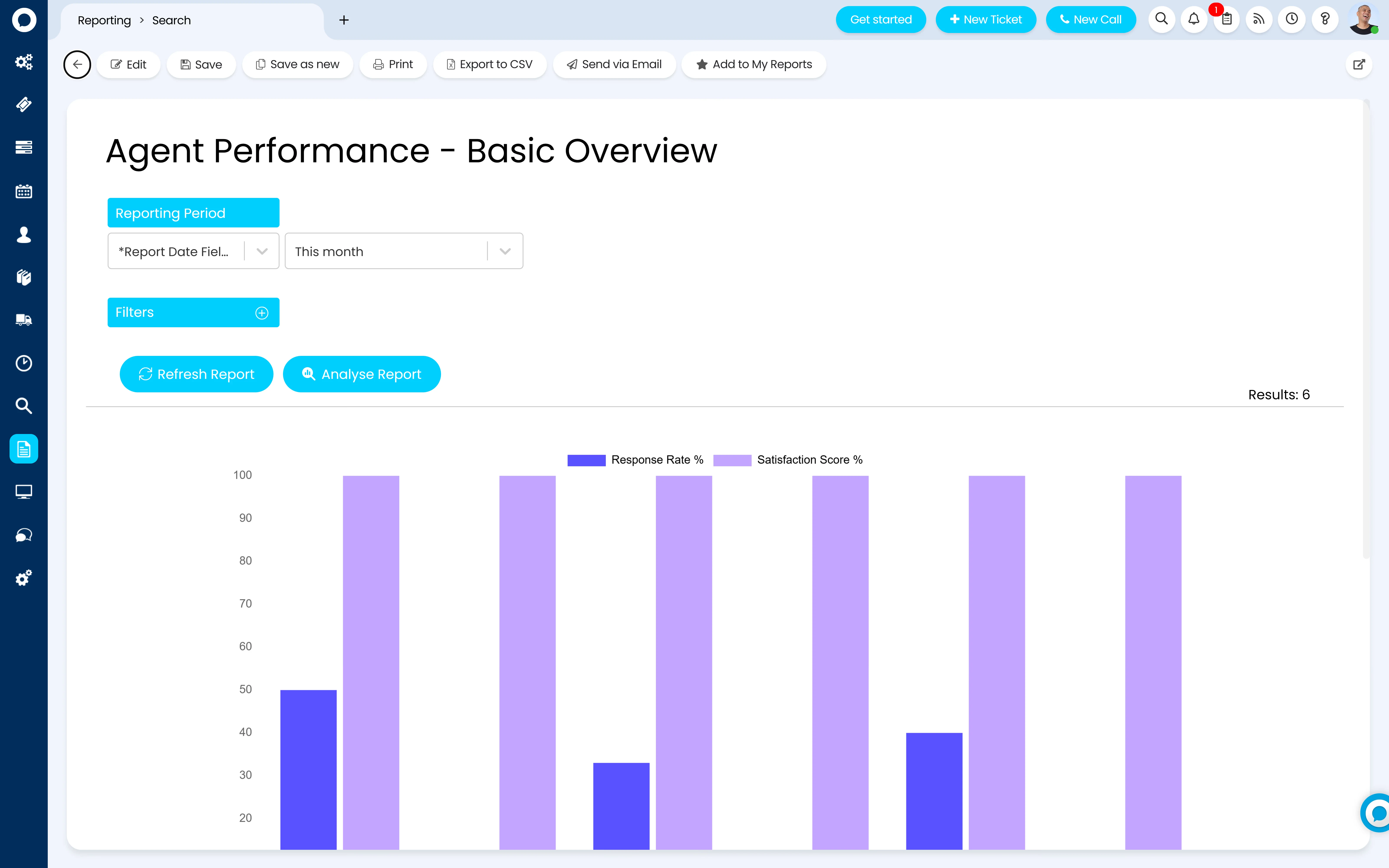
  • Response rate and satisfaction score report per agent, side by side — not one blended average that hides the agent who's quietly slipping
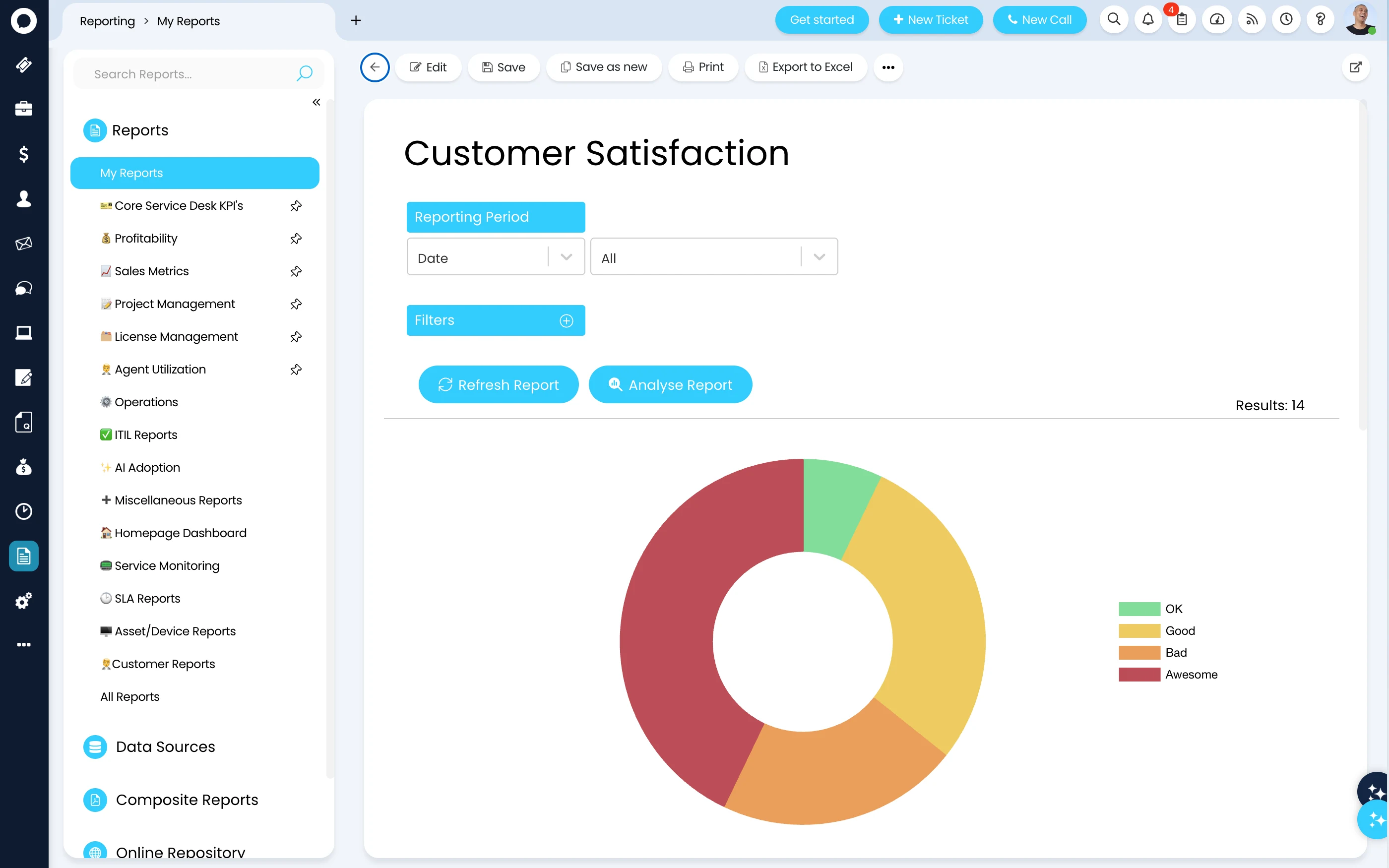
  • Because survey fields sit on the ticket, they roll up by team, ticket type and category the same way any other ticket field does — a specific product line or service can carry its own satisfaction trend
  • Real-time, no-code dashboards put satisfaction alongside SLA and volume data in the same report, not a spreadsheet exported from somewhere else — see Halo Reporting for the engine behind every number on this page
A Halo 'Agent Performance - Basic Overview' report — a bar chart comparing Response Rate % and Satisfaction Score % across six agents for the selected reporting period, with reporting-period and filter controls above the chart A Halo 'Customer Satisfaction' report under Reporting > My Reports — a donut chart of 14 results broken into OK, Good, Bad and Awesome, with a reporting-period selector and filters above it, and a sidebar listing report folders including Core Service Desk KPIs, SLA Reports and Customer Reports

AI on the feedback

Flagging the relationship before the score does

Halo's Ability Library — its set of pre-built AI assistive workflows — includes a Satisfaction Surveys ability, described by Halo as intelligent CSAT/NPS surveys that trigger at the right moment, with sentiment analysed and at-risk relationships flagged before they slip. The surveys and one-click feedback covered on this page are what generates that underlying signal; the AI layer is what helps make sure a concerning pattern doesn't sit unread in a report.

Satisfaction Surveys (Ability Library)

One of Halo's growing set of ready-made AI abilities — intelligent CSAT/NPS surveys that trigger at the right moment, with sentiment analysed against the ticket and at-risk relationships flagged for attention, rather than left to be spotted manually in a monthly report.

Sentiment as an early signal

A survey score is a lagging indicator — it only arrives after the ticket closes. See Halo CSM Omnichannel for where sentiment on live channels can surface earlier, and Halo AI for how this ability sits within the wider platform.

Configured by Allied ESM

A feedback loop built around your service, not a default form

Every setting on this page is configuration, not code. But a satisfaction field bolted onto one ticket type with no follow-up screen and no one watching the reports is how you end up with a score nobody trusts.

Survey design & question set

Mapping the questions that actually matter to your service into Halo's custom field structure, grouped and attached to the ticket types worth surveying — not every ticket type by default.

Trigger rules & frequency

Configuring the Ticket Closed template, one-click feedback ranges, per-range follow-up screens and closure confirmation timings, so surveys go out at the right moment, to the right ticket types, at a frequency customers won't tune out.

Scoring model & benchmarks

Setting NPS-aligned response ranges and a satisfaction scoring model so a score means the same thing across every team, ticket type and customer, not a different scale invented per project.

Reporting & at-risk alerting

Building the agent, team and category dashboards that surface results, and configuring the sentiment and at-risk signals from the Ability Library where you actually want them switched on.

Allied ESM designs and configures all of this as part of a fixed-price Halo CSM implementation — so you know the full cost before work begins. Where you need custom integrations or automation on top, Allied ESM can scope and deliver that as part of your project.

Frequently asked questions

Surveys, CSAT and customer feedback in Halo CSM — answered directly.

When are surveys actually sent?
On ticket closure, via the Ticket Closed email template — not on every reply. A customer isn't asked for feedback mid-conversation; they're asked once the ticket is actually done.
What's the difference between CSAT and NPS in Halo?
Halo doesn't force one model on you. You build your own custom survey fields, and the one-click feedback ranges can be mapped to a CSAT-style scale (Excellent/Good/Okay/Bad) or an NPS-style 0–10 recommendation question, depending on the questions and range bounds you configure.
Can we ask different questions per customer or per ticket type?
Yes to both. Per ticket type: survey custom fields (or a Field Group) are added only to the ticket types you want tracked. Per customer, site or team: Message Groups can carry a different version of the Ticket Closed email — including its survey link and feedback images — without touching every other customer's flow.
Do we need a separate survey tool alongside Halo?
No. Survey custom fields, one-click feedback and the reporting on both are native to Halo, so results sit directly against the ticket, agent and category rather than living in a disconnected export from a different platform.
Can we see satisfaction scores per agent?
Yes. Reports such as Agent Performance show Response Rate % and Satisfaction Score % per agent side by side, and because survey fields live on the ticket, results also roll up by team, ticket type and category.
What happens when a customer leaves a bad score?
The feedback range it falls into can trigger its own custom HTML follow-up screen — for example, routing the customer to alternative support. Halo's Satisfaction Surveys ability can also flag the relationship as at-risk from the sentiment involved. Either way, a human still decides what happens next — this surfaces the problem, it doesn't resolve it automatically.
Does the customer need a portal account to respond?
One-click feedback works from a single click on the closure email — no login required for that. The fuller survey form opens on the Self-Service Portal, which may or may not require login depending on how your portal's access settings are configured.
How much does Halo CSM cost?
Halo is priced on one all-inclusive monthly licence — survey custom fields, one-click feedback, closure procedures and reporting are all included, with named and concurrent licence options. See Halo's all-inclusive UK pricing →

Proof, not a promise

What happens when the asking is built in

+87

Net Promoter Score — up from +80

Managed service provider TSG rolled out Halo AI across its service desk — AI triage, automated knowledge creation and a virtual agent handling routine requests — and watched its Net Promoter Score climb. NPS runs from −100 to +100 and measures how many customers would recommend you; anything above +70 is considered exceptional.

Source: Halo customer story, TSG (Azure Expert MSP), 2026

That movement is only visible because the score was measured inside the platform running the support. Retailer Glossify tells the same story from the other end — the overwhelming majority of their customers rate support “excellent”, tracked alongside 99% SLA adherence in one system rather than two.

Keep going: the rest of the Halo CSM story

Surveys measure how every other part of Halo CSM actually performed — the channels tickets arrive on, the AI that helps resolve them, the portal customers use, and the commitments behind it all.

Feedback You Can Actually Report On

Survey design, one-click feedback, scoring and at-risk alerting — Allied ESM configures Halo CSM's surveys and CSAT on fixed-price engagements, so you know the full cost before work begins.

Book a Consultation

Official Halo Partner

Allied ESM is a pure play Halo partner — licensing, implementation, consulting & managed services.